
Home › Forums › Calendar Products › Community Events › Calendar is invisible when WooCommerce plugin activated
- This topic has 16 replies, 4 voices, and was last updated 10 years, 8 months ago by
Support Droid.
-
AuthorPosts
-
December 22, 2015 at 2:05 pm #1045596
Karen
ParticipantHi,
I have an issue with my Events Calendar being visible until I activate the WooCommerce plugin. I have an online shop and need WooCommerce functioning.
I am currently working in my new environment so that I can ensure it is all fully operational prior to moving to my existing URL. The setup is the same as it will be on my production site.
I turn all plugins off and the calendar shows on the site, then turn the plugins on one by one and the calender remains visible until I activate WooCommerce.
Thanks for your help.
Karen
December 23, 2015 at 7:14 am #1045955Geoff
MemberHi Karen,
First off, welcome to the forums! Let’s see what’s happening here and figure out how to make sure the calendar displays when WooCommerce is active.
I see you’re running the latest versions of all plugins — that’s awesome and looks good, so no worries there.
I tried testing on my own site and things seemed good there as well. I deactivated all plugins except The Events Calendar, Events Calendar PRO and WooCommerce.
The only difference between our tests may have been the theme. Does the calendar display if you switch to a default WordPress theme, like Twenty Fifteen? Let’s try that and see what we get.
Thanks!
GeoffDecember 23, 2015 at 7:47 am #1045970ParticipantHi Geoff,
No, it doesn’t. I have switched to TwentyFifteen, and even tried TwentyFourteen, with all of the plugins still activated and it doesn’t show.
I have just deactivated all of the plugins. Then turned Events Calendar on. It shows. As soon as I turn Events Calendar Pro on also, it doesn’t show.
I then turned off Events Calendar Pro and have activated all other plugins except for WooCommerce. When I activate WooCoomerce the display disappears.
Karen
-
This reply was modified 10 years, 10 months ago by
December 23, 2015 at 7:53 am #1045974MemberDang, that’s super strange!
Do you happen to have any customizations in place? For example, custom templates or functions for the calendar, add-ons for WooCommerce, etc?
I also see you have Debug Bar installed. Does that return any errors for the main calendar view?
Geoff
December 23, 2015 at 7:59 am #1045980ParticipantNo I have no customisations for WooCommerce in place and no other add-ons. No customisations for the site at all.
No, I don’t see any errors for the main calendar view.
Karen
-
This reply was modified 10 years, 10 months ago by
December 23, 2015 at 8:12 am #1045986MemberOK, let’s try a couple of other things:
- Do you have any other pages on your site that use the /events slug? If so, please delete them and see if that makes a difference.
- Does it help to change the calendar template under Events > Settings > Display? If it is set to use one of the theme page templates, for example, then change it to use the default calendar template. And vice versa.
- Let’s also flush the site’s permalinks by heading to Settings > Permalinks from the WordPress dashboard, making sure the Post Name option is selected, then hitting Save.
I’m hoping one of these three things remedies the issue. If not, we’ll want to do some deeper troubleshooting.
Thanks!
GeoffDecember 23, 2015 at 8:54 am #1045996Participant1. No other /events slug pages on the site at all. I had deleted them ages ago whilst trying to figure out what was happening.
2. Okay, so TwentyFifteen Theme.
Events Calendar – On
Events CalendarPro – Off
WooCommerce – Off
Events>Settings>Default Page Template
or Events>Settings>Default Events Template
with Skeleton Styles used
Calendar is visibleTurn WooCommerce on – Calendar view disappears
Events Calendar – On
Events CalendarPro – On
WooCommerce – Off
Events>Settings>Default Page Template
or Events>Settings>Default Events Template
with Full Styles used
Calendar is visibleTurn WooCommerce on – Calendar view disappears
Events Calendar – On
Events CalendarPro – On
WooCommerce – Off
Events>Settings>Default Page Template
or Events>Settings>Default Events Template
with Tribe Events Styles used
Calendar is visibleTurn WooCommerce on – Calendar view displays Yippeee… 🙂
3. Permalinks flushed.
With the Events calendar displaying on the site, I change to the Thrive Rise Theme that I am running. Calendar was displayed. As soon as I clicked on another page link on the site, then back to the ‘Events’ link the calendar view disappeared.
The only way to then get the calendar view to return on the site is for me to deactivate ‘Events Calendar Pro’ and ‘WooCommerce’.
December 23, 2015 at 3:45 pm #1046124MemberHi Karen,
I’ve circled around with others on the team and we’re all a little stumped. If you’re willing, it would be awesome if you could share a copy of your theme with us. I’d like to do more testing on my end as close as I can get to how you’ve configured it. You can zip that up and share a link via Dropbox, if you’d like in a private reply.
Similarly, but not necessary, a copy of your database would be helpful as well.
Thank you for your help!
Geoff
December 23, 2015 at 3:47 pm #1046126MemberOh, I should add that we have seen something like this in the past and one customer shared a solution that you might want to try as well:
Let me know if that helps.
Geoff
December 26, 2015 at 12:05 pm #1046904ParticipantThis reply is private.
December 28, 2015 at 8:06 am #1047440MemberHello Karen,
Thanks SO much for the theme and plugin files–this helps a ton as far as troubleshooting goes.
I’m still curious what will happen once we play with the database but–so far–I’m still unable to recreate the issue. I have the Rise theme and both plugins active and the calendar is showing up at /events even with WooCommerce is activated.
However, note the screenshot of my calendar:
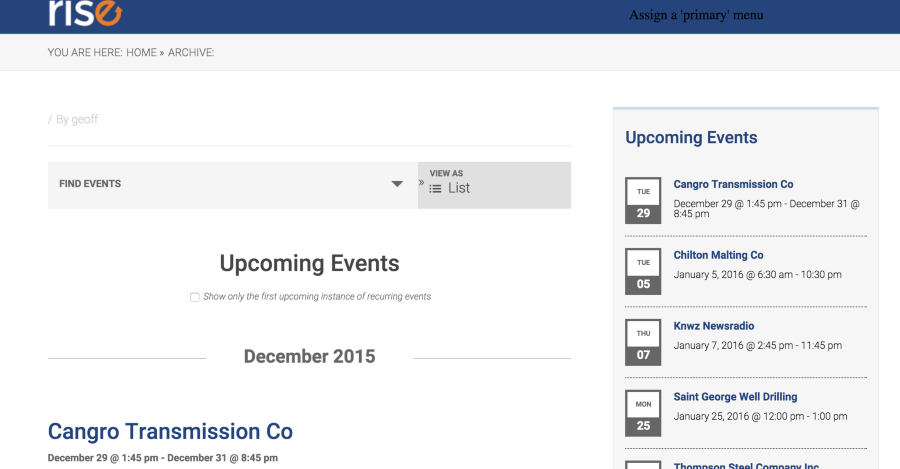
Specifically, see how the breadcrumb below the header reads:
You Are Here: Home > ArchiveThat’s different than what it says on your site:
<i>You Are Here: Home > Events</i>That’s significant because the calendar itself is an archive, yet your site is recognizing it as a page. In other words, the site is looking for a page that actually doesn’t exist.
Are you sure there are no other pages on the site that use the /events slug? That would certainly explain the issue. I would suggest even checked the Trash to ensure it is completely gone, then flushing permalinks one more time after.
Thanks!
GeoffJanuary 15, 2016 at 2:14 pm #1056833ParticipantThis reply is private.
January 19, 2016 at 12:23 pm #1058817Barry
MemberHi Karen,
Geoff has been out these last few days so I thought I’d pop by and take a look at this problem rather than leave you waiting 🙂
When I look at the structure of inquiryatwork.com.au/events it has all the hallmarks of a regular WordPress page.
Though you’ve already discussed this angle with Geoff I think it’s worth probing a little further. Can you please try navigating to the following admin URL:
WP Post Editor for Page ID 1001
What do you see? Could this be the mysterious page that is using the /events/ slug and is therefore blocking the main events view … if it is, can you trash it or modify the slug?
January 19, 2016 at 1:19 pm #1058841ParticipantYes Barry, that was the problem. Thank you so much for your help. I renamed that page events-old and I can now see the events calendar listings on my page. YAY! How exciting.
I have no idea where that page was as I wasn’t able to see it at all either in my live page listings, or in the trash (as I had deleted all of the pages there). What I need to do now is to delete that page (ID 1001) permanently.
How did you find the page? I am curious.
Fantastic support from the team. I have really appreciated your diligence in getting to the bottom of this for me.
January 19, 2016 at 2:32 pm #1058867ParticipantThis reply is private.
-
This reply was modified 10 years, 10 months ago by
-
AuthorPosts
- The topic ‘Calendar is invisible when WooCommerce plugin activated’ is closed to new replies.