I renamed that page events-old and I can now see the events calendar listings on my page.
Excellent!
How did you find the page? I am curious.
By default, lots of information is exposed in the markup behind every page (of course, not the point of being a security risk – but enough to let themes and plugins interact with different types of pages, posts and archives in different ways).
By looking at the body class in this case I could see that A) it was a page and B) what the page ID was. An actual event archive would have had something quite different in place here.
I now do not have an Events page link in my top navigation bar … Since I deleted that page that you gave me above, the navigation link and the page that I had in my page structure have disappeared.
So your previous nav link was to page #1001 and my guess is that WordPress intelligently removed it when you deleted the page. Try this:
- Visit Appearance → Menus
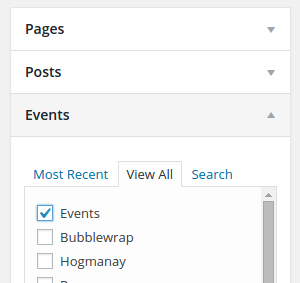
- Using the Screen Options pulldown at the top of the screen, ensure Events is selected
- You should now see a list of event pages/views you can select from
- Check and add the main events page
- Save the menu!
Here’s what you’re looking for:
Does that help?
.

