

Forum Replies Created
-
AuthorPosts
-
Brook
ParticipantHowdy again Brian,
I am sorry to hear this is getting worse.
If you haven’t changed anything and the site suddenly broke, it does seem likely that GoDaddy is deploying more changes. If I were you I would contact them. I would ask them if their server has deployed any updates lately or if it’s under a particularly heavy load. They might even have some logs for you to help shed more light on these errors. Anything you can learn will be helpful.
If you are getting database connection errors, it is possible that they are either throttling your account specifically or their database is simply under a lot of load, and anything which does a couple of JOINs (which our plugin does sometimes out of necessity) is too taxing.
One thing we noted is that your are now running Event Tickets 4.3.3 alongside The Events Calendar 4.2.2. This is less than ideal and can introduce issues. If I were you I would run the latest version of 4.3.x or 4.4.x, rather than mixing and matching two different major versions.
Once you have reached out to GoDaddy, have they been able to help you with any extra information on what changed? Maybe that can help us isolate a fix.
Cheers!
– Brook
February 16, 2017 at 12:25 pm in reply to: Recurring weekly event showing every day on calendar #1239029ParticipantHowdy Rich,
I would love to help you with this.
Thank you for sharing a link to that event. I see that you have set it to not be a recurring event for now.
When this was a recurring event, do you recall what the End date was? Was the End date on Friday Feb 17th, or was it in April?
Something that can be a bit confusing is that the end date should typically be the same day as the start date. If you set the end date to be in April, then you have create a single event which starts in February, runs for a couple months and ends in April. If you set this event to recur every Friday, it will create a new event each Friday, and this recurrence will also last two months. Thus you will have two overlapping events that happen each day of the week. By the third Friday, you will have three overlapping events…
The solution to this, is to setup the first occurence of your series to start and end at the proper times, which typically spans a few hours on one day. After this first occurence is setup properly, add more events using the recurring feature. Each subsequent recurrence will mimc the pattern of the first one, lasting only one day and at the same times. Does that sound like the problem you might be facing?
Cheers!
– Brook
ParticipantExcellent news! Thank you for getting back.
I am not sure either. Perhaps your theme uses a datepicker elsewhere, and in that location when you click it the page goes dark like that?
I am happy we could find a fix though. Cheers!
– Brook
ParticipantHowdy Jessica,
Performance is an enormous passion of mine, and so George roped me in on this topic!
Thank you for sharing your system info and hosting details. That is very helpful.
I would like to start out by elaborating on what George meant here:
It’s true that some of the queries in our plugins are not as effective and optimized as they could be, and there is an active initiative to improve a number of queries in our plugins.
We work extremely hard to make our plugins as performant as possible. We do regular performance audits and optimizations. Any time we discover an area that’s not quite up to speed, we file a bug ticket and address it ASAP.
The primary reason why we do this is because WordPress best practice imposes an enormous handicap on “post meta date queries”. In short, WordPress best practice dictates that you store as much information as possible in its postmeta table, including dates. But, unfortunately this table is not optimized for dates. Any date query is literally hundreds of times slower than it could be. As you can imagine, calendars have to do lots of date queries!
Due to this handicap any calendar built following WordPress best practice, ours included, is operating with an enormous handicap. To overcome this, one has to work extremely hard to keep make the plugin performant, and we do.
Misc Bugs – Do you think any of these impact you?
When George said there was some inefficiency in our plugin, he was specifically referring to a couple of bugs we’re working on.
- Minicalendar widget does some unnecessary queries. Are you using the Minicalendar widget anywhere on your site? If so, for now can you try disabling it?
- Event Tickets does not paginate the Attendee list. Do your events have hundreds or thousands of attendees?
Month View Caching
Further, I see that your primary view is Month View, and that you do not have the Month View Cache enabled. Month View is a very beautiful and useful view. However, due to the nature of that view it can show considerably more posts than the average WordPress page. In WordPress, most pages show 20 posts, depending on your settings. But, a month view can show 6 weeks of events, and up to 3 events per day. Thus, it can show well over one hundred posts on a single page!
In your case, based on the numbers you have shared you have an average of 20 events per week. Thus, Month view is trying to show 5-6x the regular number of posts! You can expect it to be about that much slower than a regular page.
To help compensate for this we have a built-in cache for Month view. It can be found in WP-Admin > Events > Settings > Display with the name “Enable the Month View Cache”. Do you mind checking this box and hitting “Update”.
After you have enabled the cache, would you mind pasting the following snippet in your theme’s functions.php file? This will disable JSON+LD on Month View, which will further speed up the site when caching is enabled.
https://gist.github.com/elimn/9ce1c3e64d060b758e22627b815455ae
Once you have both of those in place, it will drastically cut back on the performance impact month has. While Month still has to render 120 events, it will only have to do this once. It will then store all that hard work and use it for each subsequent viewing of the page. When you add or update an event, it will redo the hard work and store it again. This will help performance on a site with a lot of events like yours.
Your Host
I really value these logs you have shared. There are some strange anomalies in them. 4 of them are caused by our calendar, the rest are not. The majority of them are some of the simplest and fastest queries imaginable. They are straight forward option queries like this:
SELECT option_name, option_value FROM wp_options WHERE option_name = value;
This sort of query should literally take about 0.001 seconds. On my server just now it took half of that time. But on your server it is taking over 5 seconds! That is not normal.
Presumably your host is heavily throttling your entire site, causing even the simplest of queries to be logged as slow. When this happens it becomes difficult to tell what the source of the problem is. It is very possible that the calendar is only a small part of it. I have seen some host support reps blame the calendar without truly investigating. Usually they see that our queries contain more characters than average, and thus just assume this is a problem. But that is an inaccurate assumption in many cases.
Your Database
Would you mind logging into your hosts Database Manager, which should be PHPMyAdmin? From there, could you take a screenshot of your database tables, and include the Records and Size columns in it? Then share the screenshot here.
I am interested in particular to see if the wp_options table is unusually large. Usually it is the fastest table in the database, and yet in your logs it was one of the slowest. Here is an example screenshot of what I’m looking for:
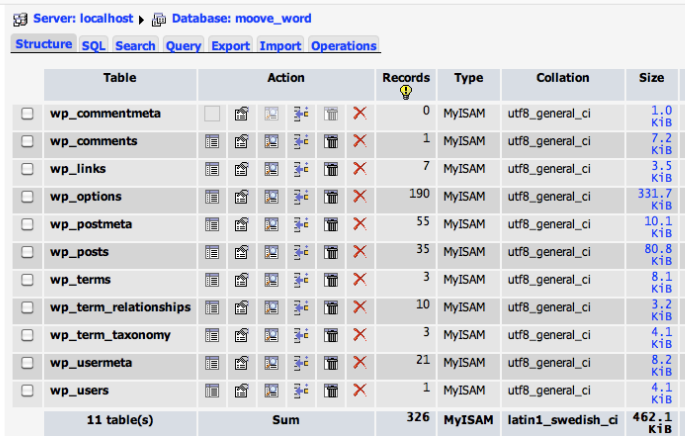
My main goal here is to get the calendar running as fast as it reasonably can on your current host. If from there your host is still throttling or suspending it, you will only have a few options left:
- Delete as many posts from your site as you can, including events. Also delete comments, and any plugins you don’t need. In general remove everything you possibly can to fit inside of your hosts performance envelope.
- Decided whether or not you want a WordPress calendar. Any one built according to WordPress best practice and contains 4300 events is just going to run too slow on your host. If you can do without a calendar, or are interested in switching away from WordPress…
- Find a different host. There are ample hosts out there, and I can think of a few that shouldn’t throttle or suspend you like that. I do not in any way wish to detract from Site Point, they seem like a decent host. But, there are other options which should not face this specific issue you’re seeing.
Please let me know if you have any questions of your own.
Cheers!
– Brook
ParticipantHowdy Dale,
There are some extremely similar issues, with similar symptoms, that are quite different from the problem being faced on GoDaddy. Most of them have easy solutions.
We have many clients on WP Engine. So far you would be the first one to be impacted by this GoDaddy issue.
Would you mind opening a new topic for your problem? In it, could you share your system information, describe the problem in your own words, and if you can take a screenshot of your Attendee List page for an even affected by this problem. From there we can try to help you find a solution.
That is really interesting to hear, Brian. I will let our developer who is investigating this know. We have been able to confirm the issue on our own GoDaddy server multiple times, we’re just trying to isolate the cause. If it went away on our server as well, that would be very intriguing.
Cheers!
– Brook
ParticipantHowdy Don,
I would love to help you with this.
We actually turned that snippet into a mini plugin that we have kept as up to date as we can:
https://theeventscalendar.com/extensions/add-the-source-link-of-an-event-imported-from-facebook/
If you download that plugin, does it correct the issues you’re experiencing?
Cheers!
– Brook
ParticipantHowdy Raymond,
We do have a lovely little extension for being able to view the tickets from the admin:
https://theeventscalendar.com/extensions/add-view-ticket-link-to-the-my-tickets-screen/
With that in place, any changes you make that affect the look of a ticket will be immediately display on all tickets you view. So assuming your event/ticket already has an order for it, you can view the ticket using this extension and make your changes.
The actual issue we are having is that customers only seem to get one ticket through, no matter how any people they are booking for. Does that sounds correct, and is it possible to modify the ticket email so that it states how many people are on the ticket?
That definitely does not sound right. Would you mind grabbing your system information and pasting it here? Make sure to use the ‘Set as private reply’ checkbox to protect your private information from the public. You can find the system info by going to WP Admin > Events > Settings, clicking on the “Help” tab, and scrolling down to the ‘System Information’ box. (Or by going to [yoursite]/wp-admin/edit.php?post_type=tribe_events&page=tribe-events-calendar&tab=help) That will give me a lot of extra information to help diagnose the problem.
Further, would you mind trying a test purchase right now? You could purchase two tickets using a coupon or some other free/testing method. Fill out the attendee info for both. Are you able to reproduce this problem with your own test orders?
Cheers!
– Brook
ParticipantHowdy Stuart,
I would love to help you with this.
Thank you for so thoroughly testing this. I am happy to hear you have not made any permalink changes, and that you already tried pressing save changes. That is good to know!
Permalinks are one of those most finicky aspects of WordPress. It’s just very easy for one plugin or theme to accidentally break things for another. In light of this, would you mind trying a conflict test? This guide walks you through how to test for a conflict, and then identify what is conflicting. If this is a conflict, and you can narrow down what’s conflicting by using that guide, then it is probable we can find a simple solution to this.
If you have tried the above, and no conflict was found, then we are going to have try some more in depth debugging. First, would you mind carefully following the steps in this article in order: Troubleshooting 404 Page Not Found error. You have already done some of them to an extent, but if you don’t mind redoing everything except the conflict test, and following each of the tiny little suggestions such as clearing your browser cache, it will be tremendously helpful.
Does that all make sense?
Cheers!
– Brook
ParticipantHowdy Arno,
It would be my pleasure to assist with this.
It sounds like that one of your plugins, or perhaps even your theme, is not designed for the latest versions of The Events Calendar . Our first step will be to find out what is not working quite right, and from there hopefully we can find a simple fix. This guide walks you through how to test to see if this sort of conflict is happening, and then identify what is conflicting. Would you mind running through that for me when you have a few minutes? What are the results, so I can begin researching a fix?
Cheers!
– Brook
ParticipantHowdy Emma,
I would love to help you with this.
I have seen this problem before. Usually it’s related to the QR scanning app on your iphone. Some have a builtin web browser. Thus, even if you are logged in in your primary browser/Safari, the QR app opens up a different browser where you are not logged in. To make matters worse, some of these apps clear the cookies for the built in browser frequently, which makes logging in impossible.
Which QR application are you using?
Cheers!
– Brook
ParticipantThis reply is private.
ParticipantHowdy Again Titus,
That is a really good question. We are working on making this a built-in feature of our plugin. If an event has attendee meta, you will not be able to increase/decrease the stock of the event inside the cart. But that feature is not ready yet.
In the mean time, I could help you with disabling the increase/decrease stock buttons for all products in the cart, including tickets. Would that work?
Cheers!
– Brook
ParticipantHowdy smeedo,
I would love to help you with this.
Would you mind grabbing your system information and pasting it here? Make sure to use the ‘Set as private reply’ checkbox to protect your private information from the public. You can find the system info by going to WP Admin > Events > Settings, clicking on the “Help” tab, and scrolling down to the ‘System Information’ box. (Or by going to [yoursite]/wp-admin/edit.php?post_type=tribe_events&page=tribe-events-calendar&tab=help) That will give me a lot of extra information to help diagnose the problem.
Cheers!
– Brook
ParticipantHowdy Keith,
I would love to help you find a solution for this.
It sounds to me like you are looking for the attendee list screen. This will show a list of all attendees, and within each item there is a link to “View Details” that will show all of their responses to the Attendee Meta fields.
Does that article help you find the appropriate screen? Is that the info you’re looking for?
Cheers!
– Brook
ParticipantHowdy Dwayne,
I would love to help you figure this out! Would you mind logging in first so I can verify your support access? Or, if you do not have a license to any of our premium plugins (which includes a year of support access to these forums) then do not forget about the free support you can get on WordPress.org: The Events Calendar . We even check those forums once each week and provide as much support as we can for free.
Cheers!
– Brook
-
AuthorPosts