Forum Replies Created
-
AuthorPosts
-
Brook
ParticipantHowdy Mike,
Sorry for the difficulties with the errors.
There are no tables to delete. Our plugin is a “WordPress custom post type”. In WordPress it is strongly encouraged to not create tables whenever possible, and instead make full use of the WP API. Which is what we are doing here.
Would you mind clarifying what errors you are seeing when you deactivate? Can you copy/paste the exact errors here? Also, could you try a “conflict test”? This guide walks you through how to test for a conflict, and then identify what is conflicting. It is extremely likely that the errors you are getting are the result of another plugin, or your theme, assuming that EventBrite tickets is still present. When it tries to access it, errors result. Thus a conflict test would be able to help narrow what is causing those errors, and thus help us find a fix for you.
What is your goal here? Are you simply trying to uninstall and get rid of Eventbrite, maybe replacing it with an alternate plugin? Or are you trying to reset and reinstall Eventbrite for some reason?
Once I know more about your needs I think we can help you better. At the outset I answered your question of where are the missing tables. But obviously now that you know there aren’t any, that answer is unlikely to solve your problem. So if you don’t mind explaining the problem a bit more I’m sure we can make real progress.
Cheers!
– Brook
April 5, 2017 at 5:05 pm in reply to: Bug in "Make Event Titles Link to the Event Website URL" Extension #1265492ParticipantHello again Craig,
I was able to find the source of this bug. Inside of /wp-content/plugins/events-calendar-pro/src/Tribe/Geo_Loc.php on line 779 you will see this:
$link = get_permalink( $event->ID );
And it should be changed to this:
$link = tribe_get_event_link( $event->ID );
With that change in place on my site it worked as expected. Given how small this change is. It is very likely it will make it into our upcoming maintenance release. We will just need another developer to look at it, and ensure that they can not concieve of any circumstance where this code might break things or misbehave. If you wish to make it yourself now using a code editor, feel free to do so.
Cheers!
– Brook
April 5, 2017 at 7:19 am in reply to: Bug in "Make Event Titles Link to the Event Website URL" Extension #1264982ParticipantHowdy Craig,
Thank you again for pointing this out. I will investigate this further this week. I suspect this is actually a bug in the The Events Calendar. The Events Calendar provides a way to filter every link to an event, but it must not be using that in this case. In which case this is something we will have to patch within our core plugin, and can not fix inside of the extension.
I will get back to you with my findings later this week. Until then, let us know if you have any question. Cheers!
– Brook
April 3, 2017 at 2:24 pm in reply to: Paid Orders not returning as ‘Processing’ staying in ‘Pending’ #1263536ParticipantHowdy Jo,
Nothing new to report yet. I did bring it to the attention of our release planners once again, but it was already on their radar. While I don’t have a timeline nor release, we will of course hit this as soon as we possibly can after weighing it against any other bugs we know of.
We will get back to you as soon as we have exciting news regarding this bug. Until then, stay tuned. Cheers!
– Brook
April 3, 2017 at 2:19 pm in reply to: Last Day of Event Not Showing in iCal Export When Set to "All Day" #1263534ParticipantHowdy Jeff,
I am sorry to hear this is impacting you so heavily. This is something we will fix as soon as we possibly can.
This bug ticket is currently assigned our second highest priority. This is basically the highest a bug like this can achieve. As soon as we have cleared out the higher priority bugs, ones like this will get hit. Unfortunately though, this means I can’t give you a timeline as I do not yet have one to give.
In the mean time, the only work around I can think of is to convert these from all day events to ones with start and end times. You could set the start time to the zero hour on the first day, and the end time to the last minute of the last day. Not a great solution I know, but at least it will work for now while waiting is necessary.
Please let us know if you have any other questions. Cheers!
– Brook
ParticipantHowdy Linn,
We will absolutely let you know. This has now been bumped to our highest priority, and is thus a very likely candidate for our next MR which is in due in a little over 2 weeks. While our plans are not yet finalized, I would not be surprised if this is fixed at that time, which is as soon as it possibly could be.
Cheers!
– Brook
April 3, 2017 at 1:55 pm in reply to: Spurious URLs being generated, creating "Not Found" Google Crawl Errors #1263522ParticipantHowdy Gregg,
Sorry for the delay! As you probably know our team went on a trip all last week, and thus delayed responses a bit.
I checked the site sitemap generated by Yoast, and that I manually submit to Google console regularly, and none of these URLs appear in the sitemap. If Yoast was the cause wouldn’t these URLs appear in the sitemap?
Not necessarily. That said I just checked the ticket, and we are sitll not completely sure what is causing those links. More research is needed to isolate.
I see that on your site you are now 301 redirecting those pages to a new canonical page. That is a great solution. A 301 or 302 is a good idea for anyone facing this for now. Once we isolate it, we will release a proper fix. But in the mean time solutions this are awesome, and should continue working even once we find a more permanent fix.
Cheers!
– Brook
ParticipantThis reply is private.
ParticipantHowdy Adam,
Thanks for sharing that idea. It seems to me we could extend the Status column here. It already can show statuses such as “refunded” or “cancelled”. These are driven by the status of the associated order, which in your case can be set in Woo. Already you can leverage this to cancel tickets, but perhaps we could allow more granular control on a per ticket basis without needing to modify the original order?
Thanks again.
– Brook
April 3, 2017 at 1:23 pm in reply to: Users can’t submit events/ HUGE list of Venues w/ IDs listed #1263513ParticipantHowdy Lauren,
I wanted to jump in and get you a response. Our team trip is now over, but not all of us are yet back in our respective offices so responses are still slightly delayed.
This is going to take a while to fix
I am sorry to say I have bad news. Since this issue has such an easy workaround, and no one should be seeing it on their live sites, it was recently given a lower priority than average. This means it will take a while to fix, we will have to work through all higher priority bugs first.We have devoted this entire year to try and get as close as possible to zero known bugs, but this will take a while. Currently we are at 300, down from 500. This puts us ahead of many large pieces of sofware, plenty of which have tens of thousands of bugs. But still our goal is to get them all i we can!
Thus, your bug might not be patched for a few months.
How you can fix this bug now
You will notice that I said “this should not be appearing on any live site”. This is because no live site should have WP_DEBUG enabled. Yours apparently does. This is a bad idea. It causes messages like this to be needlessly displayed on your site. These messages are intended solely for PHP developers, such as plugin and theme programmers. They are not something you ever want to display on your site. So simply disabling WP_DEBUG will cause them to go away. Does that fix the issue for you?As others have noted, downgrading would also work. But if I were you I would avoid that solution, as the above will not only hide these useless messages, but any others you might encounter as well.
Cheers!
– Brook
ParticipantHowdy George,
Thank you for reaching out again about this. I have not forgotten it, and it is a logged upcoming bugfix we want to release. I added a ticket that indicated this fix worked for you and I predicted it would not break for the many. But we still want to have a second developer think through all the implications of this change and make sure it will work for all servers and not just yours. Perhaps it could break others? I doubt it, but there is a reason for the “bureaucracy”.
Suffice to say, that as soon as our team trip finishes I think that will happen, and then the fix will come in our next release.
Please let us know if you have any questions. Cheers!
– Brook
ParticipantThis reply is private.
ParticipantAhh, I’m guessing you renamed the tickets on your website then. That makes more sense. I’m happy you found it!
– Brook
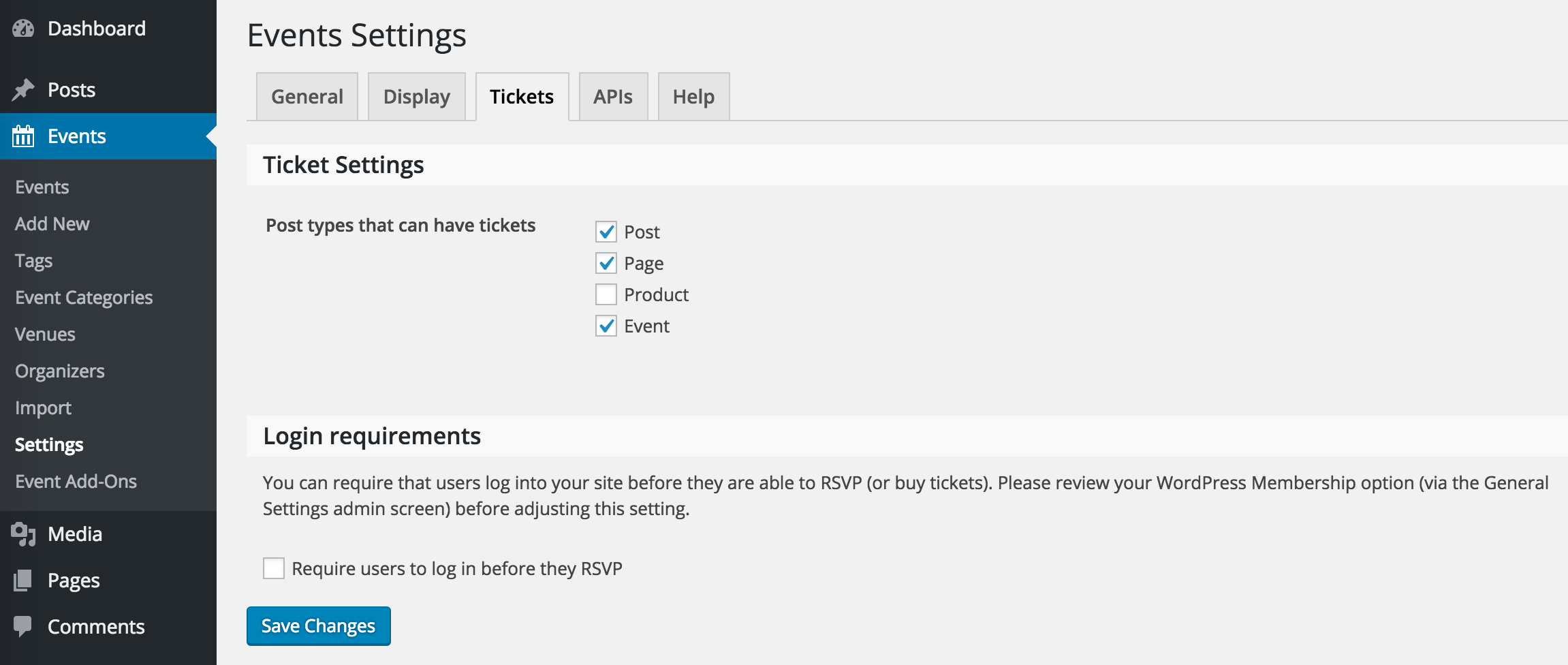
ParticipantIt’s worth noting, if you are on a multisite, you will want to be in the site admin now the network admin. That might explain this missing tabs.
– Brook
ParticipantWell that’s odd!
Perhaps my instructions are not clear enough. Just to confirm you are not seeing the page described in the KB article? The first screenshot in that image shows exactly where to find it in the admin:

With that screenshot in mind, are you completely missing the Tickets tab? Are you not seeing any of the tabs up top, or is perhaps the wrong item highlight in the left hand menu?
Cheers!
– Brook
-
AuthorPosts