

Forum Replies Created
-
AuthorPosts
-
Brook
ParticipantExcellent news!
Thank you for getting back and letting me know.
Don’t hesitate to reach out should ever need anything else.
Cheers!
– Brook
February 15, 2017 at 12:05 pm in reply to: featured image in event post (The events calendar) #1236097ParticipantExcellent news! Thank you for sharing that David. I will be sure to pass on this possibility to other Brooklyn users.
Cheers!
– Brook
February 15, 2017 at 12:01 pm in reply to: Refunded order, but still "You'll receive your tickets in another email." :) #1236083ParticipantThank you very much for your understanding Shadi. And again, I really appreciate you reaching out to report these bugs.
Our ideal calendar is one with no legacy bugs, and all newly discovered bugs get patched in a very short timeframe. I’m not sure how realistic that is. Few pieces of software are able to achieve that, and most of the ones that do have stopped adding new features. However, by the end of 2017 I’m pretty sure we’ll be as close as possible to that goal.
We will get back to you when a fix is getting ready for release. Until then, don’t hesitate to reach out with questions.
Cheers!
– Brook
ParticipantYou are welcome! Definitely let me know how it goes, or if you need anything else. I’ll be here to help.
Cheers!
– Brook
ParticipantYou are very welcome! Please let me know if that snippet gives you any trouble, or if you have any other related questions.
Cheers!
– Brook
ParticipantHowdy Gustavo,
It seems like that should work splendidly! Very nice find.
When you create a ticket for an event, a “Simple Product” is added to WooCommerce, exactly like the one pictured here. So you should be able to edit this product and add restrictions using that tool.
Cheers!
– Brook
ParticipantHowdy Titus,
I would love to assist here.
That should be possible! Here is an example of how to remove options from that area. This is a modified version of that code that I think will do exactly what you want:
https://gist.github.com/elimn/58f9058cd6f2c3abbd4567d960081968
Did that work?
Cheers!
– Brook
ParticipantHowdy Christopher,
I would love to assist as much as I can.
This is certainly possible by using WP Filters. Checkout this example, which adds a column to the CSV export:
https://slack-files.com/T0258N5TN-F2PKQ3FD3-b58b542827
The function tribe_export_custom_add_columns () is adding column titles to the CSV export, while the function tribe_export_custom_populate_columns () is adding column data to each row. By modifying these two function you can add multiple columns, and populate them with any data you want. It will certainly take a bit of PHP knowhow, but assuming you have that or someone on staff who does, you should be able to get this accomplished no problem.
Does that all make sense?
Cheers!
– Brook
ParticipantHowdy Deven,
I would love to help you with this.
Something on your website, probably your theme, is adding the .offcanvas-active theme to your <body> element when you click on the datepicker. This is causing the following CSS to take effect:
body.offcanvas-active:before {
 position: fixed;
 top: 0;
 left: 0;
 right: 0;
 bottom: 0;
 z-index: 1001;
 opacity: 1;
 background-color: rgba(0,0,0,0.7);
}
The easiest way to hide this would be with some more CSS. You could add custom CSS to your website to hide that overlay on Events pages:
body.post-type-archive-tribe_events.offcanvas-active:before {
 display:none;
}
Does that all make sense? Did that do the trick?
Cheers!
– Brook
ParticipantHowdy Juan,
I would love to help you with this.
Our plugin does make it very easy to publish an event to Eventbrite. But, it would be unusual for someone to try selling tickets through Eventbrite and their own website simultaneously. I would like to note a few things that are relevant to this usage.
- Eventbrite is intended to help you manage an event. As such it requires that each event have tickets available. Unfortunately, these tickets will be completely separate from the tickets created by the Event Tickets. Thus they will not have things like a shared # of tickets available that decreases when someone purchase a ticket from either place.
- To publish an event to Eventbrite you will need to visit the event’s page and edit it, select a box indicating you want to publish it to Eventbrite, and fill out the Eventbrite specific fields for that event, such as the tickets you wish to add on Eventbrite.com. There would be no way to do this in bulk.
- If you have tickets available in Event Tickets, and tickets available in Eventbrite, there will be two separate ticket purchase boxes on your website. So you might wish to hide the Eventbrite one from your site.
Basically, what you want is a pretty unique usecase. Most people who are using Eventbrite are using it to manage the entirety of their event. In order for that to happen though, all tickets must be purchased through Eventbrite.
If you are simply trying use Eventbrite to attract more attention to your event, but still prefer to sell tickets through your own platform, it won’t work quite as smoothly as how Eventbrite is intended to be used.
Does that all make sense? Do you have any other questions?
Cheers!
– Brook
ParticipantHello again!
My apologies, I was not speaking clearly before.
There is no plugin that can do what you need. However, what you want to do should be possible as a customization. This customization will require someone experienced in PHP to write some code that does what you want.
Our support team is experienced with writing PHP. Once you have a license to one of our plugins, we can assist you or your PHP developer with writing this code.
Does that make more sense?
Cheers!
– Brook
February 14, 2017 at 8:33 am in reply to: Refunded order, but still "You'll receive your tickets in another email." :) #1234561ParticipantThe option to restock only appears if you click the the ^ arrow and increment how many of each item you want to return.
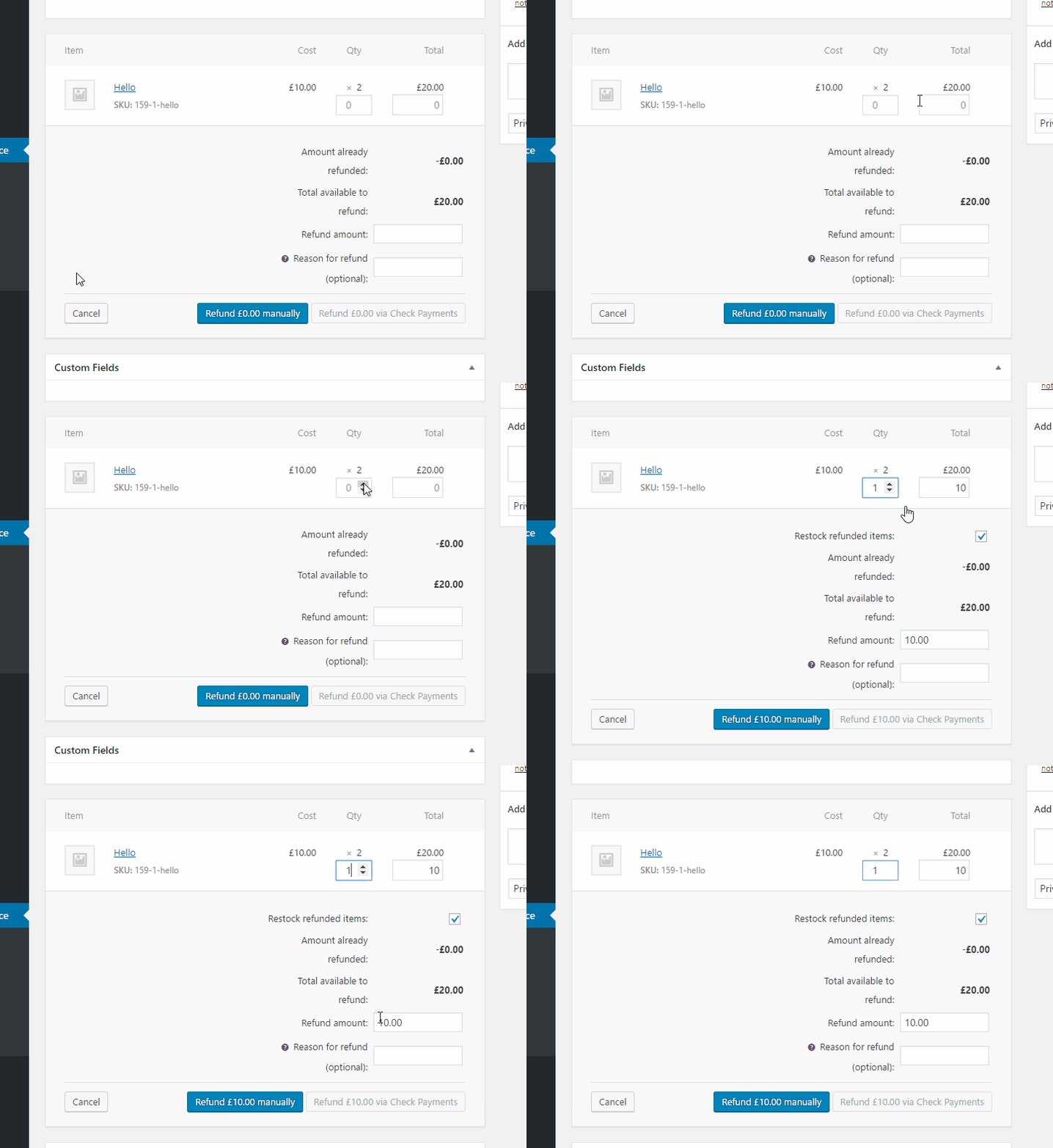
We have found that many people do not refund items this way, and thus Even Woo itself will not restock the item. But, when they do refund this way, Woo will restock and soon our plugin will too.
I hope these issues get fixed ASAP, what seem as a minor bug to some, can be major in the eyes of end users (clients).
I understand that completely. With regard to any bug I can promise you we will fix it ASAP. There is an urgency with all bugs, including yours. We have actually even slowed on the introduction of new features for 2017, in an effort to address all bugs more quickly. But, to be realistic it still might be a number of months while we catch up on our backlog. I simply want to set your expectations here, and not over promise. There is a chance we will all be surprised an it gets fixed next month.
In the mean time, if you prefer you can hide that message from all emails by inserting this into your theme’s functions.php file:
add_filter( 'wootickets_email_message', '__return_empty_string' );
Obviously that is not a perfect solution. But, I figured you might prefer your site not show the string at all until a proper fix has been released.
Please let me know if you have any more questions. Cheers!
– Brook
February 14, 2017 at 8:13 am in reply to: featured image in event post (The events calendar) #1234548ParticipantThank you for the response David. It turns out someone else with Brooklyn has had this same issue. On basically any other theme, featured images show. But on Brooklyn the uploader box disappeared.
My guess is that Brooklyn has replaced the built-in featured image utility with one of their own. If I were you I would reach out to them. In WordPress there is extensive support for “Custom Post Types” (CPTs). Our plugin, and countless thousands of others, are all built as CPTs that way it is easy for a theme to support all of them. It is extremely probable that the theme author encounters this issue all the time with a variety of CPTs, including events. In response they probably already have a solution for you, or have simply stated their theme does not support CPTs.
Does that all make sense? Will that work for you?
Cheers!
– Brook
ParticipantYou are extremely welcome! I appreciate you reaching out and sharing this with us.
– Brook
ParticipantHowdy Gustavo,
That’s a good question. It looks to me like this could be accomplished easily enough using the woocommerce_available_payment_gateways filter. You could tap into the order at some point before that filter fires, and if the order contains tickets hide any payment gatways you don’t want using that filter.
After purchasing the plugin, if you need assistance with this I’m sure our Premium Support will be able to help a good bit. Just open up a topic in the premium support area to begin.
Does that answer your question?
Cheers!
– Brook
-
AuthorPosts