

Forum Replies Created
-
AuthorPosts
-
Andras
KeymasterI am glad to see you were able to figure it out, and thanks a bunch for posting that tip!
I am going to go ahead and close this ticket. If you have a similar issue or another in the future, please do not hesitate to create a new one.
Cheers,
AndrasPS: If you like our plugin, we would be happy to receive a review in the wordpress.org repository. Thanks!
KeymasterHello again Dan,
I’m sorry you are having this problem. Let me try to help you with that.
I disabled most of my plugins …
For conflict testing it is best to disable all plugins, except for the Modern Tribe ones, and WooCommerce, if that is needed. Can you confirm you did this?
Could you share which threads you took the suggestions from? So that I know what you tried already, and I don’t give you the same advice. 🙂
Thanks and cheers,
AndrasKeymasterHi Chuck,
I’m sorry you are having this issue of the events settings not saving. I’ll try to help you with this.
Are you receiving any error messages when you save?
Did you maybe try disabling all Modern Tribe plugins as well, and re-enable one by one, to see if any of those are causing the problem?
Could you enable debugging and check if you receive any error messages then?
To enable debugging, set define(‘WP_DEBUG’, true); in your wp-config.php file. It should be somewhere close to the end.
Cheers,
AndrasKeymasterHappy I could help!
Since this is marked resolved I am going to close this ticket, but if you need anything else related to this topic or another please post a new topic in the forum and we can help you out.
In case you are happy with Modern Tribe’s products and support, we would be really happy if you could leave us a review.
Thanks and cheers,
AndrasKeymasterHi Lisa,
Right click – click right: LOL! Sorry, that was totally my misunderstanding. 🙂
I’m super happy I could help!
Since this is marked resolved I am going to close this ticket, but if you need anything else related to this topic or another please post a new topic on the forum and we can help you out.
Thanks and have a great weekend,
AndrasKeymasterHi Riccardo,
The difference comes due to the fact that the ‘events calendar’ widget calls in a new set of styling, which is then applied to the ‘upcoming events’ widget as well.
If you don’t have the ‘events calendar’ widget, then those styles are not loaded, thus you will receive the original looks.
However, you can override that look. Try copy-pasting the below code to your child-theme’s style.css file and see if that helps:
.tribe-mini-calendar-event {

overflow: hidden;

width: 100%;

padding-bottom: 5px;

margin-bottom: 5px;

border-bottom: 1px dotted #2f2f2f;

}

.tribe-mini-calendar-event.first {

margin-top: 10px;

}

.tribe-mini-calendar-event .list-date {

background: #666 none repeat scroll 0 0;

box-sizing: border-box;

display: inline;

float: left;

font-weight: bold;

margin: 10px 5% 10px 0;

overflow: hidden;

padding: 3px;

text-align: center;

width: 15%;

}

.tribe-mini-calendar-event .list-date .list-dayname {

background: #fff none repeat scroll 0 0;

box-sizing: border-box;

color: #666;

display: block;

font-size: 9px;

padding: 3px;

text-align: center;

text-transform: uppercase;

width: 100%;

}

.tribe-mini-calendar-event .list-date .list-daynumber {

color: #fff;

display: block;

font-size: 15px;

line-height: 22px;

text-align: center;

width: 100%;

}

.tribe-mini-calendar-event .list-info {

font-size: 13px;

margin: 10px 0;

display: inline;

line-height: 1;

float: left;

width: 80%;

}

.tribe-mini-calendar-event .list-info h2 {

font-size: 14px;

font-weight: bold;

line-height: 18px;

margin-top: 0;

margin-bottom: 10px;

}
Please let me know if that gives you the desired result.Ciao,
AndrasKeymasterThis reply is private.
KeymasterTeme, thanks for getting back to me with the sys info. That definitely sheds a new light on things.
You don’t see that section because you are using the Event Tickets plugin as well, which I didn’t realize before.
You have an RSVP set up, that is why the “Pris: Gratis” appears. And part of that is hidden with some CSS code.
Here is what could work to achieve the result you are looking for. Add the following to your theme’s style.css file:
.tribe-events-meta-group-details dl dt:nth-of-type(3) {

    display: none;

}

.tribe-events-single .tribe-events-divider, .tribe-events-single .tribe-events-cost {

    display: none !important;

}
This piece of CSS should hide all the elements that you would like to hide.This should solve your issue. Please get back to me on the result.
Cheers,
AndrasKeymasterHey rdesignsro,
I’m sorry about that. The problem does exist when you have an ‘Autocomplete’ type in the filter bar and you don’t have anything filtered there. Once a value is there it works.
Nonetheless, I’ll red flag this and will let you know as soon as this is fixed.
Cheers,
AndrasKeymasterHi Lisa,
Thanks for using our plugins! Let me try to help you out with your questions.
Disable popup: if you put the below code in your theme’s (preferably child-theme’s) style.css file, then all popups should be hidden.
.tribe-events-tooltip {

display: none !important;

}
Right-click on a register/view button:
I’m afraid, that influencing how the right click of a mouse works in a browser is out of scope of our support.
However, if the visitors left click on the name of the event in the month view, that will take them to the events page where they can put the tickets in their shopping cart. Additionally you could add to the template file a button like this, and CSS format it either inline or using a class (line 196 in the original file):
" class="url">
buttonLet me know if this helps.
Cheers,
AndrasKeymasterHi again,
I see you are using WPML. One of my colleagues pointed out that it could cause a problem with the import. Modern Tribe plugins might work together with multilingual plugins, however they are officially not supporting them.
Could you try to disable all WPML plugins, flush the database with the above snippet, and try the import again, if that helps?
Andras
KeymasterThis reply is private.
KeymasterHey Teme,
Could you share with me your system information, please? Here’s a guide for that.
Also, please follow this guide to rule out any conflicting plugins / themes and make sure you are using the most recent versions of all Modern Tribe plugins.
The ‘Event Cost’ section should be visible when you create a new event or edit an old one, even without the PRO version of the plugin. Just like this:
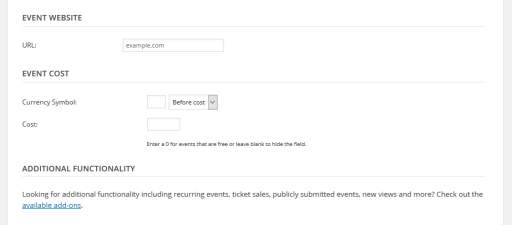
I’ll be waiting for your answer.
Cheers,
AndrasKeymasterHey Dominik,
I hear you. This is a frustrating issue.
I’ll try to check with my teammates if anybody else has seen this or has a solution. I kindly ask for your patience, it shouldn’t take too long.
Andras
May 19, 2016 at 3:14 pm in reply to: Additional Attendee Info Fields Not Displaying in Enfold Theme #1116746KeymasterHello Jack,
Thanks for the extra info.
Did you test this functionality with a default theme like twentyfourteen or twentysixteen? Can you confirm that with any of those it works properly (or is broke)?
With these two themes I can’t replicate your issue.I suspect it has to do with the customized Enfold theme. We don’t really offer support for customized themes. I suggest to get in touch with the theme author to help with the implementation. Or can hire a freelancer to help you out. Here’s a list of guys who we recommend and are not affiliated with us: https://theeventscalendar.com/knowledgebase/find-a-customizer/
Cheers,
Andras -
AuthorPosts