

Forum Replies Created
-
AuthorPosts
-
Andras
KeymasterHi Patrick,
Thanks for submitting this quick fix!
We are aware of the problem, it has been flagged couple weeks ago. We already have a bug ticket in the system and it is being worked on. I will add your thread to the bug ticket to help the developers. The fix should be coming soon, though I cannot commit to a fixed date.
I’ll mark this topic as “pending fix” so you will receive a notification when the fix is done.
Meanwhile, if you have other questions, feel free to open a new topic. We’ll be glad to help!
Cheers and thanks for going Pro!
AndrasPS: If you like our plugin, we would be happy to receive a review in the wordpress.org repository. Thanks!
KeymasterCiao Riccardo,
Thanks for going pro! I’m sorry you are experiencing that problem.
Could you please share with me:
- a link to the site where this exists (if you can share)
- screenshots of the differences
- your system information (here’s a guide)
I’ll be able to look further into the problem once I have these on hand.
Also you might want to check for a conflicting plugin or theme that you are using.
Looking forward to hearing back from you!
Cheers,
AndrasMay 18, 2016 at 3:12 pm in reply to: Event description required field pops up even when a description is entered #1116163KeymasterHello again,
Thanks for the extra info and bearing with me. I have some clarification questions.
When using your theme and all plugins, are you able to submit community events? Or you are only able to submit community events when you use a default theme.
The “Submit another event” appears only right after submitting an event. Do I understand correctly, that this did not appear after submitting an event when you were using your theme?
As for the Captcha, it only appears, if the user submitting an event is not logged in and if the Site key and Secret key is filled in under Events > Settings > Community. If you are logged in as admin (or any other role), the capcha will not appear.
If you disable the Community Events plugin, the capcha for will also not display, as there is no need.Note: capcha loads from Google, not locally and not from Modern Tribe or The Events Calendar servers.
Thanks for bearing with me and looking forward to your answers.
Cheers,
AndrasKeymasterHi Antonio,
Thanks a lot for sending your sysinfo and checking that setting. Since it uses a different template the looks will be a bit different.
As said, we are working on the fix. I will set this thread to ‘pending fix’ status, so you will get a notification, when the fix is released.
Meanwhile, if you have any other questions, please, feel free to open a new thread.
Cheers,
AndrasKeymasterHi Sergey,
Thanks for getting back to me on that one. Could you send me a link where you found that tip? It might be helpful for others as well.
Thanks,
AndrasKeymasterWhat you can try meanwhile is :
Events > Settings > Display tab > Events template section > set to ‘Default Page Template’
This will use a different template to show the calendar pages. The duplacation will not occur here, but the calendars might look a bit different.
Let me know if that helps.
Cheers,
AndrasKeymasterHi Antonio,
Sorry you are experiencing this problem. Indeed, this is a bug we have recently discovered. The fix is already being worked on, so hopefully it will be solved in the next release.
I will add this thread to the bug ticket to raise the priority.
What php version are you using? So far we had this problem with php 7. Could you send me your system info? Here’s a guide how to do that.
Cheers,
AndrasKeymasterHi Teme,
Might be your eyes are playing tricks. 🙂
When you edit an event, there is a section below ‘Event Website’. It is called ‘Event Cost’. Here’s a screenshot on how it looks.
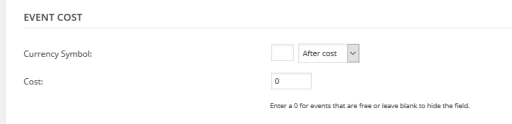
Check and let me know if it works out.
Cheers,
AndrasKeymasterHello Pamela,
Yes, you will need to renew your licence. You can easily do that if you log in to your account and go to the license keys page. You also get a 30% discount for the renewal.
All of our plugins are sold with a one-year license. That means that for one year from the date of purchase, you have access to plugin downloads, new version releases, and our premium support.
Here’s a bit more info on this.
Let me know if I can help you further with this.
Cheers,
AndrasKeymasterHi Sergey,
I’m sorry you are having this problem. Let me try to help you with that.
I would like to ask you to do 2 things:
Please check for plugin conflicts – here is a detailed guide for that – and let me know if the problem still exists.
Please do the following steps and let me know the outcome.
(Possibly with only the necessery plugins – TEC, Event Tickets, Event Tickets Plus, WooCommerce – and a default theme like twentyfourteen):- Create ticket (make ticket count 10)
- Purchase 4 tickets on Frontend
- Go to admin > WooCommerce > Orders, mark order complete > save order
- Go to see the ticket details in the backend
Is the outcome something like this?
RESULT: details state 4 sold, but Stock amount does not go downCould you also do some screenshots on the way and send them?
Thanks and cheers,
AndrasKeymasterHi Teme,
Thanks for using Events Calendar PRO! Let me try to help you fix those.
In the event do you have zero (0) set up as the price for the event? It looks like that, and the field is hidden with some CSS.
Solution: if you don’t put in any number for the price, you just leave the field empty, then the whole price section will be hidden, as you want it.
(If you put in 0, then it will show Gratis. If you put in any other number, it will show up as the price of the ticket.)
That should also fix your second question. The ” | Gratis ” only shows up, when you put zero (0) as the ticket price. If you leave the field empty, that will also disappear.
Let me know if this solves your problem.
Cheers,
AndrasKeymasterHi Pamela,
Thanks for getting back.
Indeed, Community Events 3.9 is not compatible with The Events Calendar 4.1.3. I would recommend you to update your Community Events plugin to the current version, and would also strongly recommend updating WordPress as well.
Let me know if you have any follow up questions.
Thanks,
AndrasKeymasterHi Dominik,
No problem with the delay and thanks for getting back.
We have found an error in the snippet, due to which not all trashed / deleted events were successfully removed from the database. So there is still hope. 🙂
Please remove the previous version and use this instead in your functions.php file. Note, if you already have an opening <?php tag, in the file, then you don’t need to copy that from here.
<?php

/*

 * Deletes the saved copy of "deleted" events generated by iCal Importer

 * This allows you to re-import events. The script deletes 50 instances per page load

 * Code by Nico; enhancement by Andras

 */

function del_deleted_events () {

	$posts = get_posts( array( 'post_type'=>'deleted_event', "posts_per_page" => 50, 'post_status' => 'trash', ) );

	if (!empty($posts)) {

		foreach ($posts as $post) {

			wp_delete_post( $post->ID, true);

		}

		echo '<p style="background-color:yellow;z-index:1;text-align:right;">50 deleted events removed, refresh again</p>';

	} else {

		echo '<p style="background-color:yellow;z-index:1;text-align:right;">Done deleting!</p>';

	}

}

add_action( 'admin_init', 'del_deleted_events' );
Sorry for the extra round. I really do hope this will solve the glitch. Please let me know, I’ll be here in case further action is needed.
Cheers,
AndrasKeymasterHi Pamela,
Thanks for reaching out! Let me try to help you out with this.
Are you logged in when you try to submit a Community Event, or you are browsing as a guest?
What version of the Community Events plugin are you using? The current version is 4.1.1. and it is always recommended to use the latest versions.
Can you share with me your system information? That might be of further help to unravel this mystery. Here is a guide on how to do that.
Cheers,
AndrasPS: I see that your Community Events plugin has expired, which means you can still use it, however, you are not eligible for updates any more. Modern Tribe cannot guarantee the compatibility of older versions with other plugins or even with WordPress.
KeymasterHello Jim,
I am glad to see you were able to figure it out and it works fine.
I am going to go ahead and close this ticket. If you have a similar issue or another in the future, please do not hesitate to open a new ticket.
Thanks and cheers,
Andras -
AuthorPosts