

Forum Replies Created
-
AuthorPosts
-
Andras
KeymasterHello again Nicola,
I have some news on this. We have found a bug regarding this issue and are currently investigating it.
Until it gets fixed what you can do is go to your database (via phpMyAdmin or cPanel or similar), look for the wp_options table, and rename or delete the option that has the option name tribe_settings_sent_data.
That should fix it and you will be able to save your settings. (If it gets stuck again later, just repeat.)
Please let me know if this helps.
Cheers,
AndrasKeymasterHello Chuck,
I have some news for you. We have found a bug regarding this issue and are currently investigating it.
Until it gets fixed what you can do is go to your database, look for the wp_options table, and rename or delete the option that has the option name tribe_settings_sent_data.
That should fix it and you will be able to save your settings. (If it gets stuck again, just repeat.)
Please let me know if this helps.
Cheers,
AndrasKeymasterHello again,
Since this is marked resolved I am going to close this ticket, but if you need anything else related to this topic or another please post a new topic on the forum and we can help you out.
Thanks and cheers,
AndrasKeymasterHi Lars,
Thanks for reaching out to us! Let me help you with your request.
Firstly to clarify, your system info, when you paste it in the “System information” box when creating a new topic, it will not be shared publicly, it will be only visible to the Modern Tribe support team, who, I can assure you, are handling this data with utmost confidentiality. If someone initially forgets to share the sysinfo and we ask for it later – using this guide – it should always be shared as a private reply, so again, nobody else, only the support team will see it. I hope this clarifies. 🙂
I checked your image and actually the right arrow is there, just above the letter T(hursday). I guess it is a CSS error, which could be caused by the theme you are using. Could you activate a default theme like twentysixteen and check if the issue still persists?
Thanks,
AndrasKeymasterCiao Nicola,
Welcome to the forums and thanks for going Pro!
I’m sorry you are experiencing this problem. I will be helping you with that.
Firstly, for the saving the settings issue, could you please test for plugin and theme conflicts based on this guide? Let me know if anything comes up with that.
Secondly, where do you have the tooltip issue? Can you share with me a direct link to that page and tell me where I should check?
Grazie e saluti,
AndrasMay 25, 2016 at 3:02 pm in reply to: Filter Bar 4.1 not working, even after upgrading Events Calendar PRO to 4.1.3 #1118888KeymasterHello funinjerusalem,
Thanks for reaching out and sharing your system information.
I see you tried testing for a plugin conflict, thanks for that as well. Could you also do a test with a default theme like twentyfourteen or twentysixteen, just to eliminate the possibility of a theme conflict?
Also, how is the category filter added there? Was there any customization apart from the looks?
Thanks,
AndrasKeymasterThis reply is private.
May 25, 2016 at 2:04 pm in reply to: https://tiga.org/events/the-tiga-games-industry-awards-2016 #1118865KeymasterHello Richard,
I apologize, I’m a little confused here. Did you manage to figure out what the problem was?
If not, and you are still in need of help, then please follow the steps outlined above and I will try to help you solve this issue.
Thanks,
AndrasMay 25, 2016 at 1:50 pm in reply to: Add Purchaser address (_billing_address_1) to Attendees Table #1118863KeymasterHello Roger,
I’m glad that solution helps you a little bit. Just an idea, you can potentially add a radio button to the fields asking whether the entered data is the the customer address as well.
Otherwise I’m afraid you will need to do some custom coding, which is beyond our support. If you’d like to hire someone, here’s a list of freelancers who are well known in the domain and are not affiliated with us.
Is there anything else in this topic I can help you with? (For other questions / issues I ask you to open a new thread to keep things clean. 🙂 )
Thanks and cheers,
AndrasKeymasterHi Lafate,
Thanks for reaching out! Let me help you with that.
You could try a plugin like Bulk Delete to remove lots of posts at once. I did a quick test, it worked for me.
Once installed and you are on its page, then look for the section By custom taxonomy. There you should be able to choose tribe_events and then Event Categories, then simply choose the needed category. I also reco to restrict the plugin to delete the first 1000 posts, in case you are experiencing a script timeout.
Let me know if this helps you with your question.
Cheers,
AndrasMay 24, 2016 at 2:28 pm in reply to: https://tiga.org/events/the-tiga-games-industry-awards-2016 #1118422KeymasterHi Richard and welcome to the forums,
I’m sorry you are having a problem. Let me try to help you with this.
To be able to help you more effectively, could you please do the following:
- Share your system information with me, according to this guide.
- Run a test for conflicting plugins with the help of this article.
Also, could you tell me or share a screenshot of the settings of the event that is causing this, plus explain further where you don’t see the data?
Thanks and cheers,
AndrasKeymasterHello David,
Thanks for reaching out, you have a great question there.
It is most likely possible but would require some custom coding, which is beyond the scope of our support. Nevertheless, I can point you in a direction worth exploring.
You can create custom queries with the tribe_get_events() function. You can find more info on it’s usage here and here.
I strongly suspect you will need to check the Countdown_Widget.php file, around line 137, public function get_output() .
If you need someone to help you out, you can find a list of freelancers in the below link, who could help you out and have no affiliations with us whatsoever.
https://theeventscalendar.com/knowledgebase/find-a-customizer/
Let me know if this helps you out.
Thanks and cheers,
AndrasKeymasterThis reply is private.
KeymasterHi,
I cannot really say what the root cause was or if deleting everything would help. This is already beyond what we cover in our product support.
It might be worth a try. If you do a database backup before, then if what you try doesn’t work out, you can reload the backup. There are plenty of good backup plugins out there, e.g. Updraft Plus.
I’ll get back to you on the beta thing.
Cheers,
AndrasMay 24, 2016 at 1:32 pm in reply to: Add Purchaser address (_billing_address_1) to Attendees Table #1118387KeymasterHey Roger,
I might have an easy solution for you which actually doesn’t require any coding.
When you create a ticket you can also create a fieldset. Just check the box “Request information for each attendee during registration”. This will open a simple form builder, where you can add a (required) field to ask for the address. You can save this form so you can re-use it with one click for other tickets as well.
Here are some screenshots:
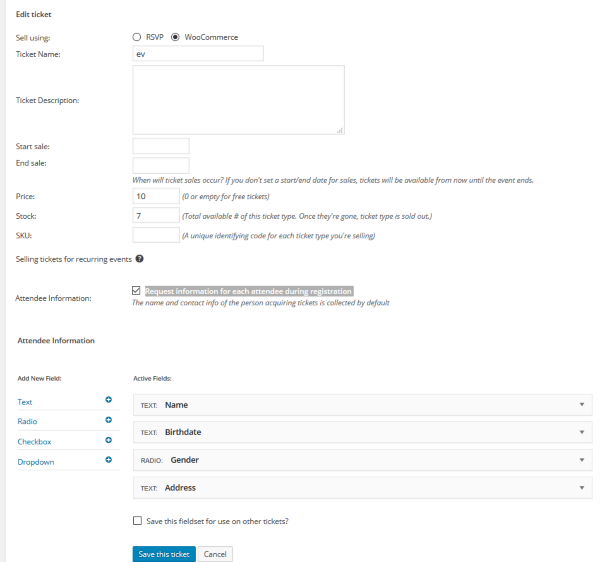
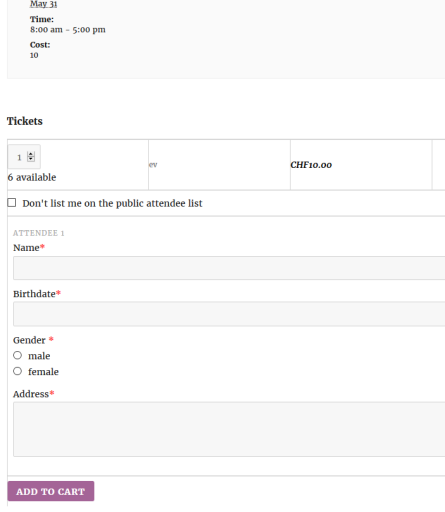
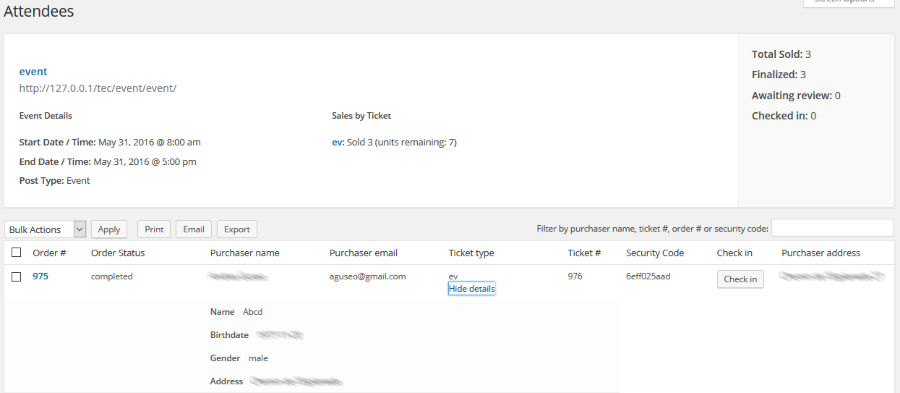
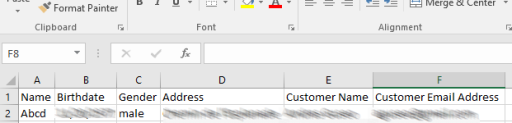
I believe this is a much more effective way to do it, without any coding.
Please, let me know if this helps.
Cheers,
Andras -
AuthorPosts