
Home › Forums › Ticket Products › Event Tickets Plus › Add Purchaser address (_billing_address_1) to Attendees Table
- This topic has 7 replies, 4 voices, and was last updated 10 years, 4 months ago by
Roger Klein.
-
AuthorPosts
-
May 23, 2016 at 1:10 am #1117662
Roger Klein
ParticipantHello
I would like to add the adresses for ticket orders to the attendees table (src: /event-tickets/src/tribe/Attendees_Table.php).
Am I right that there isn’t a placeholder for the address like there are for purchaser_name and purchaser_email?I also tried adding the following code:
<?php get_post_meta( $item[‘order_id’], ‘_billing_address_1’, true ); ?>
Unfortunately it doesnt work. Are you aware of how to achieve that?
Thank you very much in advance for your response
May 23, 2016 at 4:06 pm #1118012Andras
KeymasterHi Roger,
Welcome to the forums! You have a really good questions there.
I am able to answer some questions to help you get started on a customization, but for the most part that is beyond the support we can provide.
You are right, there is no placeholder for the address.
I think you are not far off with that code, though I don’t know where you are adding it.
You can try this in the Attendees_Table.php file to get an extra column with the address in the backend.:
1. In the “public function get_columns() {” function add a column name like
'purchaser_address' => "Purchaser address",
2. Create a function for displaying the address:
public function column_purchaser_address( $item ) {

echo get_post_meta( $item[order_id], '_billing_address_1', true );

}
Here the function name has to match the column name above like:
public function column_{column_name}( $item )Let me know if this gets you started.
Cheers,
AndrasMay 24, 2016 at 2:23 am #1118121ParticipantHello Andras
Thank you for your help – it worked!
Now i tried to do the same for the export function (CSV). I found out the export is made in Tickets_Handler.php from Row 288. I added the new export_columns but noticed that the new placeholders doesnt work.
Can you tell me how to achieve the same function for the export file (CSV-File)?
Thanks again for your amazing support!
Roger
May 24, 2016 at 1:32 pm #1118387KeymasterHey Roger,
I might have an easy solution for you which actually doesn’t require any coding.
When you create a ticket you can also create a fieldset. Just check the box “Request information for each attendee during registration”. This will open a simple form builder, where you can add a (required) field to ask for the address. You can save this form so you can re-use it with one click for other tickets as well.
Here are some screenshots:
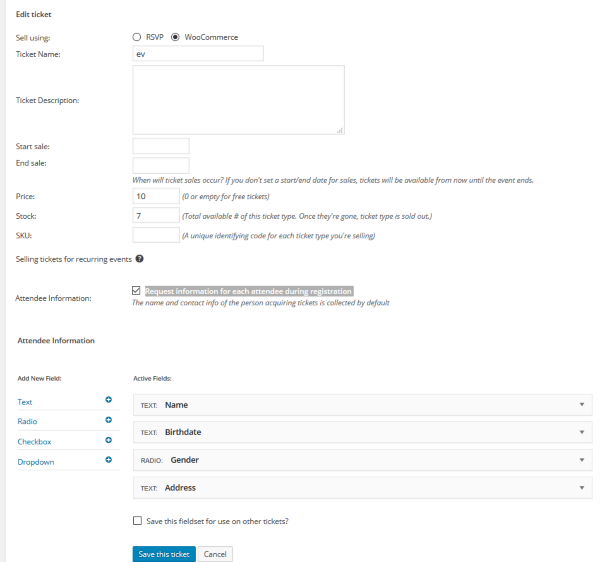
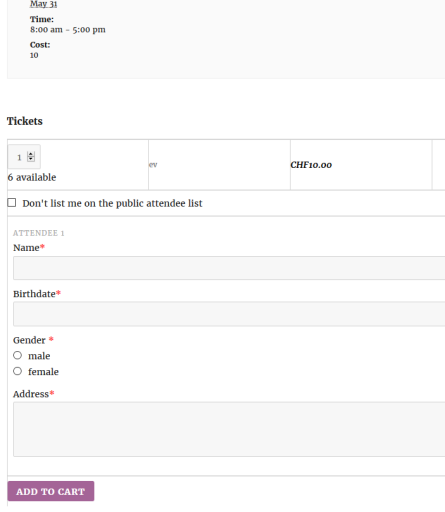
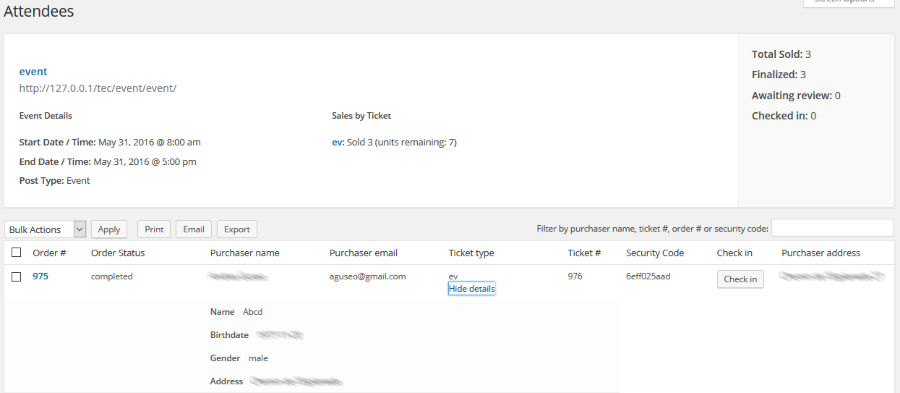
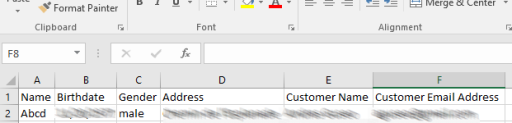
I believe this is a much more effective way to do it, without any coding.
Please, let me know if this helps.
Cheers,
AndrasMay 24, 2016 at 11:44 pm #1118601ParticipantHi Andras
Thank you so much for the solution you provided.
I tried it and everything in the backend looks good except one little claim I have to mention regarding the export-table. The attendee addresses were successfully added to the export file but I need the customer address from woocommerce in addition to the attendee address. Unfortunately it’s not possible to also export the customer’s address on this way.
The export file now looks as follows
Attendee name, Attendee Address, Customer Name, Customer Email AddressThis is how it should look like
Customer name, Customer Email Address, Customer Address, Customer Postal, Customer City, Attendee Name, Attendee AddressI will defninitely use this field function
Thank you
RogerMay 25, 2016 at 1:50 pm #1118863KeymasterHello Roger,
I’m glad that solution helps you a little bit. Just an idea, you can potentially add a radio button to the fields asking whether the entered data is the the customer address as well.
Otherwise I’m afraid you will need to do some custom coding, which is beyond our support. If you’d like to hire someone, here’s a list of freelancers who are well known in the domain and are not affiliated with us.
Is there anything else in this topic I can help you with? (For other questions / issues I ask you to open a new thread to keep things clean. 🙂 )
Thanks and cheers,
AndrasJune 9, 2016 at 9:35 am #1124565Support Droid
KeymasterThis topic has not been active for quite some time and will now be closed.
If you still need assistance please simply open a new topic (linking to this one if necessary)
and one of the team will be only too happy to help. -
AuthorPosts
- The topic ‘Add Purchaser address (_billing_address_1) to Attendees Table’ is closed to new replies.