
Home › Forums › Calendar Products › Events Calendar PRO › Error Save Display Setting and tooltip
- This topic has 9 replies, 5 voices, and was last updated 10 years, 4 months ago by
Geoff.
-
AuthorPosts
-
May 25, 2016 at 3:28 am #1118627
Nicola
ParticipantHello, I have got a problem with the settings of Event Calendar, when I save the setting and when reload page its change on the default value and didn’t save, also I have problem with tooltip that don’t display, I dont have javascript error or something.
RegardsMay 25, 2016 at 3:09 pm #1118890Andras
KeymasterCiao Nicola,
Welcome to the forums and thanks for going Pro!
I’m sorry you are experiencing this problem. I will be helping you with that.
Firstly, for the saving the settings issue, could you please test for plugin and theme conflicts based on this guide? Let me know if anything comes up with that.
Secondly, where do you have the tooltip issue? Can you share with me a direct link to that page and tell me where I should check?
Grazie e saluti,
AndrasMay 25, 2016 at 5:57 pm #1118945KeymasterHello again Nicola,
I have some news on this. We have found a bug regarding this issue and are currently investigating it.
Until it gets fixed what you can do is go to your database (via phpMyAdmin or cPanel or similar), look for the wp_options table, and rename or delete the option that has the option name tribe_settings_sent_data.
That should fix it and you will be able to save your settings. (If it gets stuck again later, just repeat.)
Please let me know if this helps.
Cheers,
AndrasMay 26, 2016 at 12:51 am #1119049ParticipantCiao Andras,
the issue was resolved when I delete the option tribe_settings_sent_data,but when I save settings the problem reappears.
For the tooltip this is a test link.
energiaesport.internetimage.info/corsi/settimana/2016-05-30/Cheers
-
This reply was modified 10 years, 5 months ago by
May 26, 2016 at 12:40 pm #1119317KeymasterBuonasera,
Regarding the issue:
I was thoroughly testing it, and sometimes it worked, sometimes it didn’t. But couldn’t nail down why. Anyway, the team is working on a fix with top priority.
Also note, that while it seems that the changed data is not saved, it most probably is. You can test this with changing the “Number of events to show per page” in Events > Settings > General Settings.
Regarding the tooltip:
I was checking the link you sent in 4 different browsers in Windows and I did see a tooltip everywhere when I hovered over the event on May 30, see a screenshot here:
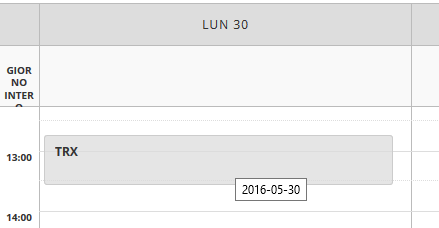
Is this what you are missing, or something else?
Cheers,
AndrasMay 27, 2016 at 12:28 am #1119598ParticipantHello,
I’m waiting for the fix of settings events.
Regarding the tooltip I was referring your feature tooltip like this demo:
http://oi68.tinypic.com/21bqcr6.jpg
I see in debugger that the javascript tooltip render was not loaded. I think is that the problem.Regards
May 27, 2016 at 7:37 am #1119693KeymasterHi Nicola,
I checked your page now, and I saw the tooltips and I didn’t see the javascript error. Did you manage to get it working?
I see some other strange things though. It’s likely a theme conflict. You might want to test it with a default theme.
Let me know if you have any follow up questions.
Ciao,
AndrasJune 11, 2016 at 9:35 am #1125593Support Droid
KeymasterThis topic has not been active for quite some time and will now be closed.
If you still need assistance please simply open a new topic (linking to this one if necessary)
and one of the team will be only too happy to help.June 22, 2016 at 1:45 pm #1130548MemberHey there,
Just want to drop a quick note in here to let you know that The Events Calendar 4.2.1 is about to release any moment and it will include a patch for this issue. Please update and let us know if you continue to hit any trouble.
Thanks so much for your patience while we worked on this!
Cheers,
Geoff -
This reply was modified 10 years, 5 months ago by
-
AuthorPosts

- The topic ‘Error Save Display Setting and tooltip’ is closed to new replies.