

Forum Replies Created
-
AuthorPosts
-
Andras
KeymasterHi again Eric,
If it’s running well with twentysixteen, then I’m afraid it’s a theme issue. So you might want to contact Elegant Themes’ support to notify them of this issue happening in Chrome.
I did a bit more testing on your site. That rendering issue happens – for me – when the top header shrinks to smaller size. Once that’s over, the rendering seems fine. I tried some css fixes, but it doesn’t really help.
At the moment I have little else beyond what I have already provided. Let me know if you have any follow up questions.
Cheers,
AndrasKeymasterCraig, thanks a lot for your feedback, much appreciated.
Since this is marked resolved I am going to close this ticket, but if you need anything else related to this topic or another please post a new topic on the forum and we’ll be happy to help you out.
Cheers,
AndrasPS: If you like our plugins, we would be happy to receive a review in the wordpress.org repository. Thanks!
KeymasterHello Dutchess,
Thanks for sharing your system information. I see you are using the freshest of our plugins, that’s great.
Did you also try deactivating other plugins or maybe using a default theme like twentysixteen? If not, please run a test for conflicting plugins / themes based on this guide, and let me know the result.
Thanks,
AndrasKeymasterThis reply is private.
KeymasterI am glad to see this got sorted. 🙂
I am going to go ahead and close this ticket. If you have a similar issue or another in the future, please do not hesitate to create a new one. We’ll be happy to help.
Cheers,
AndrasPS: If you like our plugin, we would be happy to receive a review in the wordpress.org repository. Thanks!
KeymasterHi Nicola,
I checked your page now, and I saw the tooltips and I didn’t see the javascript error. Did you manage to get it working?
I see some other strange things though. It’s likely a theme conflict. You might want to test it with a default theme.
Let me know if you have any follow up questions.
Ciao,
AndrasKeymasterHey Craig,
A new set of beta files are available as of today with some small fixes, might want to give those a test drive.
If you encounter any errors or bugs, please report them according to the beta testing guidelines so we can have a look and provide a fix if needed. The more detailed the explanation the better.
Let me know if you have any follow up questions.
Cheers,
AndrasKeymasterHello Nigel,
Thanks for going Pro and welcome to the forums!
We are aware of this bug and our team is working on a fix. Until the fix arrives there are 2 things you can do:
Either 1) go to your database, wp_options table, and from there delete the option with the option_name tribe_settings_sent_data.
Or 2) You can downgrade to The Events Calendar 4.1.3. That version is free of that bug.
I am going to close this ticket to new replies, but the issue is still open and we will update this ticket once we release a fix.
If you have any new questions or issues please create a new ticket and reference this one.
Thanks and cheers,
AndrasKeymasterHi Chris,
I’m sorry you are having a problem! Thanks for reaching out and sharing your sysinfo upfront. Let me try to help you with this.
I have a suspicion that Event and Venue show up twice because the other plugin that is managing events / tickets for you. (Highly likely those are the first 2.)
The RSVP section is supposed to show up below the event detail and venue details in a separate section.
The RSVP section doesn’t show up if:
- There is no RSVP ticket set up
- If the Start ticket Sale date is in the future
- If the End ticket Sale date is in the past
Can you confirm that you set up an RSVP ticket and it either doesn’t have an start / end sale date, the start sale date is NOT in the future and the end sale date is NOT in the past?
Cheers,
AndrasKeymasterHello Dutchess,
I’m sorry you are getting that problem, let me help you with this one.
As a first, could you share with me your system information? Here’s a handy guide for that.
Thanks,
AndrasKeymasterThis reply is private.
KeymasterHi Dominik,
This is to let you know, our devs are working on this issue.
I am going to close this ticket to new replies, but the issue is still open and we will update this ticket once we release a fix.
If you have any new questions or issues please create a new ticket and reference this one.
Thanks,
AndrasKeymaster🙂
KeymasterHey Lars,
I’m happy this got sorted out.
Since this is marked resolved I am going to close this ticket, but if you need anything else related to this topic or another please post a new topic on the forum and we can help you out.
Thanks and cheers,
AndrasPS: If you like our plugin, we would be happy to receive a review in the wordpress.org repository. Thanks!
KeymasterBuonasera,
Regarding the issue:
I was thoroughly testing it, and sometimes it worked, sometimes it didn’t. But couldn’t nail down why. Anyway, the team is working on a fix with top priority.
Also note, that while it seems that the changed data is not saved, it most probably is. You can test this with changing the “Number of events to show per page” in Events > Settings > General Settings.
Regarding the tooltip:
I was checking the link you sent in 4 different browsers in Windows and I did see a tooltip everywhere when I hovered over the event on May 30, see a screenshot here:
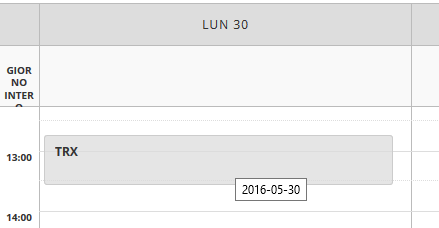
Is this what you are missing, or something else?
Cheers,
Andras -
AuthorPosts