

Forum Replies Created
-
AuthorPosts
-
Andras
KeymasterOn the recurring events, if you think that is something you would like as a feature I encourage you to visit our User Voice Page and either upvote an existing request or make a new request there.
As for the listing, you might want to give our Advanced Post Manager plugin a try. It can do exactly what you want and a bit more. And totally free. 🙂
About the docs, thanks for the tip! I’ll mention it to the team.
Is there anything else in this topic I can help you with?
Andras
KeymasterYeah, that comes from the fact that the sidebar is not wide enough. Originally the date part takes 15+5% (box+margin) of the width and the info part takes 80%.
With setting the date part width to initial it will be as wide as the text needs it, which might be bigger than 20% if the screen size is too small.
To offset that, you need to add this as well to your css:
.tribe-mini-calendar-event .list-info { width: 78%; }
You might need to change the percentage value lower. This was a value which worked for my test site, but obviously the measures are different than yours, so you might need to play around with it a bit.
Let me know if you have any follow up questions.
Cheers,
AndrasKeymasterNo problem Joe, I’m glad I could help!
I am going to go ahead and close this ticket, but if you need help on this or something else, don’t hesitate to open a new topic.
Cheers,
AndrasKeymasterHi Lorie Ann,
Great, glad it helped! I am going to go ahead and close this ticket, but if you need help on this or something else, don’t hesitate to open a new topic.
Cheers,
AndrasPS: If you like our plugin, we would be happy to receive a review in the wordpress.org repository. Thanks!
KeymasterAnd hello again, 🙂
Thanks for keeping the topics separate and clean. It is much easier to handle them and to follow up this way.
Yes, recurring events are handled in a way that all recurrence has a separate entry in the database, thus all events appear in the admin separately as well.
In the admin they can be edited either as the whole series, separately, or the series can be split into two.
It might be possible to change it so it works the way you described, but not without extensive programming, which is outside of our support scope.
Let me know if this answers your questions.
Cheers,
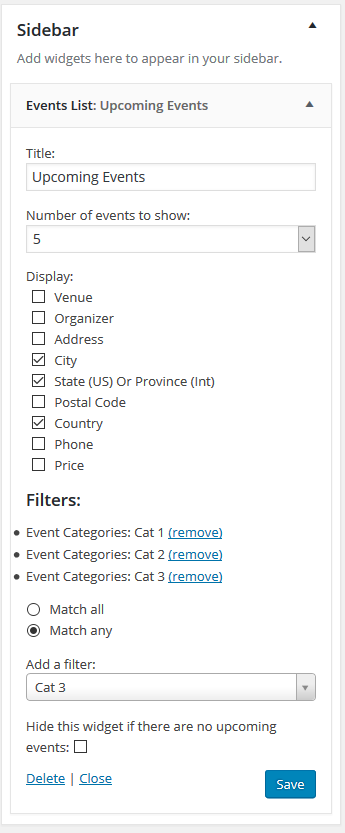
AndrasKeymasterOn the widget: it does allow to add more categories, you just need to add more filters and you can select as many categories / tags as you want and choose to Match all at once or Match any.
Cheers,
AndrasKeymasterHello again Joe,
Looking at your code, the second double-quote looks different, than the rest. Try that as a first and let me know if that helps. 🙂
Cheers,
AndrasKeymasterHi Sam,
Thanks for going Pro and welcome to the forums!
Currently there is no option for this. However, it should be achievable, but not without some extensive customization.
I can try to answer some questions to help you get started on a customization, but for the most part that is beyond the support we can provide.
If you would like to hire a professional, then you can check this list of freelancers who could help you and are not affiliated with us: https://theeventscalendar.com/knowledgebase/find-a-customizer/
Let me know if you have any follow up questions.
Thanks and cheers,
AndrasKeymasterHi Joe,
Thanks for going Pro and welcome to the forums. Let me help you with your question.
If you want to make the text smaller, then here’s the CSS you can copy to your style.css file.
/* optional - unset the width */

.tribe-mini-calendar-event .list-date {

width: initial;

}

/* change font size */

.tribe-mini-calendar-event .list-date .list-dayname,  .tribe-mini-calendar-event .list-date .list-daynumber, {

font-size: 10px !important;

}
If you totally want to remove it, then use this:
.tribe-mini-calendar-event .list-date {

display: none;

}
Let me know if any of this works for you.
Cheers,
AndrasKeymasterHello Lorie Ann and welcome to the forums!
That’s an interesting issue, let me try to help you with that.
Unfortunately due to our current policy cannot accept logins or can’t log in to customer servers/WordPress installations.
Thanks for running a test for conflicting plugins and sharing your system information, I see you are using the freshest versions, that’s good. 🙂
Did you maybe try without running multisite? Does it happen then?
How many items (pages) are listed on one page? (Previously I encountered a similar issue where showing 100 entries was too much. Setting it to a lower amount helped. You can set this at the top via clicking on Screen Options.)
How much memory do you have allocated for your site? I think a default is 64 MB, which in some cases is not enough, try 128 or 256 MB. To increase it you can try to add this line to your wp-config.php, although some servers don’t allow that.
define('WP_MEMORY_LIMIT', '128M');If that line doesn’t help, you can try to set it in your php.ini file, if you have access to that, or talk to your hosting provider to increase it for you.
Let me know if any of those work out. If not, we take it from there.
Cheers,
AndrasKeymasterHello vividimage,
Brook brought your issue to my attention. Let me try to help you with this one.
Time zones and their conversion is quite tricky, and unfortunately it’s a bit difficult to test the DST effect. However, I did some deeper testing of events, WordPress and how Outlook handles all this. Here is what I discovered.
As you most probably know UTC doesn’t ever change, it doesn’t take DST into consideration. It is fix all throughout the year for all time zones. For Chicago the offset is always UTC-06:00. And this is going to help us here.
There are 2 places where you can set the timezone. One is for WordPress under Settings > General, which I believe you indicated above. Since you want your site to be running on the proper local time all the time, I recommend you to set this to Chicago. This automatically will do the DST switch when needed and it will not influence your event timings and iCal export whatsoever. This is only for setting the time of your site. This time is recorded for example as the publishing time of a post when it is published.
The second place where you can set the timezone is when you create an event. (Check this screenshot.) If you click on the timezone it will change to a dropdown and you can select a timezone of your liking. By default this is set to the timezone of your WordPress site. However, you should set this to your UTC timezone (so UTC-6) to have it export and import properly.
Though I couldn’t test this with DST changes, it should work, as Outlook does some fancy timezone calculations which should make it appear at the proper time in any timezone, no matter whether DST or not is on. (In case interested, here is an extensive article about how Outlook handles all this with meeting invitations sent across multiple timezones.)
Please check and I’m looking forward to hearing about your results!
Cheers,
AndrasKeymasterHello again Dutchess,
Could you please try the following:
- Go to your profile on theeventscalendar.com and disconnect all licenses. (You will not lose them, they will only not be assigned to any site.)
- Then go to your WP admin and save empty license keys under Events > Settings > Licenses
- Check if it works as expected.
- After that enter only the Community Events license. Check if it works as expected.
- Finally input PRO license. Check if everything works as expected.
- Check if the license keys are correct on your site.
Let me know how that works out and if needed, we take it further from there.
Cheers,
AndrasMay 30, 2016 at 12:40 pm in reply to: Filter Bar 4.1 not working, even after upgrading Events Calendar PRO to 4.1.3 #1120450KeymasterThis reply is private.
KeymasterHi Lori,
Thanks for going Pro and welcome to forums!
As a default the list view in The Events Calendar has the buttons both at the top and at the bottom. The top one is usually hidden with CSS and can be made visible pretty easily.
However, I checked your site and I don’t see the other pair of buttons in the code. It might be done by the theme you are using or could be some other issue.
To investigate this could you please share with me your system information? Here is a handy guide for that.
Thanks and cheers,
AndrasKeymasterHi again,
Thanks for getting back to me on that. I will need some time to check on that problem. I ask for a bit of patience. I’ll be in touch shortly.
Thanks and have a great weekend!
Andras -
AuthorPosts