

Forum Replies Created
-
AuthorPosts
-
Andras
KeymasterHi Danny,
Thanks for reaching out! Happy to help you out with this.
Which widget are you interested in (Calendar or Event List), and do you want to change the color of all the text in the widget to the same color?
To change all the colors for the Calendar widget, add this to your style.css with the color code you need:
.widget_calendar table, .widget_calendar table a {

color: #00ff00;

}
For the Event list widget, use this:
.tribe-events-list-widget, .tribe-events-list-widget a {

color: #00ff00;

}
Let me know if this helps.
Cheers,
AndrasKeymasterHi Fred,
No worries about the duplication, if the solution – if provided – doesn’t work for you. 🙂
Thanks for checking for plugin conflicts. Did you / can you also check with using a default theme like twentyfourteen or twentysixteen?
Do you possibly have any customization on your site? Some code in functions.php that could affect this?
I also see that you are using a quite old version of WordPress. I would strongly recommend to update it to the most recent version (after backing up), as an old version could already cause a lot of issues, not to speak about security.
Waiting for your answer.
Cheers,
AndrasJune 3, 2016 at 4:30 pm in reply to: Calendar Widget not functioning for non logged in users #1122420KeymasterHi Kelli,
I’m sorry you are experiencing this issue. Let me try to help you with this one.
As a start can you:
- share with me your system information? Here is a guide on that.
- share a link where you are experiencing this problem?
Cheers,
AndrasKeymasterHi Janice,
Thanks for reaching out! That is indeed a tricky thing to do.
I will check if it’s possible to solve the 2-day ticket somehow.
For the 1-day tickets you could simply create 2 tickets, one for 26th and one for 27th. Or create two single events, with 1-day tickets.
For recurring events, you definitely need the Pro version. Though I’m not sure it will fix your ‘date on the ticket’ problem.
Let me know if this is helpful and I’ll get back to you on the 2-day ticket challenge. 🙂
Cheers,
AndrasJune 3, 2016 at 4:03 pm in reply to: Tribe-Events-Nav-Next Disappearing when publishing new Event #1122414KeymasterHi Craig,
Thanks for posting this issue and testing already for plugin conflicts!
Could you share your system information with me? Here’s a nice post on how to do that.
Also, can you share some more details on the process? First, future events were imported (for past current month), then a new event was added for current month?
How was the import done? File or link? Could you share that perhaps?
Thanks and cheers,
AndrasKeymasterHey Corey,
Thanks for reaching out and sharing that update with us! Much appreciated!
I am going to close this ticket, but if you need anything else feel free to post a new topic on the forum and we can help you out.
Cheers,
AndrasKeymasterHi David,
Thanks for going Pro and welcome to the forums!
I can try to help out here, but I am limited in supporting customizations.
Per our terms and conditions we support features of the plugins and although we try to help get you started on customizations for the most part you are going to have to take it on to complete.
I’m not sure whether you can capture the data using a hook. More likely you will need to look into capturing the data on a form submit and then saving it to a session variable.
If you need some expert help, I can recommend you some freelancers who are not affiliated with us and I’m sure they would be happy to help out.
Let me know if this gets you started.
Cheers,
AndrasJune 3, 2016 at 12:34 pm in reply to: https://tiga.org/events/the-tiga-games-industry-awards-2016 #1122380KeymasterHello Richard,
I’m sorry we still couldn’t nail this frustrating problem.
Could you please share with me your system information as per this article? Knowing that can eliminate some future questions.
Also, can you confirm that you are still experiencing the issue when using a default theme (like twentyfourteen or twentysixteen) and you have only the Modern Tribe plugins plus WooCommerce activated? This can help determine whether there is a conflicting plugin, or if the theme you are using somehow modifies the output.
Thanks for your cooperation!
AndrasJune 2, 2016 at 2:54 pm in reply to: Filter Bar 4.1 not working, even after upgrading Events Calendar PRO to 4.1.3 #1121894KeymasterThis reply is private.
June 2, 2016 at 2:03 pm in reply to: https://tiga.org/events/the-tiga-games-industry-awards-2016 #1121865KeymasterThanks for clarifying, Richard. Indeed we thought of something else. 🙂
If you tick the box “Request information for each attendee during registration / The name and contact info of the person acquiring tickets is collected by default”, then the purchaser information is collected automatically through the WooCommerce checkout form. However that only collects info from one person.
If you want to have a name / data per ticket, then you need to create a custom attendee meta field to collect the required data per ticket. See the screenshot for the looks:
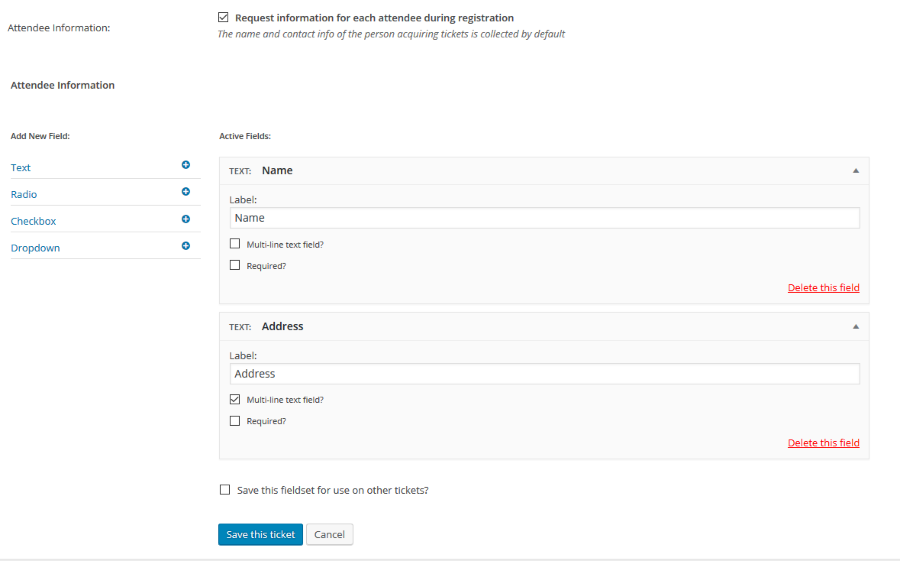
If you want to use the same fields for different tickets, then you can save the fieldset and you can reuse it with one click for a different ticket.
Does this help you with your question?
Cheers,
AndrasKeymasterThis reply is private.
KeymasterThis reply is private.
KeymasterJoe, thanks a lot for your feedback, much appreciated.
Just talked to a colleague, he confirmed that in the case of an unlimited recurring event, events are created 2 years ahead. So if it’s a weekly, then 2 x 52 events, if it’s monthly then 2 x 12 events etc.
I’m going to close this one as well. You already know the rest. 🙂
Cheers,
AndrasMay 31, 2016 at 3:39 pm in reply to: https://tiga.org/events/the-tiga-games-industry-awards-2016 #1120942KeymasterHi Richard,
Looking at your site the option might be hidden with CSS in the fronted. Look for something like this in your style.css:
.tribe-tickets-attendees-list-optout {

display: none;

}
If you remove that, then the checkboxes should be visible.In case this doesn’t solve it, then:
Please share with me your system information. Here’s our handy guide for that.
And please confirm that having a default theme (like twentysixteen) active and only the Modern Tribe plugins + WooCommerce activated, then you are still having this problem.
Thanks and cheers,
AndrasKeymasterSuper!
Since this is marked resolved I am going to close this ticket, but if you need anything else please post a new topic on the forum and we can help you out.
Cheers,
AndrasPS: If you like our plugin, we would be happy to receive a review in the wordpress.org repository. Thanks!
-
AuthorPosts