
Home › Forums › Calendar Products › Events Calendar PRO › Calendar Pro Shortcode Problem
- This topic has 5 replies, 3 voices, and was last updated 10 years, 4 months ago by
Joe.
-
AuthorPosts
-
May 30, 2016 at 3:26 pm #1120489
Joe
ParticipantGetting things set up, and I believe I found a problem. It’s also entirely possible I’m doing something wrong, as this is Day 1 for me working with the Pro plugin.
On this page: https://theeventscalendar.com/knowledgebase/pro-widget-shortcodes/
It says I can access a list of events using the “tribe_events_list” shortcode (I’m not using the proper [ symbol )
Which I got going, but when I went to modify it, it was showing ALL the categories, not just the ones I asked for. Here’s the actual shortcode I used:
[tribe_events_list categories="misc, mens, womens, childrens“ limit="6"]The problem is that it’s showing ALL the categories. There are two other categories besides the one in the example here (Bible Study & Services) Bible Study doesn’t currently have any entries, but services does. If I understand the docs right, that shortcode above should NOT show items from the others not explicitly listed, but it is for “services”. Am I doing something wrong, or is there a problem?
Additionally, I thought about using the “Upcoming Events” widget, but you only let me pick ONE category in the dropdown. It would be far more useful to let me choose what is in there, vs just one. That’s the reason I was trying to use the shortcode solution, which either isn’t working right, or I did something wrong.
The first two on the attached screenshot are from the “services” event category, and in theory shouldn’t be on this list. (I used this screen capture in another post I just made – but I did read your documents about making multiple requests in a single message, so I didn’t. )
This is a church, and I bought the Pro for repeating, regular events. But i don’t want those repeating Sunday services to show up on the events list – everyone knows about those (plus they’ll clog the list) – they’ll just be on the calendar/events page.
Please note that you cannot see this version of the site. If you go to it, you’ll see an old version that doesn’t use this plugin or theme. I’m constructing it on a private server, and would require you to change the hosts file on your machine to see it.
May 30, 2016 at 4:38 pm #1120503Andras
KeymasterHello again Joe,
Looking at your code, the second double-quote looks different, than the rest. Try that as a first and let me know if that helps. 🙂
Cheers,
AndrasMay 30, 2016 at 4:51 pm #1120504KeymasterOn the widget: it does allow to add more categories, you just need to add more filters and you can select as many categories / tags as you want and choose to Match all at once or Match any.
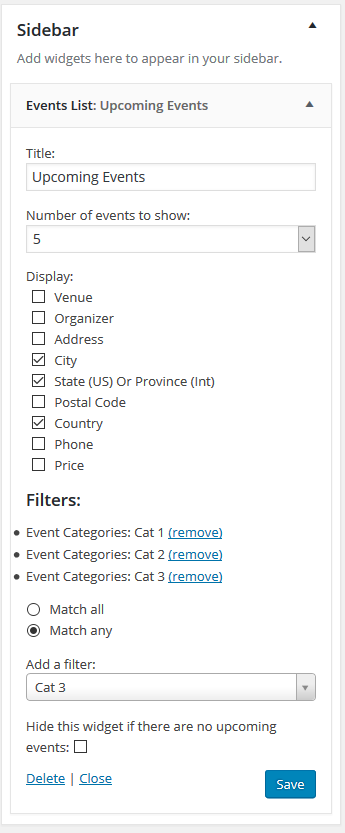
Cheers,
AndrasMay 30, 2016 at 5:10 pm #1120510ParticipantOK, turns out you were right, I had a different quotation mark there, so I fixed that and it worked like it should. We’re good there.
I also discovered the bit about other categories, so I’m good there, too. I’ll actually need both, as I’ll use the “widget on a page” plugin to get upcoming events on the front page of the site.
Tkx for helping out the n00b. 🙂 ha
May 31, 2016 at 2:41 pm #1120913KeymasterNo problem Joe, I’m glad I could help!
I am going to go ahead and close this ticket, but if you need help on this or something else, don’t hesitate to open a new topic.
Cheers,
Andras -
AuthorPosts
- The topic ‘Calendar Pro Shortcode Problem’ is closed to new replies.