

Forum Replies Created
-
AuthorPosts
-
Andras
KeymasterHallo Hans-Gerd
Gern geschehen. 😉
It would be awesome if you could share your translations. Even better would be if you would upload it into our system. Then we will quickly review and approve it so it can make it to the next release.
Here are 2 articles on handling translations.
https://theeventscalendar.com/knowledgebase/adding-or-updating-a-translation/
And let me know if any of the strings don’t get translated.
Danke und Grüsse
Andras
KeymasterBonjour Yves,
Thanks for using our plugins and welcome to the forums!
I can try to help out here, but I am limited in supporting customizations. Per our terms and conditions we support features of the plugins and although we try to help get you started on customizations for the most part you are going to have to take it on to complete.
One thing you can try is including the events in the main blog roll with the setting under Events > Settings > General tab > Include events in main blog loop and make your archives pages show past posts.
You can also try using the [tribe_events] shortcode which is part of our Events Calendar Pro plugin.
Or you can create a custom query for that but unfortunately that is beyond my knowledge level and the cover of our support.
In case you would like to hire professional help, the I can share with you this list of developers from the community who should be able to help you out:
https://theeventscalendar.com/knowledgebase/find-a-customizer/
I hope this will help you get started. Let me know if you have any questions.
Cheers,
AndrasKeymasterHola Antonio,
Hey thanks for reaching out!
Since I still didn’t manage to learn Spanish – it’s on my bucket list – I used google translate again.
I’m really sorry about this issue. We are aware of this issue and already has a high priority so should be fixed soon.
The issue comes from the translated url for “all” instances of the recurring events. Fortunately there is a workaround until the fix comes.
Open the wp-content\plugins\events-calendar-pro\lang\tribe-events-calendar-pro-xx_XX.po translation file with a translation editor like Poedit and change the translation of the English original ‘all’ string from ‘todos’ to ‘all, or remove it. Then save and upload.
Let me know if this fixes it for you.
Cheers,
AndrasKeymasterIn case you have any customizations on your site – most likely place is your theme’s functions.php file – then please disable those as well.
Thanks!
A.
KeymasterHello Susanna,
Thanks for reaching out to us. I’m sorry you are having this issue. Let me try to help you solve this.
Do you also get this when you deactivate Events Calendar Pro?
Also, it would be great and helpful if you could run a test for conflicts based on this guide and share with me the results.
Thanks and looking forward to hearing from you.
Cheers,
AndrasKeymasterHello Bryan,
Thanks for going Pro and welcome to the forums!
I’m sorry you are having this issue. To be able to help you could you please:
- share your system information with me
- give me a url to the site where you are experiencing this?
Thanks and looking forward to solving this with you!
Cheers,
AndrasJanuary 17, 2017 at 9:22 am in reply to: EA license not working – "Buy Aggregator" – plus red exclamation points #1219686KeymasterHello Cather / New user 😉
Thanks for using our plugins and welcome to the forums! I apologize, we don’t provide support via email but I’m more than happy to help you out here. I’m sorry about the issue you are having.
In order to get down to the bottom of this I will need some more information from you.
Can you send me a screenshot of the error message?
Please also send me a screenshot of Events > Help > Event Aggregator System Status
(should look something like this: https://cloudup.com/c_AbQU9nKmr)Try removing the license key from Events > Settings > Licenses save, and then re-add it and check if that helps. (In case you didn’t do so yet.)
Also it would be great if you could share with me that ICS feed you are trying to import so I can test it.
You say:
see red exclamation points for everything
and you are pulling from one ICS feed. Can you please clarify? Could you share a screenshot of that page?
Looking forward to your reply.
Cheers,
AndrasJanuary 17, 2017 at 9:09 am in reply to: Email ticket with event details (date, time, location, event name) #1219678KeymasterHi Steven,
Thanks for using our plugins and welcome to the forums! And thanks for reaching out with your question.
By default the email that contains the ticket does contain basic information like that.
Here’s a screenshot:
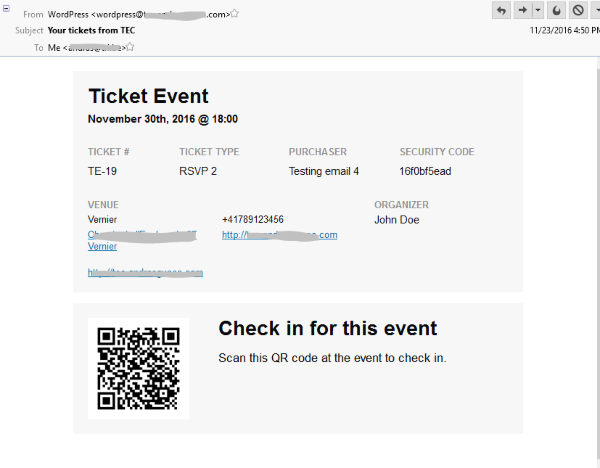
Note that when a purchase is done, first the WooCommerce email is sent to the user with the successful purchase. Once that order has been set to completed status in WooCommerce, then the ticket email will be sent to them automatically.
Does this help? Let me know if you have any more questions.
Cheers,
AndrasKeymasterHello Ilkka,
Thanks for reaching out! That’s a super question you have there.
Please give me some time to look around and I’ll let you know soon what I found.
Cheers,
AndrasJanuary 17, 2017 at 9:03 am in reply to: Add Next month nav ABOVE the calendar in month view #1219675KeymasterHello Joyce,
Thanks for going Pro and welcome to the forums! Great questions, I can help you solve those.
I believe these 2 articles from our knowledgebase should help you with them:
Add “Next” and “Previous” Links Above the Calendar in Legacy Month View
https://theeventscalendar.com/knowledgebase/add-nextprevious-links/
Let me know how it works out.
Cheers,
AndrasKeymasterHi Brian,
I don’t see anything in your functions.php that would stand out. What I can think of is the awkward case of more tickets being sold than the stock.
Try changing like 464 from this:
if ( $stock_count - $sold_count == 0 ) {to this
if ( $stock_count - $sold_count <= 0 ) {So it will also print the message if the result is negative.
I just tested the code on my test site and it worked.
Let me know if that help solve it.
Cheers,
AndrasKeymasterHi Soula,
Yes, events not being published could definitely be a cause of them not showing up.
Also note that the [tribe_events] shortcodes only work when you have Events Calendar Pro activated, since it is a Pro feature.
* When I activate Events Calendar Pro, the feature images from my events are replaced with date icons (older events seem to all use the one date)
This happens where? On a calendar view page (e.g. List view), in the widget bar (which widget?), with a shortcode (which shortcode?) ? Can you share a link where I can see this, maybe 2 screenshots so I can compare?
Also I would recommend you to set up a test / staging site where you can easily play around with settings and creating events. It can be as simple as setting up a subdomain like (http://staging.qgw.com.au/) and making a copy of your site there.
Thanks and cheers,
AndrasKeymasterMichael, thanks a lot for clarifying that. That helps a lot to know where we are.
This is a bug that we are aware of and a fix is on the way. The code for this is pending review at the moment. If all goes according to plan then it should ship with the next maintenance release within 2-3 weeks. Please hang in there, we’ve got your back.
I’ll set this thread to pending fix, we will update it once the fix ships so you will get a notification.
If you have any new questions or issues please create a new ticket and reference this one.
Thanks and cheers,
Andras
KeymasterHello Diane,
Thanks for checking that console error. Did you manage to do a conflict test as well? That could bring us closer to the issue.
I also see that you have customized that community add event page. It would be worth removing the customization to have the original / default page and check if the issue exists there.
Regarding the design thank you for your feedback and honesty. If you could give me more details on what exactly you find confusing and possibly how it could be improved to be less confusing, that would help us understand how people use and see our products, so we can develop better products in the future. Thanks!
If you would like to use the old design, then you will need to downgrade the plugins, that means all of the calendar ones as mismatching version numbers don’t always fully cooperate.
Looking forward to your test results and feedback!
@Matthias, thanks for chiming in and drawing our attention to that glitch. I will let our development team know so we can do some adjustments.
Meanwhile you can try this little css snippet if it helps:
.tribe-events-community-details span, .tribe-events-community-details label {
height: 20px;
vertical-align: middle;
}Also @Matthias, if the CSS snippet doesn’t help and you would like your issue to be handled, I kindly ask you to open a new thread and reference this one. This would help us keep the forums clean and the support easier for everybody. Thanks a lot!
Cheers,
AndrasKeymasterIn the previous post I was referring to the German translation files. Obviously, use the appropriate ones based on your needs.
A.
-
AuthorPosts