Forum Replies Created
-
AuthorPosts
-
Victor
MemberHi Paul!
Thanks for clearing that out. I can see the screenshot and can understand what you mean now.
In the “Attendees by Ticket” summary you will always get the total amount of tickets sold no matter if they were then deleted or cancelled. I believe this to be a default behaviour and not a bug.
Just to confirm, did you sell 4 “Event Registration (Member)” tickets but deleted 1? And the same for this ticket “Revel & Roll Networking Event”, did you sell one and later deleted? If yes for both, then it’s default behaviour.
The “Total Tickets Sols” says 6, but if you subtract the 3 deleted (which may be 2 deleted and 1 cancelled), you then have a total of 3 tickets which is what you have at the moment in the attendee list.
I know this can be confusing, so let me know if you have other questions.
Best!
Victor
March 29, 2017 at 3:20 pm in reply to: Add Event and Attendee Information to WooCommerce Order Details email issue #1261777MemberHi John!
Thanks for coming back to us! I am really sorry you are experiencing these issues
“Add Event and Attendee Information to WooCommerce Order Details” extension with Event Ticketing Plus isn’t allowing attendee information to appear in the New Order emails – basically the event information (name, date, time) is instead being duplicated.
I can’t reproduce this issue. I tried the extension myself and works as expected. You mention that “the event information is being duplicated” which seems a strange behaviour. What do you mean by this? Is that info showing twice in the order email? Could you please send us a screenshot of that?
This information is also not accessible in the WP Admin either, the way it should be under the ‘Details’ tab. It is saved to the db though, I see the custom fields populated in the order itself.
Is this the case for older ticket orders or it happens with new orders after upgrading to 4.4.5?
Could you please try creating a new event (it can be hidden to the end users or password protected) which has a ticket requiring attendee information? But please do that after switching to a default theme and deactivating all other plugins except The Events Calendar, Event Tickets, Event Tickets Plus and WooCommerce. Then make a purchase of that ticket and see if the issue still occurs?
Let me know how that goes and if you have any other questions.
Best!
Victor
MemberHi Ayleen!
Great to hear that! Thanks for letting us know about it.
I’ll go ahead and close this thread but feel free to open a new one if you have other questions.
Best!
Victor
MemberHey Chad!
That’s great! I’m super happy you could work it out 🙂 Thanks for coming back and letting us know about it.
I’ll close this thread now but please feel free to open a new one if any other questions.
Good luck with your project!
Victor
MemberHi Paul!
Thanks for reaching out to us!
I’m sorry, but I don’t think I see the error you are having. Where is it exactly I should be looking for the issue? Could you please explain to us the steps you took to get to the error?
Maybe you could provide me with a screenshot of the event tickets and tell me how the stock settings are set.
Thanks!
Victor
MemberHi Chad!
Thanks for reaching out to us! 🙂
While our “Terms of Service” doesn’t allow us to do customizations, we do like helping out and at least point users into the right direction. That said, let me try to help you with this.
what is the correct way to create a WordPress template (not page or post) that contains a list view which I can style for print and
You could start by creating a new template page for your theme and then construct a custom query of events in it, either using tribe_get_events() as the basis of the query, or the default WordPress get_posts() function in which you would make a calle for the tribe_events post type
Additionally, there is a good article on creating print styles for WordPress here > https://codex.wordpress.org/Styling_for_Print
I hope that helps. Let me know if any other questions.
Best!
Victor
MemberHi Alexander!
Thanks for reaching out to us and letting us know about this.
We are aware of a few PHP errors related to PHP version 7.1. While I’m not sure if it’s exactly the same issue as the one you are reporting, I will make sure to link this to the corresponding bug report so the team will take it into account when dealing with it and will let you know as soon as the bug fix is released.
Thanks again for reporting this and feel free to ask any other questions.
Best!
Victor
MemberHi Ayleen!
Thanks for reaching out to us!
I can see the form now showing in the link you provided. Did you manage to solve the issue? Is there anything else I’m failing to see about the issue?
Please let me know so we can further assist you.
Thanks!
Victor
MemberHi Blazej!
Thanks for coming back! I’m really sorry you’re having those issues. 🙁
How are you showing the calendar in the frontend here http://akademiatb.pl/ ? Are you using a shortcode? If so, which one and how?
Have you tried switching to a default theme and see if the issue continues? This could be related to a plugin or theme conflict, so could you please go through the complete steps in this guide > <u>https://theeventscalendar.com/knowledgebase/testing-for-conflicts/</u> and let me know what you can find in the process?
Also, when coming back could you please share with us your system info by following this guide > <u>https://theeventscalendar.com/knowledgebase/sharing-sys-info/</u> ?
Thanks!
Victor
MemberHi Bradley!
Thanks for coming back.
Unfortunately, that functionality is not built in with our plugins. I sure see the value in having something like that in our plugins. So I encourage you to visit our user voice and post it as a new idea so other users may vote for it and we can add the feature in a future version. Here > https://tribe.uservoice.com
Let me know if you have other questions.
Best!
Victor
March 28, 2017 at 10:35 pm in reply to: Google missing dtstart, hentry, hcalendar…142+ error messages in my code #1261254MemberHi Kim!
Thanks for reaching out to us! I’m sorry you are having these issues.
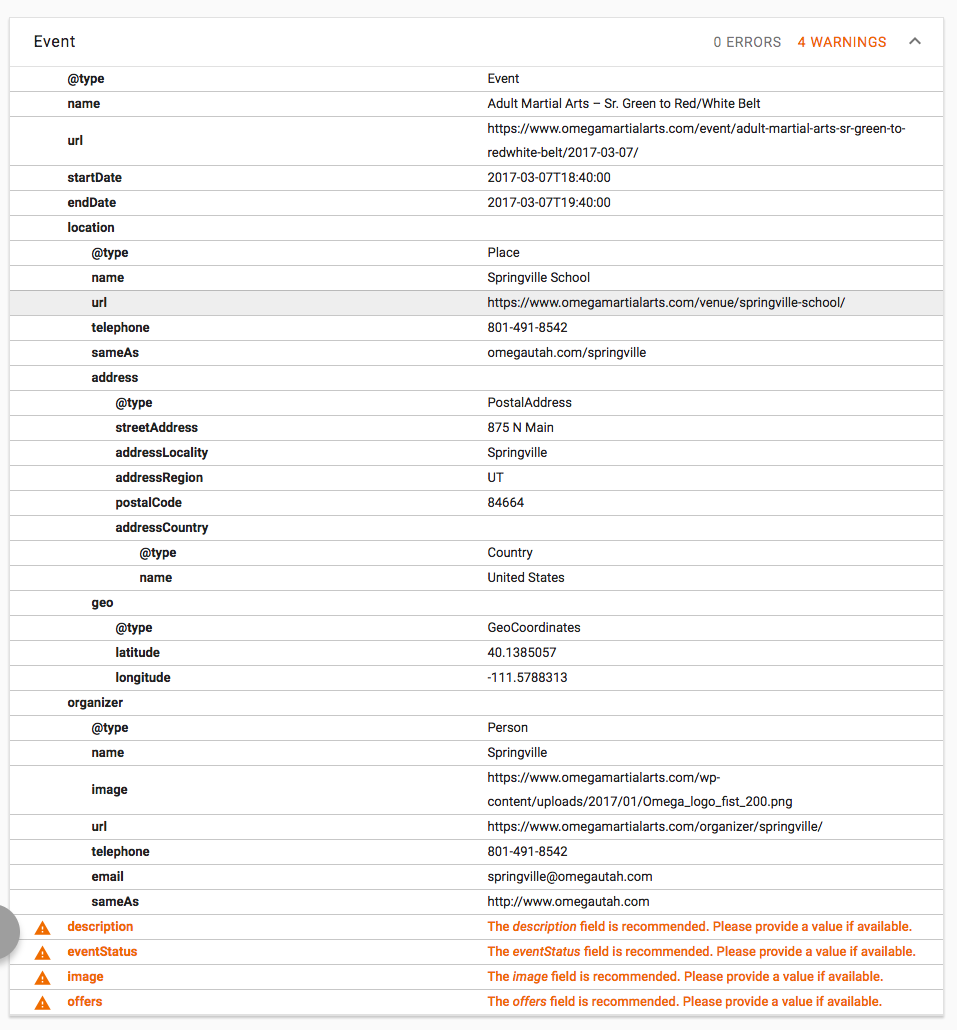
Those are problems related to how structured data for the events are showing to Google crawlers. You can find more information about this here > https://developers.google.com/search/docs/data-types/data-type-selector
Seeing the screenshots you provided, some seem to only be warnings of data missing for some of the events. In this screenshot that event does not seem to have any contents in it, thus not printing that information in the structured data. Try adding content to that event and then running the testing tool.
For the rest of the issues you can use a tool like this > https://search.google.com/structured-data/testing-tool to spot what data is missing or wrong.
I see in another screenshot that the most common error is the author missing for many events, but when I take one of those events and test it with the tool I don’t get the author missing error. See here > https://search.google.com/structured-data/testing-tool#url=https%3A%2F%2Fwww.omegamartialarts.com%2Fevent%2Fopen-rank%2F2017-11-10%2F
Some errors could also be related to a theme conflict so I would try switching to a default theme like twentyfifteen, and then testing again the event/s and see if the error is still showing.
Also, when coming back please share with us the links to the pages that have been reported to have errors so we can test them faster.
Thanks!
Victor
MemberHey Cara!
Don’t worry about the comment. It’s not strange to me because I also answered your other thread. 🙂
Regarding the profile issue, I really hope you can solve it with the theme authors.
I’ll go ahead and close this thread so feel free to open a new one if any other questions and we’ll be happy to help.
Good luck with your project!
Victor
MemberHey Cara!
Thanks for the follow up on this! Let me try and help you with that.
One option could be to create an additional field for the events that will enable you to add that extra information. For example, create a field called “Members Price” and set that to Free (or even a different price) in the events. You can find all about adding Additional fields here > https://theeventscalendar.com/knowledgebase/pro-additional-fields/
The other option I can think of would be to try out our Event Tickets free plugin which will enable you to create different tickets and prices in addition to also manage and collect RSVP’s for your events.
I hope that helps. Let me know if you have further questions and I’ll be happy to help.
Best!
Victor
March 28, 2017 at 4:24 pm in reply to: wrong start date (1 Jan 1970) of events imported from facebook #1261172MemberHi Adrien!
Thanks for the follow up!
I’m sorry that changing the update authority isn’t an option for you. Rest assured we will fix this bug in a future release and let you know about it.
Regarding your other issue, I understand what you mean. I think that being able to select whether to update or not venues (or even organisers) would be a useful thing to have as a setting. I could not find it as a future idea but I would encourage you to post it in our user voice here > https://tribe.uservoice.com/
If you need further assistance with this or any other thing, I will kindly ask you to open a new thread so it won’t get mixed up with this pending fix bug.
Thanks!
Victor
MemberHi Anne!
I just wanted to let you know that we are very busy at the moment and also part of the team is out for the annual team retreat. So, it may take us longer than I expected to review this and come up with something you can use.
Thanks for your patience and let me know if there’s anything else I can assist you with.
Best!
Victor
-
AuthorPosts