

Forum Replies Created
-
AuthorPosts
-
August 22, 2018 at 1:30 pm in reply to: Scheduled imports from Google Calendar not updating event date changes #1603409
Victor
MemberHi Nicholas!
Just wanted to share with you that a new release of out plugins is out, including a fix for this issue 🙂
Find out more about this release → https://theeventscalendar.com/release-event-tickets-4-8-event-tickets-plus-4-8/
We apologize for the delay and appreciate your patience while we worked on this.
As always, we suggest to setup a dev/staging site so you can make all plugin updates without disrupting the live site.
Please update the plugins and let us know if the fix works for your site.
Best,
VictorMemberHi Cameron!
As you might already know from your other post, a new release of out plugins is out, including a fix for this issue 🙂
Find out more about this release → https://theeventscalendar.com/release-event-tickets-4-8-event-tickets-plus-4-8/
We apologize for the delay and appreciate your patience while we worked on this.
As always, we suggest to setup a dev/staging site so you can make all plugin updates without disrupting the live site.
Please update the plugins and let us know if the fix works for your site.
Best,
VictorMemberHi Cameron!
Just wanted to share with you that a new release of out plugins is out, including a fix for this issue 🙂
Find out more about this release → https://theeventscalendar.com/release-event-tickets-4-8-event-tickets-plus-4-8/
We apologize for the delay and appreciate your patience while we worked on this.
As always, we suggest to setup a dev/staging site so you can make all plugin updates without disrupting the live site.
Please update the plugins and let us know if the fix works for your site.
Best,
VictorMemberHi There!
Just wanted to share with you that a new release of out plugins is out, including a fix for this issue.
Find out more about this release → https://theeventscalendar.com/release-event-tickets-4-8-event-tickets-plus-4-8/
We apologize for the delay and appreciate your patience while we worked on this.
As always, we suggest to setup a dev/staging site so you can make all plugin updates without disrupting the live site.
Please update the plugins and let us know if the fix works for your site.
Best,
VictorMemberHi Adam!
Just wanted to share with you that a new release of out plugins is out, including a fix for this issue 🙂
Find out more about this release → https://theeventscalendar.com/release-event-tickets-4-8-event-tickets-plus-4-8/
We apologize for the delay and appreciate your patience while we worked on this.
As always, we suggest to setup a dev/staging site so you can make all plugin updates without disrupting the live site.
Please update the plugins and let us know if the fix works for your site.
Best,
VictorMemberHi Raymond!
I’m sorry for a bit of delay in getting back to you.
As you may already know, we are fairly limited in how much support we can give for custom development questions like that.
We can certainly point you in the right direction. I would suggest you take a look at the WordPress Rewrite API. Additionally, it would probably be a good idea to make use of the ‘tribe_events_rewrite_rules_custom’ hook you can find at /wp-content/plugins/the-events-calendar/src/Tribe/Rewrite.php
Hope that helps!
Best,
VictorMemberHola Adrian!
Genial que pudiste hacerlo funcionar! Un placer ayudarte. Gracias por avisarme.
Voy a cerrar esta conversación, pero no dudes en abrir otra si tienes alguna duda.
Saludos y suerte en tu proyecto! 🙂
VictorMemberHola Adrian!
Gracias por enviar las capturas de pantalla.
Lamento que te sientas perdido. No te preocupes que voy a intentar ayudarte lo más que pueda para resolverlo.
Por lo que puedo ver, el problema es que no tienes habilitado los servicios de la API necesarios para que funcionen los mapas en tu sitio. Los servicios que necesitas habilitar son Maps Javascript API y Geocoding API como puedes ver en la siguiente pantalla:
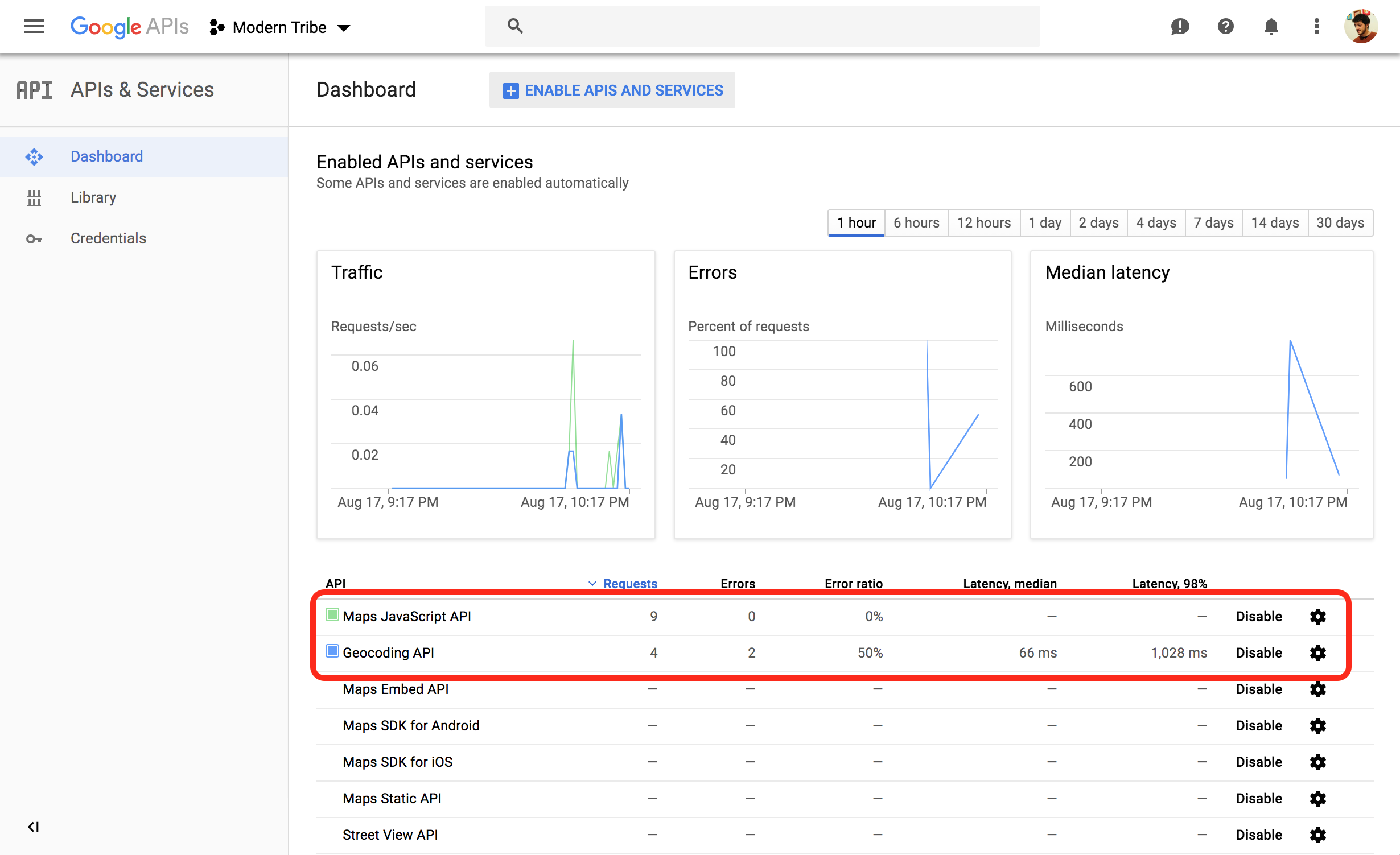
Deberías poder agregarlos y habilitarlos haciendo click en Habilitar las API y los servicios (Enable APIS and Services) desde esa misma pantalla.
Si tienes problemas para habilitar los servicios desde ahi, te sugiero que intentes crear una nueva API key utilizando el siguiente enlace > https://developers.google.com/maps/documentation/javascript/get-api-key#get-an-api-key
Espero que te funcione. Avisame como va.
Saludos!
VictorMemberYou are welcome 🙂
Since you marked this “Resolved”, I’ll go ahead and close the thread now. Do feel free to open a new topic if anything comes up and we’ll be happy to help.
Best,
VictorMemberHi Jo,
Thanks for following up with this.
It’s good you could narrow down the problem to the month view template. Just to confirm, does removing the month template override fix the issue?
If it doesn’t, did you happen to notice a difference when deactivating all other plugins or switching to a default WordPress theme, like Twenty Seventeen? What happens if you try deactivating all plugins and switching to the Twenty Seventeen theme together? Do you notice a difference then?
If you see no difference in those conditions, then we’ll need to do some deeper troubleshooting.
Also do you have any updates on when a fix for month view on mobile not working?
I’m not sure what issue you are referring to. Are you experiencing an issue with your mobile view of the events? Please let me know more about this.
Thanks,
VictorMemberHi Cordes,
Thanks for coming back with all that information.
I tried to replicate the same in my own local installation but failed to do so under default conditions.
First, could you please navigate to your WP Admin > WooCommerce > Settings > Products tab > Inventory > and make sure you have checked “Enable stock management”?
Additionally, please check that the Enable stock management at product level is also activated for the ticket product. You can verify this by editing the corresponding ticket product in WooCommerce in Product Data > Inventory
Does it change anything?
Please let us know about it.
Thanks,
VictorMemberHola Adrian,
Gracias por hacer esas pruebas.
He intentado reproducir el mismo error de consola en mi sitio de pruebas local, pero no puedo. Por lo tanto debe ser algo particular de tu sitio.
no se que mas hacer encima yo pague por el paquete Pro, sera por eso al instalar el paquete pro que empezo el error?
El error de consola no viene de nuestros plugins, sino de la comunicación que tiene tu sitio con la API de Google. Primero tenemos que asegurarnos que el problema no esté en la configuración de la API de Google.
¿Podrías enviarme unas captura de pantalla de tu consola de Google APIs? Precisamente necesito ver las siguientes pantallas:

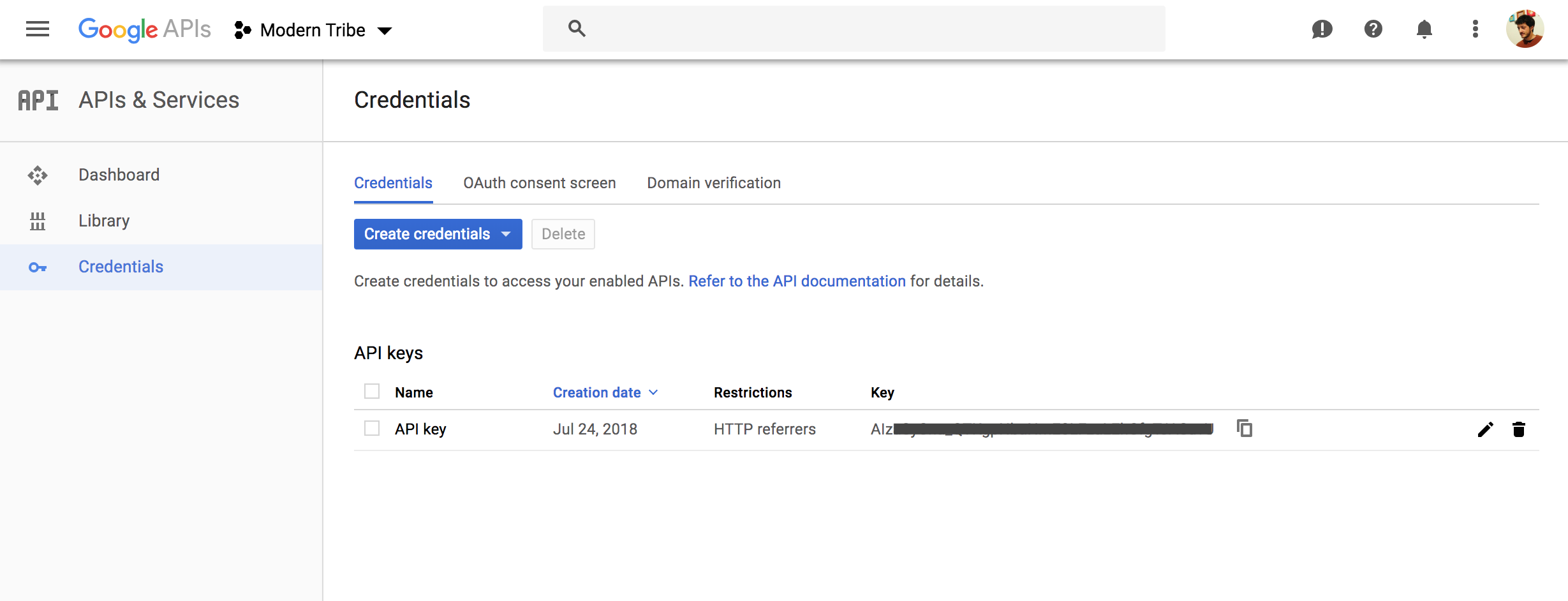
Además, por favor envíanos la información de tu sistema para asegurarnos de que todo este bien ahi.
Gracias,
VictorMemberHola Adrian,
Gracias por intentar eso y por enviar la captura de pantalla.
El error de consola sugiere que es un error que envía la API de Google al intentar mostrar el mapa. De todas formas, para asegurarnos de que no hay ningún conflicto con el tema o algún otro plugin, ¿podrías cambiar el tema a uno por defecto (como Twenty Seventeen) y desactivar todos los demás plugins excepto los nuestros? Haciendo esto, ¿se muestra el mapa o cambia el error de consola?
Este proceso es básicamente un test para verificar que no haya conflictos (testing for conflicts). Siempre sugerimos hacer estas pruebas en un sitio de prueba (staging), para no afectar al sitio en vivo. Pero en caso que no tengas un sitio de pruebas, puedes utilizar alguno de los siguientes plugins:
Estos permiten realizar el testeo sin que los visitantes de tu sitio vean disrupción alguna. Por favor avisame si ves algún cambio.
Cuando vuelvas, por favor comparte la información de tu sistema > https://theeventscalendar.com/knowledgebase/sharing-sys-info/ así también podemos ver si detectamos algún problema desde ahí.
Gracias,
VictorMemberHola Adrian!
Gracias por ponerte en contacto!
Al parecer, el error viene desde la API de Google. Probablemente sea que la API key que estás usando esté restringida de alguna manera que no permita la utilización de la misma en tu nuevo dominio.
Lo primero que te sugiero es intentar quitar cualquier restricción que tenga la API y verifica si funciona luego de esto. Ten en cuenta que puede tardar unos minutos en hacer efecto una vez que cambias la restricción. En la siguiente captura de pantalla verás donde debes modificar la restricción en tu consola de Google:
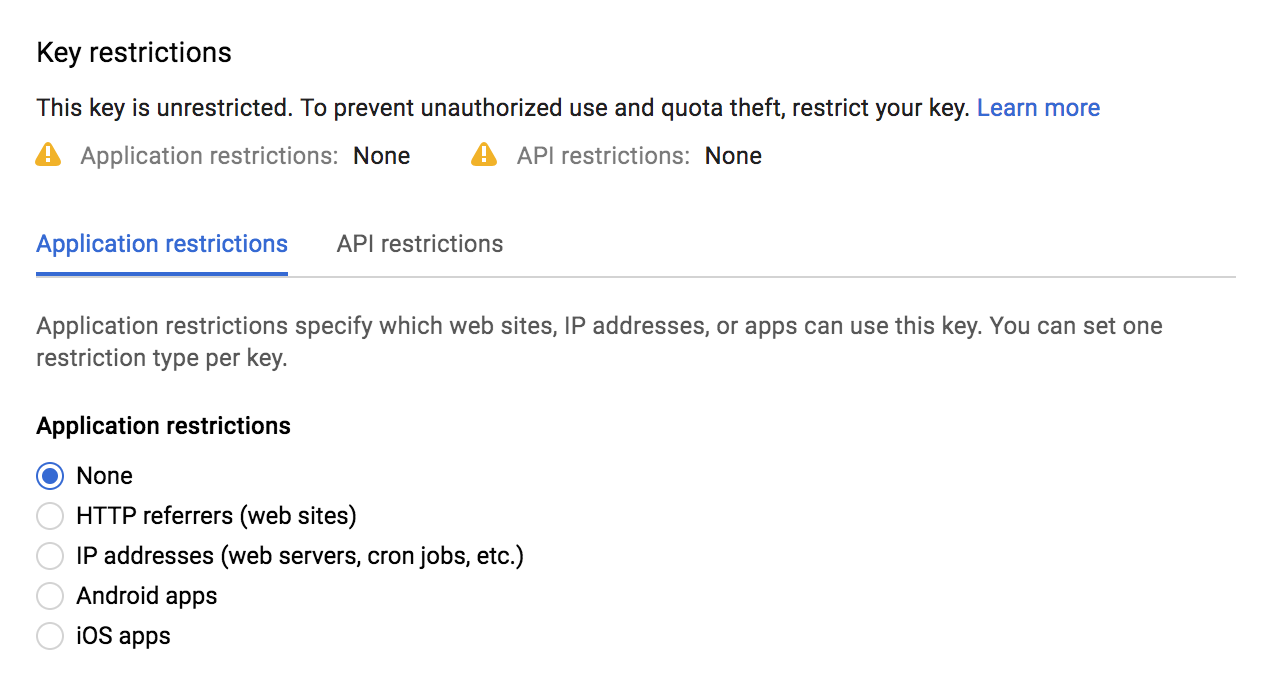
Si una vez quitada la restricción, el mapa se muestra correctamente, quiere decir que el problema reside en la restricción. ¿Podrías intentar esto y confirmar si funciona?
Si es asi, y deseas utilizar una restricción para tu API KEY, deberás crear dos API KEY para poder utilizar todas las funcionalidades de nuestros plugins: Una key restringida para HTTP referrers y otra para IP addresses. Y luego implementar el código compartido en el siguiente artículo bajo la sección “API Key Restrictions”, utilizando tu API KEY limitada > https://theeventscalendar.com/knowledgebase/setting-up-your-google-maps-api-key/
Espero que ayude. 🙂
Saludos,
VictorAugust 16, 2018 at 9:23 am in reply to: Event Tickets App Scans All Tickets As Already Checked In! #1599053MemberHi Kieran!
I’m sorry to hear you are having that issue. Let me help you with the troubleshooting.
First, please make sure you are using the latest versions of our plugins. Remember you can always download our plugins from your downloads page > https://theeventscalendar.com/my-account/downloads/
Just to confirm, when you scan the ticket with the App, does it reflect the change if you navigate to the attendees page for your event?
Are you able to manually check-in attendees through the attendees page?
Do note that the Event Tickets Plus App will cache the tickets scanned, so that if a ticket was scanned and succesfully checked-in, it will save this in the cache. So, if you scan that same ticket again, it won’t send a check-in request to your site, but show the “Already Checked In” instead.
If you want to delete the cache, you can quit the application and start it again.
I hope that helps. Please let me know how it goes.
Best,
Victor -
AuthorPosts