

Forum Replies Created
-
AuthorPosts
-
Victor
MemberHi Jens!
Thanks for the kind words and for getting in touch with us about this topic. Let me try to help you with that.
WooCommerce does not automatically modify the stock when you cancel an order by default. The reason is because it might depend on each case to determine if it is the right choice to re-stock the products or not.
Several variables are also involved like the previous order state, the WooCommerce-Specific Ticket Settings, the Payment methods, and the Woocommerce Inventory settings.
All these settings can create different scenarios and depending on each of them it would make sense to re-stock an order upon cancelling or not.
We have a couple of articles that will get you started on How to Refund or Cancel a Tickets Order and to Managing Your Orders and Attendees.
I hope that helps. We are always trying to improve how the ticket processes work out for our users, so let me know if you encounter a specific case where you are having trouble with for cancelled orders and I’d be happy to help as much possible.
Best,
Victor.December 4, 2017 at 3:27 pm in reply to: Problemas con Lista de Asistentes y Correos electrónicos #1398208MemberBuen día Javier!
Gracias por comunicarte con nosotros. Déjame ayudarte con esos problemas.
No estoy seguro de entender exactamente el problema con la lista de asistentes. Estas teniendo problemas para exportar el archivo? Podés enviar algún screenshot del problema así podemos ver el problema.
Por favor, podrías compartir la información de tu sistema siguiendo los pasos de esta guía? > https://theeventscalendar.com/knowledgebase/sharing-sys-info/
En cuanto a los correos de los tickets, podrías decirnos con que cliente de correo ocurre esto? Gmail, Yahoo, algún otro? y si esto sucede con varias direcciones de correo o solo algunas?
Gracias,
VictorMemberHi Heather!
First, let me apologise for the delay in getting back to you. It seems this thread has gone out of radar somehow and we’ve just bumped into it.
I’m not really sure why that snippet could have stopped working. I will make some tests on my end with it and see if I can come up with a working snippet to accomplish the same with our latest version.
I will get back to you shortly, as soon as I have something. Please hang in there.
Thanks,
VictorDecember 4, 2017 at 2:52 pm in reply to: No Tickets working 4.6.1.1 Events Tickets and 4.6 Events Tickets Plus #1398174MemberHi Pascal!
Thanks for reaching out to us. Let me help you with this issue.
The thread you reported to be the same issue as yours seems a bit different. You mention that your are not able to create tickets, while the other issues is for the attendee fields not being retained when updating to Event Tickets 4.6.1.
Could you please see if there are any console errors by inspecting the edit event page where you are not able to create the tickets? We have an article that explains how to do that here > https://theeventscalendar.com/knowledgebase/using-google-chrome-developer-tools/
This can be related to a theme or plugin conflict, so to narrow the problem down please go through the steps provided in the testing for conflicts guide > https://theeventscalendar.com/knowledgebase/testing-for-conflicts/ and let us know what you find in the process.
When coming back, please share with us your system information by following this guide > https://theeventscalendar.com/knowledgebase/sharing-sys-info/. We’ll see if there is anything strange that would indicate an error from there.
Please let us know about that.
Thanks,
VictorMemberHi Jo!
Thanks for coming back with that information.
I made a few other tests in my own local installation but I’m still not able to reproduce the issue, so there might be another variable involved in it.
Could you please go to that ticket product edit page and see if the stock number matches that of the remaining capacity?
Is the issue happening for all your tickets or just one? Could you please create a new sample page and create a ticket for it, then make a test purchase of that ticket and see if the capacity shows correctly?
Additionally, could you please enable WP_DEBUG and WP_DEBUG_LOG ? This will create a debug.log file inside the /wp-content directory.
After that, wait until a sale for that ticket has been made, so that in case there is an error, it will be saved into the debug.log file. Please share that log file with us so we can see if any problem from there.
Please let me know about it.
Thanks,
VictorMemberSure thing Claribel! We’ll keep you posted.
December 4, 2017 at 7:53 am in reply to: Featured Event, Featured Image don't appear in tooltip #1397803MemberHi Ken!
Thanks for letting me know about that.
Unfortunately, I’m not able to spot the issue on my end. Have you gone through the testing for conflicts guide and see if the issue still persists with a default theme and/or deactivating other plugins? > https://theeventscalendar.com/knowledgebase/testing-for-conflicts/
If you could share with us your system information and give us a link to where the issue is ocurring, we could take closer look and see if we can spot from the problem from there.
Please let us know about it.
Thanks,
VictorMemberHi Jessica & Tamara!
Thanks for following up with this. Let me try to help you further.
I can’t use tribe_get_events() unless there is a way for me to select in the CMS the id for that venue.
You could build a customization where you would prompt the user to input the venue ID when choosing that custom template and save that as a custom field for the page. Then you could use this custom field inside the template to display the information dynamically.
Of course, that is something that would require some custom coding in place, for which we are limited in the support we can give. That said, if you decide to go that way and bump into any questions I’d be happy to help as much possible.
I’m not really familiar with the plugin Tamara shared, but you might want to give it a try and see if it helps achieve what you are looking for.
Thank you Tamara for chiming in to suggest that other plugin!
Best,
VictorDecember 4, 2017 at 7:34 am in reply to: shortcomings with "Hide Others’ Organizers and Venues in Community Events" #1397782MemberHi LaVonne!
The author selector does not display by default. Try adding the following snippet into your theme functions.php file to add support for this in venues and organizers posts:
/**

* Enable author support for organizer and venue posts.

*

* @param  array $args

* @return array

*/

function tribe_add_author_support( $args ) {

$args['supports'][] = 'author';

return $args;

}

add_filter( 'tribe_events_register_organizer_type_args', 'tribe_add_author_support' );

add_filter( 'tribe_events_register_venue_type_args', 'tribe_add_author_support' );
As for the organizer description styling issue. I’ve just realized that is not a built-in field for the organizer, so styles for that field might not be available by default. Perhaps that is a customization made by your theme or yourself? If so, then you should try adding CSS styles for it to show accordingly.
Let me know how that goes.
Best,
VictorDecember 4, 2017 at 6:55 am in reply to: Event Ticket Quantity reducing in Front End, but no stock change in Back End #1397756MemberSure thing Mark! We’ll keep you posted.
Thanks for following up with this.
December 4, 2017 at 6:52 am in reply to: Default Venue Country bug still exists on Community Events Submit Event Form #1397755MemberHi Karly!
I’ve just realized the code snippet in the functions.php file won’t work for child themes. Please try changing it for the following code instead:
add_filter( 'tribe_events_tribe_venue_new_form_fields', 'custom_community_tribe_events_tribe_venue_new_form_fields' );

function custom_community_tribe_events_tribe_venue_new_form_fields ( $template ) {
	$template_directory = get_stylesheet_directory();
	//Please make sure you place a file at [your-theme]/tribe-events/create-venue-fields.php directory within your theme directory
	$template = $template_directory . '/tribe-events/create-venue-fields.php';

	return $template;
}
Please try it out and let me know if it works for you.
Thanks,
VictorDecember 4, 2017 at 6:10 am in reply to: Submission Form – Required Fields and Error Message #1397738MemberHi Karly!
Thanks for following up with this. Happy to know you could solve the issues.
I’m sorry I missed point number five. This is different from the Date & Time bug, but I could reproduce and have already logged it as well. I’m not sure they will be fixed in the same release, as it might involve additional changes in how the fix is being applied. Nevertheless, we will keep you posted for both issues.
I have also added the additional fields not being retained issue to the bug logs. I have also linked them all together so they can hopefully be addressed at the same time as they are closely related and would be great to have them fixed in one maintenance release.
We appreciate you taking the time to report these issues.
Best,
VictorMemberHi Mauricio,
Thanks for coming back with all that information.
I tried installing Easy Content Types plugin on a clean WordPress installation and I got the following error message: ‘The plugin generated 5887 characters of unexpected output during activation. If you notice “headers already sent” messages, problems with syndication feeds or other issues, try deactivating or removing this plugin.‘
Additionally, I got the same database errors in the debug.log file, so I suggest you get in touch with the plugin authors and see if they can help you out with these errors.
Please let us know if there is anything on our end we can do to help.
Best,
VictorMemberHi James!
Thanks for following up with this.
The attendees list for an event is an optional setting you can switch on/off for each event in the ticket settings as you can see in the following screenshot:
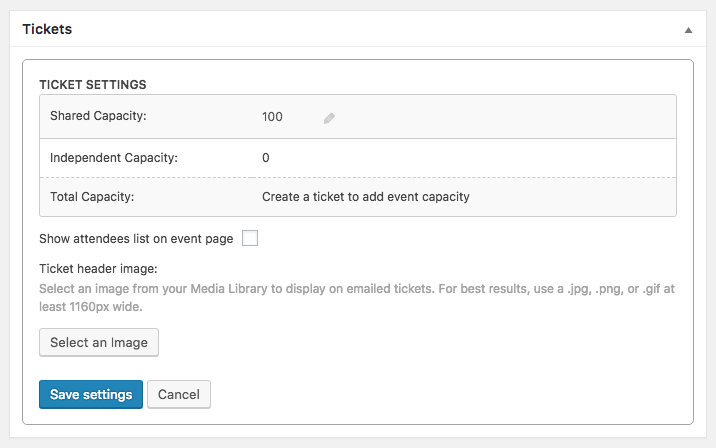
By default, this option is unchecked, thus not showing the attendee list in the frontend. But, if you updated to the latest versions of Event Tickets from several versions before, there is a chance there might have been a change in the code that caused this option to be on by default.
It’s good to know you could work it out. As you marked this thread as “Resolved” I’ll go ahead and close it, but don’t hesitate to open a new topic if anything comes up and we’ll be happy to help.
Best,
VictorMemberHi Nicolas!
I’m sorry that didn’t help.
Just to make sure we are not dealing with a conflict with your theme or plugins could you please go through the steps provided in the testing for conflicts guide > https://theeventscalendar.com/knowledgebase/testing-for-conflicts/ ? Does it clear the issue in any of the steps?
I noticed the issue is showing up in your live site. If you want to avoid the error from showing up there, I’d recommend you roll back to a previous version of Event Tickets 4.5.7 and Event Tickets Plus 4.5.6. and see if that clears the issue. Here’s a guide on how to do that > https://theeventscalendar.com/knowledgebase/downgrading-plugin-past-version/
After that, I suggest you setup a dev/staging site so you can test things out and make all plugins, theme and WordPress core updates without disrupting the live site.
Please let me know how that goes.
Thanks,
Victor -
AuthorPosts