
Home › Forums › Ticket Products › Event Tickets Plus › I want to remove Attendee List
- This topic has 4 replies, 2 voices, and was last updated 8 years, 10 months ago by
James Kendall.
-
AuthorPosts
-
November 22, 2017 at 2:46 am #1388827
James Kendall
ParticipantHello,
I have just renewed my Evenets Calendar Plus license. As soon as I did that, all my available tickets disappeard off the website so I’m having to repopulate those, which is not acceptable really. Can I speak with someone about why this has happened please?
Also – I know get a graphic above my Tickets which shows an Attendee List of who is going to the event. I do not want this displayed. See the attached screenshot.
I see there is an option to “show attendees” on the back end of the event page, but this is not clicked. So why is is being displayed?
I hope you can help.
Thanks,
J Kendall
November 23, 2017 at 6:25 am #1389953Victor
MemberHi James!
Thanks for reaching out to us. I’m really sorry you are experiencing those issues. Let me help you with the troubleshooting.
Let me first note that renewing your licenses should have no effect on the plugins functionalities. If any differences show up, these might be due to updating the plugins to a newer version. Have you recently updated your plugins before the issues started happening?
We always suggest to setup a dev/staging site so you can test things out and make all plugins, theme and WordPress core updates without disrupting the live site. We also encourage to make a full backup of your site (both database and files) so in case something goes wrong you can always restore your site.
all my available tickets disappeard off the website
Are the tickets no longer viewable when on the edit event screen? or do they just don’t show up in the frontend of your site? Please let us know about this as much as you can. You can share with us a screenshot of what you see and a link to the events where you are experiencing this.
When coming back, please share with us your system information by following this guide > https://theeventscalendar.com/knowledgebase/sharing-sys-info/. We’ll see if there is anything strange that would indicate an error from there.
Regarding the attendees list, could you please try checking the Show attendees list on event page option for an event, then save and then unchecking it and save again? Does it show the attendees then?
Thanks,
VictorDecember 1, 2017 at 6:28 am #1396567ParticipantHello Victor – thanks for your help. I managed to get my web guy to change some code in order to remove this feature.
Please coudl you feedback to Modern Tribe that having the Attendee List publically visible on events is not a good feature – I don’t want people to see how many tickets I have sold for an event. It would be great if they could remove this or make it optional in future editions.
Thanks,
James
December 4, 2017 at 4:33 am #1397696MemberHi James!
Thanks for following up with this.
The attendees list for an event is an optional setting you can switch on/off for each event in the ticket settings as you can see in the following screenshot:
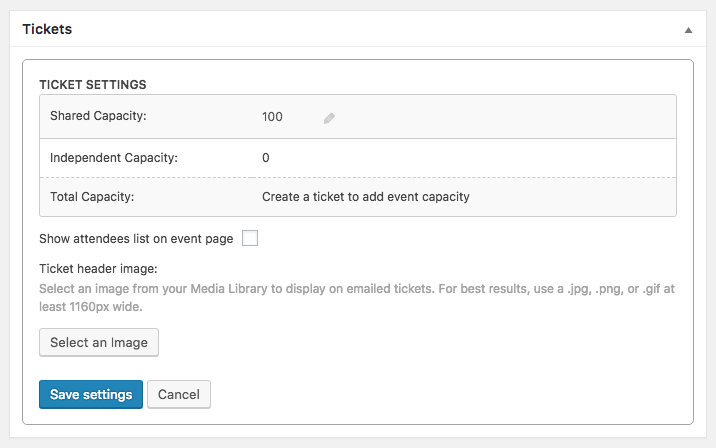
By default, this option is unchecked, thus not showing the attendee list in the frontend. But, if you updated to the latest versions of Event Tickets from several versions before, there is a chance there might have been a change in the code that caused this option to be on by default.
It’s good to know you could work it out. As you marked this thread as “Resolved” I’ll go ahead and close it, but don’t hesitate to open a new topic if anything comes up and we’ll be happy to help.
Best,
Victor -
AuthorPosts
- The topic ‘I want to remove Attendee List’ is closed to new replies.