

Forum Replies Created
-
AuthorPosts
-
January 26, 2018 at 8:23 am in reply to: Events not showing up in list before event – Possible Timezone error? #1437045
Victor
MemberHi William!
Thanks for coming back with the screenshot. That’s very helpful.
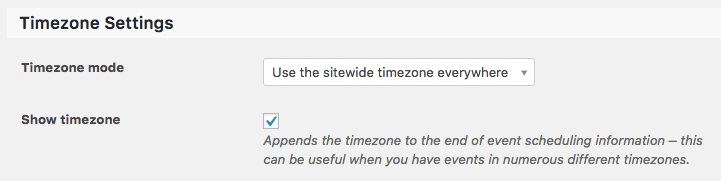
I could reproduce the issue you are having and can confirm it is indeed the bug I was previously pointing out. It seems to only be happening when the timezone mode is set to “Use the local timezones for each event”.
The only workaround for the moment is to use “Use the sitewide timezone everywhere”. Could you please try changing this setting and see if it works for you?
Thanks,
VictorMemberHi Andi!
Thanks for confirming. Yes, you should get in touch with them to see if they can help with the problem.
Is there anything else I can help you with? Let me know.
Best,
VictorMemberHi Peterson!
Thanks for coming back with the error logs.
I will reach out to the dev team to have a look at this and will get back to you as soon as I have something.
Please hang in there.
Thanks,
VictorMemberHi Matt!
Thanks for coming back with the plugin and all the information.
I will run some tests with the plugin and see what I can find. It might take us some time to get this tested as we are having our team trip next week and we’ll have limited availability, but I will get back to you as soon as we have something.
Thanks,
VictorMemberHi Gavin!
Thanks for following up with this.
I’m really sorry to hear the theme authors won’t help with this conflict.
If our plugins work well on the theme and it’s only a conflict with their styles, then the only workaround I can think of is trying to come up with some custom CSS styles that would override that of your themes for our plugins.
For example, I just tried the following CSS styles in your site and it works to fix the first row of your calendar:
#tribe-events-content .tribe-events-calendar td {

border: 1px solid #bbb !important;

padding: 0 0 .5em !important;

}
Try adding them into your theme’s style.css file or using the WordPress customizer by going to Appearance > Customize > Additional CSS. Let me know if it works for you.
Best,
VictorMemberHi Andi!
Thanks for clearing that out.
Those email fields are not being added by our plugins. It might be a customization built on top of The Events Calendar.
I can see that you are using the Registrations for The Events Calendar plugin, which is not ours. I’m not really familiar with it but it could be that those fields are being added by that plugin.
To verify this, you could try deactivating it and see if those fields disappear.
Let me know how that goes.
Thanks,
VictorMemberYou are welcome Laura! 🙂 Thanks for following up.
I’ll go ahead and close this, but don’t hesitate to open a new topic if any other questions.
Best,
VictorMemberHi Folks!
Thanks for chiming in here and following up with this issue.
I can confirm this is a bug on our latest version of The Events Calendar, which we are already investigating.
For the time being, the workaround is to downgrade to our previous version 4.6.9 > https://theeventscalendar.com/knowledgebase/downgrading-plugin-past-version/
We apologise for the inconvenience. We will keep you posted as soon as we have an update on this.
Best,
VictorJanuary 25, 2018 at 12:27 pm in reply to: Changing event page title archives to Upcoming Events #1436343MemberHi There!
Thanks for getting in touch with us. Let me help you with that issue.
I could not reproduce the issue you are having with that snippet. From the error log it seems the code snippet might be being triggered inside a plugin called constitutional functions. Could you please verify this?
Please make sure you are adding the code into your theme’s functions.php and nowhere else to see if any difference.
When coming back, please share with us your system information by following this guide > https://theeventscalendar.com/knowledgebase/sharing-sys-info/. We’ll see if there is anything strange that would indicate an error from there.
Please let me know about it.
Thanks,
VictorMemberHi Mindy!
Thanks for reaching out to us! Let me help you with those issues.
It seems there is a problem with the Google Maps API key you are using for your site. There is a console error coming from Google Maps that points to the following error > https://developers.google.com/maps/documentation/javascript/error-messages#referer-not-allowed-map-error
I’m not really sure about this error, but it might be that you haven’t authorized the API to be reached by your site. You might want to check the referrer settings of your API key on the Google API Console > https://console.developers.google.com/project/_/apiui/credential. You might also try creating a new Google Maps API key and see if any difference.
As for the location search not working, please make sure the event venues have the proper Address information so that when you save it, it can fetch the Geolocation information from the Google Maps API (Lat and Long coordinates necessary for the location feature to work). Although, your previous issue might also be the culprit here.
Please let us know how that goes and if you have follow up questions.
Thanks,
VictorMemberHi Gavin!
Thanks for getting in touch with us. Let me help you with that.
I’ve just checked your first report about the issue you mention and it seems to be a conflict with your theme’s styles. This is not a major issue, but it does affect the look and feel of the calendar.
Having a closer inspection, I could find some CSS styles coming from your theme that are too generic. This causes some border styles to be applied to our calendar and make the first row of days to not show borders.
As you already did, the best approach fix this issue is letting the theme authors know about so they can further help you. Do keep us posted for any news about this in your other thread.
As for the Community Events plugin compatibility, we cannot guarantee it will work with your theme, because we are not really familiar with it, but it should work ok with any theme that follows the WordPress standards.
Do note that we are always here to help with any issue or conflict that may arise. And also note that we have a pretty cool 30-day refund policy so in the case that you don’t feel the plugin meets your needs, you can ask for a full refund within 30 days of purchase.
I hope that helps. Let me know if you have any other questions and I’ll be happy to help 🙂
Best,
VictorJanuary 25, 2018 at 11:00 am in reply to: setting up a new site in wordpress. Compatibility questions #1436185MemberHola Nico!
Thanks for reaching out to us!
I’m not really familiar with the Memberpress plugin, but I do know some sites use WooCommerce Memberships alongside our plugins.
That said, we work hard to make our plugins broadly compatible. However, we cannot test with every plugin, theme, and server environment out there, so sometimes “conflicts” can occur. When this happens, the first thing that we suggest to do is go through our Testing for Conflicts guide > https://theeventscalendar.com/knowledgebase/testing-for-conflicts/.
Additionally, here’s a good article about plugin compatibility with WooCommerce extensions > https://theeventscalendar.com/knowledgebase/compatibility-with-woocommerce-extensions/
As a reference, let me share this blog post > https://theeventscalendar.com/compatible-themes-the-events-calendar/. While it’s not so recent, it’s a great article that will get you started when considering a theme to work with our plugins.
I hope that helps. Let me know if any follow up questions 🙂
Best,
VictorMemberHi Greg!
I’m sorry you are having that issue. Let me help you with it.
Have you tried flushing your site’s permalinks structure and see if any changes? You can do so by going to wp-admin > Settings > Permalinks and click “Save Changes”.
Please let me know if that works for you?
Thanks,
VictorMemberHi Marcial!
Thanks for getting in touch! I’ll be happy to help you with this topic.
Yes, when you RSVP or get a ticket for an event when logged in, the ticket will be linked to your account. I think you will find what you are looking for in the following article > https://theeventscalendar.com/knowledgebase/display-a-list-of-attendees-events/
I hope that helps! Let me know if any follow up questions.
Best,
VictorMemberHi Pamela!
Thanks for taking your time to report this.
Unfortunately, we are aware of this issue when exporting the attendee list.
I will set this thread’s status to Pending fix and link it to the bug report. This way we will notify you when a fix is released.
You should be able to prevent that error from showing up by disabling WP_DEBUG_DISPLAY > https://codex.wordpress.org/Debugging_in_WordPress#WP_DEBUG_DISPLAY for your site by adding the following line of code into your wp-config.php file:
define( 'WP_DEBUG_DISPLAY', false );I apologise for the inconvenience and we appreciate your patience in the meantime.
Best,
Victor -
AuthorPosts