

Forum Replies Created
-
AuthorPosts
-
September 17, 2018 at 7:32 am in reply to: Bug navigation page don t open for next event and calendar #1623333
Sky
KeymasterHi again,
In order to continue trying to help with your problem, I need two things from you.
1) Please provide your system information. You can read about how to do that here: https://theeventscalendar.com/knowledgebase/sharing-sys-info/
2) Can you confirm that when troubleshooting, you switched to the default theme and also disabled all other plugins, and were still seeing the problem.
Thanks,
SkyKeymasterHi again,
Not sure what you’re doing wrong. Here is a screenshot of the single page with your custom template. I changed the title content to “Here is my custom heading” so you can see that it showing.
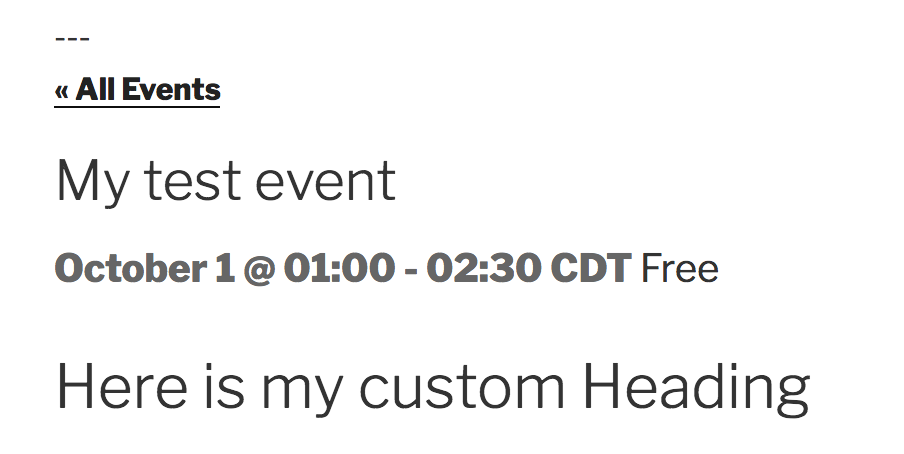
Just place your copy of single-event.php in [your-theme]/tribe-events/ folder and it will override the default template.
Thanks,
SkySeptember 14, 2018 at 11:36 am in reply to: Delete "Continue Reading" from the Monthly Calendar View Pop-Up #1622279KeymasterHi again,
Great! Please let us know if you have any questions or issues in the future.
Thanks,
SkyKeymasterBob,
I’m glad I could help!
Sorry that doesn’t solve your immediate needs. Feel free to make your suggestion on our User Voice Forum. If enough people express interest in something, it may be considered as a feature in the future.
Thanks,
SkySeptember 14, 2018 at 11:28 am in reply to: Bug navigation page don t open for next event and calendar #1622272KeymasterHi again,
It does sound like a conflict with your theme if the events navigation is working when you switch to Twenty Sixteen.
When you say the calendar is not working when you click on a date, you mean the calendar widget in the sidebar?
I am not able to reproduce this on my end. Looking at the markup in your calendar widget, I see that the day link is missing its class, which is probably used by the javascript that controls the mini calendar functionality. I’m not sure why this would behave this way with the default theme. Did you also disable all other plugins when testing that?
Can you share your system information with me?
Thanks,
SkySeptember 14, 2018 at 11:11 am in reply to: Delete "Continue Reading" from the Monthly Calendar View Pop-Up #1622259KeymasterHi there,
Thanks for reaching out. I’d be happy to help with your question.
I do not see this on our demo site, or on my test site which I am also using the Twenty Seventeen theme on. I looked around and didn’t see any settings for this anywhere.
Is it possible that this is being set within your theme’s functions.php file?
In any case, you can hide this with a bit of CSS:
.tribe-events-tooltip .link-more {

  display: none;

}
Hope that helps! Let me know if that works for you, or if you have any additional questions.
Thanks,
SkySeptember 14, 2018 at 10:56 am in reply to: Automatically remove events from WordPress when deleted from Google Calendar #1622241KeymasterHi there,
Thanks for reaching out. I’m glad to hear that you like our plugin. I will try to help with your question.
Depending on your settings, you should be able to update events on your site when they change on Google Calendar. However, you are correct that events are not removed from your site when removed from Google Calendar.
Unfortunately, I don’t see this being added as a feature. There are many reasons why this wouldn’t be a good idea for most people. Mainly, letting an external calendar dictate content being removed from your site would result in many people inadvertently having their events deleted from their site. That being said, please feel free to visit our User Voice Forums and suggest this as a feature.
I do know of a snippet that was provided by another customer, but it is geared toward a specific use case. You can check that out here: https://gist.github.com/andrasguseo/7cd929b9188bf83f1090fcc72a30ac95
It requires all the events to have a single specific category. You can set this up as part of the update, but I’m not sure how that would handle events with multiple categories.
If you do want to try that snippet, you can just drop the file in your plugins directory and then activate in Plugins. I recommend making a backup before you try this though, to make sure you don’t lose any events accidentally.
Hope that helps. Please let me know if you have any additional questions.
Thanks,
SkySeptember 14, 2018 at 10:32 am in reply to: Clicking on the date of the day to see the day it navigates to the blog section #1622213KeymasterHi there,
Thanks for reaching out. I’m sorry to hear that you’re having issues with your calendar day views. I will try to help you get this sorted.
That is indeed strange. I am not able to replicate this on my test install. The first thing I would try, is to visit WordPress > Settings > Permalinks to reset permalinks for your site. (You don’t need to do anything on the page. Just visiting it will reset permalinks) and flush any caches you have on the site or in your hosting.
If that doesn’t fix the problem, can you run through the troubleshooting steps outlined in our Testing for Conflicts Guide to see if this could be caused by another plugin or your theme?
Let me know how that goes.
Thanks,
SkyKeymasterHi there,
I’m sorry to hear that you’re having difficulty trying to import from another site. I will try to help get this sorted.
Can you share the URL of the site you are trying to import from? I’d like to try it out from my end to see what is happening.
Thanks,
SkySeptember 14, 2018 at 10:13 am in reply to: Custom Linked Post Type: Instructors duplication shows an error #1622197KeymasterHi there,
Thanks for reaching out. I will try to help with your question. Please note that we are limited in the amount of support we can provide for customizations such as this. That being said, I will try to help if I can.
Do you have a fork of this on GitHub I could take a look at?
You should be able to add multiple linked post types if you make sure to rename all of the instances of “instructor” and “Instructor” with your new term.
You mentioned only replacing “case sensitive” mentions of “instructor,” is it possible you missed some Class names or function names somewhere because of the case?
Also, did you make sure to rename the directory name inside the view folder?
Thanks,
SkyKeymasterHi Bob,
Thanks for reaching out! I’d be happy to help with your questions.
We do have an option to download the calendar for a period of time in an ics file as you have discovered, but this requires manual effort each time. There is a free extension that allows you to download a year at a time, but this still has to be done manually.
Our calendar is more geared toward pulling in events from other sources to be displayed on the website itself than as a hub for others to sync from.
We have a product called Events Aggregator that will allow you to pull in events from various calendar sources, such as Google Calendar, iCal, etc on a scheduled basis.
My recommendation would be to use something like Google Calendar as the hub, and then both the site Calendar and the Rabbi’s calendar on his phone could be pulling from the same source.
There is also a way to pull events from your website into another website directly using Aggregator, but I don’t think that is going to help in this case.
Do you need the calendar to be available offline? Would just bookmarking the site calendar in his phone not work?
Hope that helps! Please let me know if you have any additional questions.
Thanks,
SkyKeymasterHi there,
Thanks for reaching out. I will try to help with your question.
If you would like to rate your support experience, you can do so right in your support ticket here: https://theeventscalendar.com/support/forums/topic/problem-loading-several-months-before-after-current-month/
Hope that helps!
Thanks,
SkySeptember 14, 2018 at 9:32 am in reply to: Make sure no order email is sent from woocommerce when the ticket is free? #1621991KeymasterHi James,
Thanks for reaching out. I will try to help with your question.
Our Events Ticket plugin only sends out the ticket email. The order email is happening in the realm of WooCommerce. I see they have a way to disable the order confirmation email, but it is an all-or-nothing thing. There may be a hook within WooCommerce that you would be able to check the price in before sending the email, but I’m not exactly where that would be. You would need to reach out to WooCommerce support to find out how to do that.
From our end, I can suggest using an RSVP instead of a ticket for free events. This doesn’t go through WooCommerce, and would only send them their RSVP confirmation.
Hope that helps! Please let me know if you have any additional questions about this.
Thanks,
SkySeptember 14, 2018 at 9:00 am in reply to: Events Aggregator not activating – Im having same problem #1621973KeymasterHi there,
Thanks for reaching out. I’m sorry to hear that you’re experiencing this issue. I will try to help you get this sorted.
When conflict testing, did you try switching to the Twenty Seventeen theme in addition to disabling all other plugins?
I’m not seeing a list of plugins in your system information. Can you also share that with me?
Thanks,
SkySeptember 14, 2018 at 8:52 am in reply to: Bug navigation page don t open for next event and calendar #1621959KeymasterHi there,
Thanks for reaching out. I’m sorry to hear that you’re having issues with the event navigation on your site. I will try to help you get this sorted.
I took a look at your site, and I see that it is having problems when clicking on the previous/next events links. Clicking either just gives me a spinning disc.
To start, I would make sure you are updated to the latest versions of all of our plugins.
Next, can you please run through the troubleshooting steps outlined in our Testing for Conflicts guide? Basically, try temporarily switching to the Twenty Seventeen theme and disable all other plugins to see if there is a conflict between our plugins and one of the others you have installed (or your theme).
Let me know how that goes.
Thanks,
Sky -
AuthorPosts