

Forum Replies Created
-
AuthorPosts
-
Sky
KeymasterHi there,
Thanks for reaching out. I will try to help with your question.
While it’s not possible to set this up in the admin settings, you could create a custom template for the email that had three different variations based on logic like category etc.
To read more about what’s involved in creating custom Events Calendar templates, check out our Themer’s Guide: https://theeventscalendar.com/knowledgebase/themers-guide/
You would need to be familiar with PHP and HTML in order to do this, but it wouldn’t be too difficult.
Hope that helps!
Thanks,
SkyKeymasterHi there,
Thanks for reaching out. I will try to help with your question.
Unfortunately, our Tickets plugin does not have any Membership or credit capabilities. We offer an option for users to need to be logged in with an account, or it can be open to anonymous submissions.
It may be possible to integrate with a Membership plugin and/or a WooCommerce extension to get such capabilities, but I’m not aware of anything specific that I could recommend.
Thanks,
SkyKeymasterHi again,
I tried your template, and it is working for me.
Make sure you are putting this in [your-theme]/tribe-events/single-event.php
You should see the event title twice on a single events page with that code.
Hope that helps!
Thanks,
SkyKeymasterHi there!
Just wanted to share with you that a new release of our plugins is out, in which we are no longer able to reproduce the issue described here. This means that it may have been fixed before while working on other fixes/improvements.
You can find out more about this release → https://theeventscalendar.com/maintenance-release-for-the-week-of-9-september-2018/
Please update the plugins and let us know if it works for you.
Regards,
SkySeptember 13, 2018 at 11:12 am in reply to: On phones the buy button is pushed out of screen #1621135KeymasterHi There!
Just wanted to share with you that a new release of our plugins is out, including a fix for this issue 🙂
Find out more about this release → https://theeventscalendar.com/maintenance-release-for-the-week-of-9-september-2018/
We apologize for the delay and appreciate your patience while we worked on this.
As always, we suggest to setup a dev/staging site so you can make all plugin updates without disrupting the live site.
Please update the plugins and let us know if the fix works for your site.
Regards,
SkyKeymasterHi There!
Just wanted to share with you that a new release of our plugins is out, including a fix for this issue 🙂
Find out more about this release → https://theeventscalendar.com/maintenance-release-for-the-week-of-9-september-2018/
We apologize for the delay and appreciate your patience while we worked on this.
As always, we suggest to setup a dev/staging site so you can make all plugin updates without disrupting the live site.
Please update the plugins and let us know if the fix works for your site.
Regards,
SkyKeymasterHi There!
Just wanted to share with you that a new release of our plugins is out, including a fix for this issue 🙂
Find out more about this release → https://theeventscalendar.com/maintenance-release-for-the-week-of-9-september-2018/
We apologize for the delay and appreciate your patience while we worked on this.
As always, we suggest to setup a dev/staging site so you can make all plugin updates without disrupting the live site.
Please update the plugins and let us know if the fix works for your site.
Regards,
SkySeptember 13, 2018 at 11:06 am in reply to: Ticket form not displaying when tickets are sold out #1621125KeymasterHi There!
Just wanted to share with you that a new release of our plugins is out, including a fix for this issue 🙂
Find out more about this release → https://theeventscalendar.com/maintenance-release-for-the-week-of-9-september-2018/
We apologize for the delay and appreciate your patience while we worked on this.
As always, we suggest to setup a dev/staging site so you can make all plugin updates without disrupting the live site.
Please update the plugins and let us know if the fix works for your site.
Regards,
SkySeptember 13, 2018 at 10:57 am in reply to: When PRO is in the must-use plugin directory, its asset path URLs are broken #1621115KeymasterHi There!
Just wanted to share with you that a new release of our plugins is out, including a fix for this issue 🙂
Find out more about this release → https://theeventscalendar.com/maintenance-release-for-the-week-of-9-september-2018/
We apologize for the delay and appreciate your patience while we worked on this.
As always, we suggest to setup a dev/staging site so you can make all plugin updates without disrupting the live site.
Please update the plugins and let us know if the fix works for your site.
Regards,
SkyKeymasterHi There!
Just wanted to share with you that a new release of our plugins is out, including a fix for this issue 🙂
Find out more about this release → https://theeventscalendar.com/maintenance-release-for-the-week-of-9-september-2018/
We apologize for the delay and appreciate your patience while we worked on this.
As always, we suggest to setup a dev/staging site so you can make all plugin updates without disrupting the live site.
Please update the plugins and let us know if the fix works for your site.
Regards,
SkyKeymasterHi There!
Just wanted to share with you that a new release of our plugins is out, including a fix for this issue 🙂
Find out more about this release → https://theeventscalendar.com/maintenance-release-for-the-week-of-9-september-2018/
We apologize for the delay and appreciate your patience while we worked on this.
As always, we suggest to setup a dev/staging site so you can make all plugin updates without disrupting the live site.
Please update the plugins and let us know if the fix works for your site.
Regards,
SkyKeymasterHi There!
Just wanted to share with you that a new release of our plugins is out, including a fix for this issue 🙂
Find out more about this release → https://theeventscalendar.com/maintenance-release-for-the-week-of-9-september-2018/
We apologize for the delay and appreciate your patience while we worked on this.
As always, we suggest to setup a dev/staging site so you can make all plugin updates without disrupting the live site.
Please update the plugins and let us know if the fix works for your site.
Regards,
SkyKeymasterHi again,
By default, when the ticket sale has not yet started, a message will display that looks like the following:
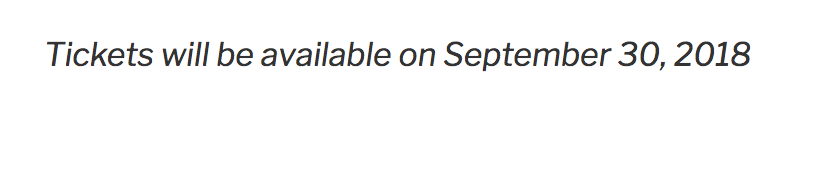
You can change this message using the two filters I mentioned. If you use the ‘tribe_tickets_unvailable_message_date’ filter and return ‘false’ the message will just read “Tickets are not available yet”.
For the other filter for time, this is disabled by default. If you want the actual time to show in the message, you would use the ‘tribe_tickets_unvailable_message_time’ filter and return ‘true’.
As I mentioned before, this is aimed towards developers who would like to change the way the unavailability message works. If you don’t know what filters are or how to use them, this is probably not something you need to be worried about.
Can you describe the actual problem that you are experiencing? What are you trying to change?
Thanks,
SkySeptember 13, 2018 at 9:20 am in reply to: Removing sales tax from tickets using functions.php #1620808KeymasterHi again,
You’re very welcome! Glad I could help.
Please let us know if you have any questions or issues in the future.
Thanks,
SkyKeymasterHi again,
Testing for theme and plugin conflicts is definitely a good place to start.
Please note that we released updates yesterday, so I would update to the latest versions before continuing to troubleshoot.
Thanks,
Sky -
AuthorPosts