
Home › Forums › Ticket Products › Event Tickets Plus › Ticket unavailability message
- This topic has 5 replies, 2 voices, and was last updated 8 years, 1 month ago by
Sky.
-
AuthorPosts
-
September 6, 2018 at 4:50 pm #1615812
Tamara Pickrell
ParticipantWhere is this “ticket unavailability message” I keep reading about in the release notes? I don’t see it anywhere in the ticket or event admin setup, and no such message appears on my event page.
September 7, 2018 at 9:06 am #1616311KeymasterHi Tamara,
Thanks for reaching out. I’d be happy to help with your question.
The “ticket unavailability message” will show on an event page when you have set an “end date and time” for the tickets, and that time has passed. It simply says “Tickets are no longer available.”
Let me know if you have any other questions about this.
Thanks,
SkySeptember 7, 2018 at 9:42 am #1616420ParticipantWell, sure, I think that message has always been there. But I’m wondering about the *start date* message, as indicated in these release notes:
September 10, 2018 at 8:27 am #1617594KeymasterHi again,
In 4.7.6 two filters were added that will allow you to show the date and/or time within the unavailability message.
The filters are “tribe_tickets_unvailable_message_time” and “tribe_tickets_unvailable_message_date”. You can set those with a callback that returns a boolean value (true or false).
This is extended functionality for developers. If you want to look at the filters, there are in event-tickets/src/Tribe/Tickets.php.
Hope that helps! Let me know if you have any other questions about this.
Thanks,
SkySeptember 13, 2018 at 9:35 am #1620940ParticipantSky,
Thanks for following up… but I feel like we’re not talking about the same thing.The notes for 4.7.5 describe a “fix” that will display a message when tickets are not yet available. This makes it sound like the message will just show up under those conditions. There’s no mention (in 4.7.5) of filters, or developer level, or anything like that. Plus, I’ve looked pretty thoroughly through the knowledge base and technical documentation and couldn’t find anything that explains how to implement this feature.
Would you mind checking again about this?
September 13, 2018 at 9:58 am #1621025KeymasterHi again,
By default, when the ticket sale has not yet started, a message will display that looks like the following:
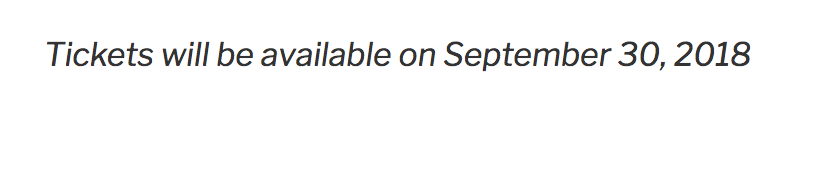
You can change this message using the two filters I mentioned. If you use the ‘tribe_tickets_unvailable_message_date’ filter and return ‘false’ the message will just read “Tickets are not available yet”.
For the other filter for time, this is disabled by default. If you want the actual time to show in the message, you would use the ‘tribe_tickets_unvailable_message_time’ filter and return ‘true’.
As I mentioned before, this is aimed towards developers who would like to change the way the unavailability message works. If you don’t know what filters are or how to use them, this is probably not something you need to be worried about.
Can you describe the actual problem that you are experiencing? What are you trying to change?
Thanks,
SkyOctober 5, 2018 at 9:35 am #1638325Support Droid
KeymasterHey there! This thread has been pretty quiet for the last three weeks, so we’re going to go ahead and close it to avoid confusion with other topics. If you’re still looking for help with this, please do open a new thread, reference this one and we’d be more than happy to continue the conversation over there.
Thanks so much!
The Events Calendar Support Team -
AuthorPosts
- The topic ‘Ticket unavailability message’ is closed to new replies.