Forum Replies Created
-
AuthorPosts
-
Jennifer
KeymasterHi Debora,
Thanks for reaching out!
There is not currently a built-in way to accept partial payments on tickets, but since tickets are essentially WooCommerce simple products, they typically work pretty well with WooCommerce extensions. I would take a look at WooCommerce Deposits or this one from a third-party. However, you would need to test these out to make sure that they will work the way you need them to.
An area where these types of integrations are sometimes not seamless is the default ticket form on the events pages. You could customize this form, or you may instead want to use the full WooCommerce product page to sell tickets.
If this is a feature you would like to see added to Event Tickets Plus in the future, we’d love it if you could post the idea in our Feature Ideas Forum! We use it to gauge user interest in new features and help plan future development.
Please let me know if you have any questions!
Thanks,
Jennifer
KeymasterHi Chris,
Thanks for checking out our plugins!
We do not currently have anything built-in that pushes events out to social media platforms, but you can use some third-party plugins to add social media share links to events (which are the tribe_events custom post type). I would recommend testing out a few with the free version.
Event Aggregator does let you import events from other sources such as Google calendars, Meetup, and iCal, and it did import from Facebook up until the recent changes with the Facebook API. We are actively working on getting this up and running, but until then, imports from Facebook will not be possible with Event Aggregator. We are posting updates on this here as they become available.
Please let me know if you have any questions!
Thanks,
Jennifer
KeymasterHi Rhys,
Thanks for reaching out – I’m glad to hear that you’re liking the free version so far!
Community Events lets users submit events from the front end, and Events Calendar Pro comes with some additional widgets, as well as shortcodes that you can use to display them. So they are two separate licenses. But since all of our plugins are sold as subscriptions, they will renew automatically – no need to manage them separately! You can also turn off auto-renew if you would like. If you are interested in any of our other products, you might check out some of our bundles.
We do offer full refunds within 30 days of purchase, so if you’d like to take any of our premium plugins for a test run, feel free to do so! Please let me know if you have any additional questions.
Thanks,
Jennifer
KeymasterThis reply is private.
KeymasterNo problem, just let me know if there is anything else that I can help with!
KeymasterGreat, I’m glad things are working again! You shouldn’t need to do these steps for the currency symbol to work – this is something that we have logged in our system for our developers to take a look at. I linked this thread to our internal ticket, so as soon as there is an update, we’ll let you know here. If you have any questions in the meantime, please let me know!
Thanks,
Jennifer
May 15, 2018 at 4:29 am in reply to: Remove Event Description from the event submission form. #1530503KeymasterNo problem! Just let me know if there is anything else that I can help with.
KeymasterHi Eric,
Are you trying to import events via Facebook or another source? Unfortunately, imports from Facebook are not currently possible due to recent changes in the Facebook API. If at all possible, we do plan to restore this functionality, but this will depend on what happens with the API going forward. We are posting updates on this issue here as they become available.
If you’re unable to import from another source, can you please send me the link that you’re trying to import from so that I can test it out on my end? Please also make sure that you’re running the current versions of The Events Calendar (4.6.15) and Events Calendar Pro (4.4.26).
One other step that you can take (if you are only seeing the option to import via CSV) is to delete the key from your site and deregister your site (instructions here), then add the key back to your site.
Thanks,
Jennifer
May 11, 2018 at 11:06 am in reply to: Remove Event Description from the event submission form. #1528538KeymasterHi Paul,
The event description is required by default, but you can change this by adding the snippet in this post to the functions.php file of your child theme. This will set only the event title to required. If you would like to require additional fields, you can include them in this snippet – see this article for more info on how this works.
Thanks,
Jennifer
KeymasterHi Paul,
Thanks for reaching out!
To remove the organizer field altogether, you can do a template override of the edit-event.php file found at wp-content/plugins/the-events-calendar-community-events/src/views/community. You’ll want to remove the following line from your copy of the template:
<?php tribe_get_template_part( 'community/modules/organizer' ); ?>If you are trying to set the organizer to the current user automatically, this is not something that is available out of the box. You could get this set up with a customization – instead of removing the line above, you’ll want to modify the organizer.php file in the modules folder (in your copy of the file, not directly in the theme files).
We are limited in the amount of support that we can provide for customizations, but if you get stuck or have any questions, please let me know – I’ll be happy to point you in the right direction!
Thanks,
Jennifer
KeymasterHello,
I’m sorry that you’re running into this issue, but I’ll be happy to help you figure out what’s going on!
Are you using Tribe Commerce to sell tickets? Either way, can you navigate to Events > Settings > Tickets, enable Tribe Commerce if you aren’t already using it, set the default currency there to euros, save, and then disable it if you aren’t using it? Then check to see if the currency has changed on the front end.
Let me know what you find!
Thanks,
Jennifer
KeymasterHi Jatinder,
Thanks for reaching out!
There is not a way to do this out-of-the-box, but you could do it with a customization. This post has some example code that you could use as a starting point on limiting the number of tickets (note that this will be per transaction, not per user). Once you set the default, you could then hide the input with CSS to help prevent users from being able to change it. This article also has some good info and examples on setting quantity limits. To prevent the same user form coming back and registering again, you would need to do some additional customizing.
We are limited in the amount of support that we can provide for customizations, but if you get stuck or have any questions, please let me know – I’ll be happy to point you in the right direction!
Thanks,
Jennifer
KeymasterI checked with the team, and this typically happens pretty quickly (~5 mins, but it might not be quite that fast every time).
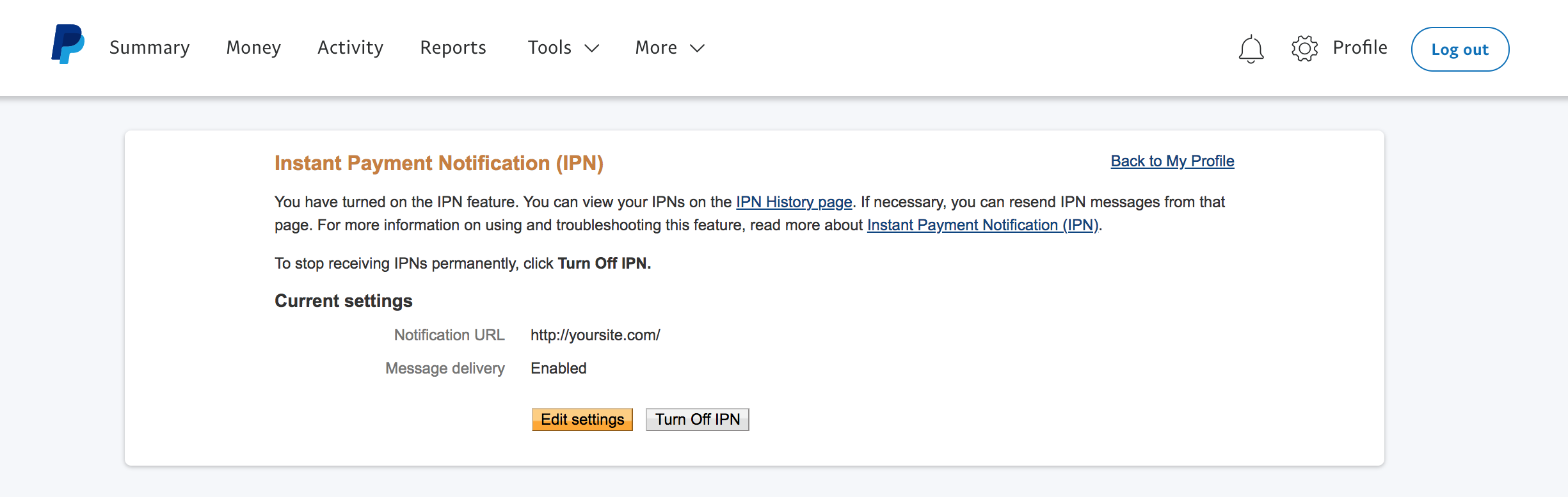
Were you able to check on your PayPal configuration? You should be able to see the IPN history by clicking on the “IPN history page” link in your PayPal account (see screenshot). Let me know if you are able to see anything there for this transaction.
If not, are you using Tribe Commerce for your ecommerce platform? Which platform are you using if not (WooCommerce or Easy Digital Downloads)? Please share your full system info with me as well.
Thanks,
Jennifer
KeymasterHi Lynna,
There is not an out-of-the-box way to limit the RSVPs to 2 per person, but you could do this with a customization. This post has some example code that you could use as a starting point, and our themer’s guide is also a good resource. Note that the snippets in this post do not limit the RSVPs per user but rather by transaction. Preventing the same user from coming back and registering again would require some additional customizing.
Regarding a zero-priced ticket, you could use Easy Digital Downloads instead to handle the checkout for tickets…if you have more than one ecommerce platform enabled at once, you will see the option (in the Settings of the ticket edit section on an event) to select which one you would like to use for those tickets – see screenshot. However, using a separate ecommerce platform to allow users to register for free tickets might not be ideal.
We are limited in the amount of support that we can provide for customizations, but if you get stuck or have any questions, please let me know – I’ll be happy to point you in the right direction!
Thanks,
Jennifer
KeymasterGreat, I’m glad that you were able to get this resolved! If there is anything else that I can help with, please let me know.
-
AuthorPosts