
Home › Forums › Calendar Products › Events Calendar PRO › Payments methods
- This topic has 7 replies, 2 voices, and was last updated 8 years, 3 months ago by
cpetrie.
-
AuthorPosts
-
May 5, 2018 at 12:56 pm #1523721
cpetrie
ParticipantI have event tickets installed. Two issues. First how do I add the option to pay with a credit card. Right now I only have the option to pay with PayPal.
Second, payments sent is showing in my PayPal account but has been several hours and not showing as payments received in her account.
May 8, 2018 at 12:31 pm #1525647Jennifer
KeymasterHello,
Thanks for reaching out!
With Event Tickets, PayPal is the only option for processing payments. Event Tickets Plus adds integrations with WooCommerce or Easy Digital Downloads, both of which will allow users to checkout directly on your site using their credit card.
Just to clarify regarding PayPal, is the transaction not showing in the user’s account or in the admin account? It may take some time for the transaction to appear, so I would recommend checking back to see if it is still missing.
Thanks,
Jennifer
May 9, 2018 at 7:34 am #1526151ParticipantThank you for information.
I purchased a ticket for $1 and it is showing as having been taken out
of my account but it is not showing up in the my clients Paypal account
as having received the dollar. How long does that usually take. The
reason this is important to know is so that I can make sure that it is
working correctly on her website.May 10, 2018 at 12:26 am #1526945KeymasterThanks for clarifying! I’m not sure what the average time is, but I don’t think that it should take this long for it to show up…I am going to check with the team on this, but I would also recommend taking a look at this article to double-check that everything has been configured correctly on the PayPal side. I’ll let you know what I find out on the average time it should take for this to happen.
May 11, 2018 at 10:00 am #1528468KeymasterI checked with the team, and this typically happens pretty quickly (~5 mins, but it might not be quite that fast every time).
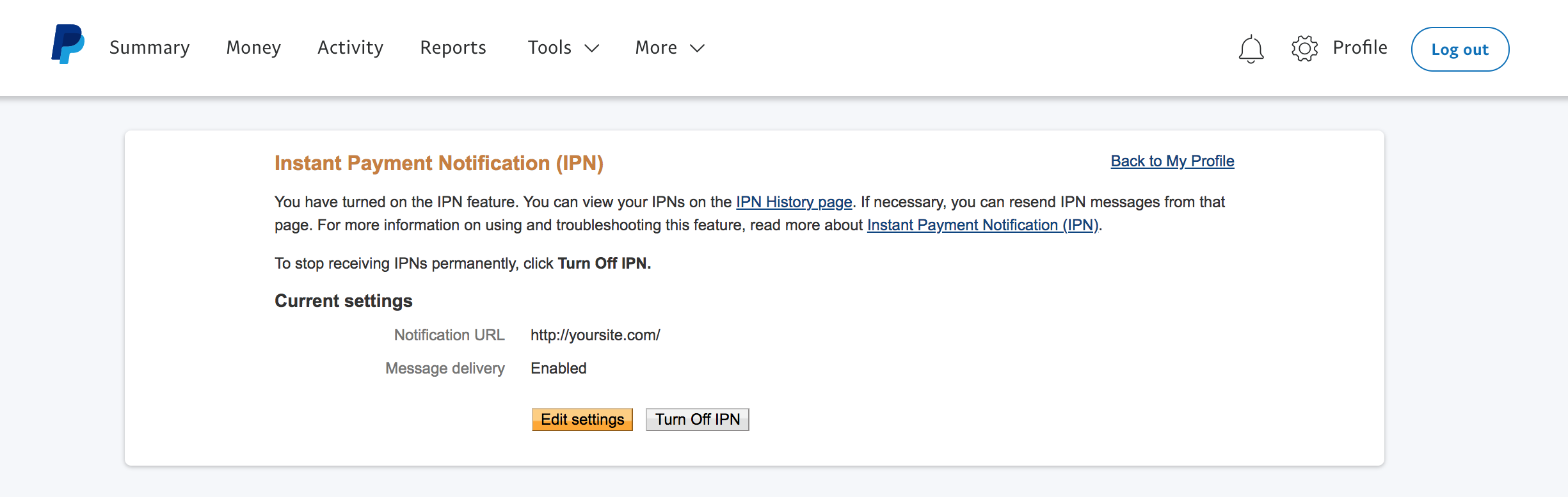
Were you able to check on your PayPal configuration? You should be able to see the IPN history by clicking on the “IPN history page” link in your PayPal account (see screenshot). Let me know if you are able to see anything there for this transaction.
If not, are you using Tribe Commerce for your ecommerce platform? Which platform are you using if not (WooCommerce or Easy Digital Downloads)? Please share your full system info with me as well.
Thanks,
Jennifer
June 1, 2018 at 9:38 pm #1544432ParticipantSo I installed Woo but I don’t see the Sell using: Woocommerce button.
Also, I can not find ANY documentation on how to integrate the two. Where is a document available that takes me step by step pls.HOME URL
https://alignedyoga.net
SITE URL
https://alignedyoga.net
SITE LANGUAGE
English
CHARACTER SET
UTF-8
NAME
c@p
EMAIL
[email protected]
INSTALL KEYS
event-tickets-plus = 341f################################74bf
events-calendar-pro = b8d5################################18b6
WORDPRESS VERSION
4.9.6
PERMALINK STRUCTURE
https://alignedyoga.net/%postname%/
PHP VERSION
7.1.16-1+ubuntu16.04.1+deb.sury.org+1
PHP
max_execution_time = 30
memory_limit = 200M
upload_max_filesize = 300M
post_max_size = 300M
display_errors =
log_errors = 1
SERVER
Flywheel
SAPI
fpm-fcgi
PLUGINS
Advanced Post Manager version 4.4 by Modern Tribe, Inc.(http://m.tri.be/4n)
Akismet Anti-Spam version 4.0.7 by Automattic(https://automattic.com/wordpress-plugins/)
Beaver Builder Plugin (Pro Version) version 2.1.2.2 by The Beaver Builder Team(https://www.wpbeaverbuilder.com/?utm_medium=bb&utm_source=plugins-admin-page&utm_campaign=plugins-admin-author)
Ultimate Addon for Beaver Builder version 1.7.3 by Brainstorm Force(http://www.brainstormforce.com)
Custom Fonts version 1.0.4 by Brainstorm Force(http://www.brainstormforce.com)
Event Tickets Plus version 4.7.3 by Modern Tribe, Inc.(http://m.tri.be/28)
Event Tickets version 4.7.3 by Modern Tribe, Inc.(http://m.tri.be/28)
The Events Calendar PRO version 4.4.27 by Modern Tribe, Inc.(http://m.tri.be/20)
Google Analytics for WordPress by MonsterInsights version 7.0.6 by MonsterInsights(https://www.monsterinsights.com/)
MailChimp for WordPress version 4.2.2 by ibericode(https://ibericode.com/)
Social Icons Widget by WPZOOM version 3.0.7 by WPZOOM(http://www.wpzoom.com/)
The Events Calendar version 4.6.17 by Modern Tribe, Inc.(http://m.tri.be/1x)
TinyMCE Advanced version 4.7.11 by Andrew Ozz(http://www.laptoptips.ca/)
Event Tickets/Eventbrite Extension: Show Cost Field version 1.0.1 by Modern Tribe, Inc.(http://m.tri.be/1971)
WooCommerce PayPal Express Checkout Gateway version 1.5.5 by WooCommerce(https://woocommerce.com)
WooCommerce Stripe Gateway version 4.1.5 by WooCommerce(https://woocommerce.com/)
WooCommerce version 3.4.1 by Automattic(https://woocommerce.com)
Yoast SEO version 7.5.3 by Team Yoast(https://yoa.st/1uk)
WPForms Lite version 1.4.6 by WPForms(https://wpforms.com)
NETWORK PLUGINS
–
MU PLUGINS
–
THEME
Beaver Builder Child Theme
MULTISITE
–
SETTINGS
schema-version = 4.6.17
recurring_events_are_hidden = exposed
previous_ecp_versions =
Array
(
[0] => 0
[1] => 4.6.13
[2] => 4.6.14.1
[3] => 4.6.15
[4] => 4.6.16
)
latest_ecp_version = 4.6.17
last-update-message-the-events-calendar = 4.6.13
earliest_date = 2018-04-11 11:00:00
earliest_date_markers =
Array
(
[0] => 1410
)
latest_date = 2020-01-29 12:00:00
latest_date_markers =
Array
(
[0] => 3782
)
tribeEnableViews =
Array
(
[0] => list
[1] => month
[2] => week
[3] => day
)
disable_metabox_custom_fields = show
pro-schema-version = 4.4.27
ticket-enabled-post-types =
Array
(
[0] => tribe_events
)
previous_event_tickets_versions =
Array
(
[0] => 0
[1] => 4.7.1
[2] => 4.7.2
)
latest_event_tickets_version = 4.7.3
last-update-message-event-tickets = 4.7.1
ticket-rsvp-form-location = tribe_events_single_event_after_the_content
ticket-commerce-form-location = tribe_events_single_event_after_the_content
ticket-authentication-requirements =
ticket-paypal-enable =
ticket-paypal-configure =
ticket-paypal-ipn-config-status =
ticket-paypal-sandbox =
stylesheetOption = tribe
tribeEventsTemplate = default
viewOption = month
mobile_default_view = list
tribeDisableTribeBar =
hideLocationSearch =
hideRelatedEvents =
week_view_hide_weekends =
monthEventAmount = 3
enable_month_view_cache = 1
dateWithYearFormat = F j, Y
dateWithoutYearFormat = F j
monthAndYearFormat = F Y
weekDayFormat = D jS
dateTimeSeparator = @
timeRangeSeparator = –
datepickerFormat = 0
tribeEventsBeforeHTML =
tribeEventsAfterHTML =
donate-link =
postsPerPage = 10
liveFiltersUpdate = 1
hideSubsequentRecurrencesDefault =
userToggleSubsequentRecurrences = 1
recurrenceMaxMonthsBefore = 24
recurrenceMaxMonthsAfter = 24
showComments =
showEventsInMainLoop =
eventsSlug = events
singleEventSlug = event
multiDayCutoff = 00:00
defaultCurrencySymbol = $
reverseCurrencyPosition =
trash-past-events =
delete-past-events =
embedGoogleMaps = 1
geoloc_default_geofence = 25
geoloc_default_unit = miles
embedGoogleMapsZoom = 15
debugEvents =
tribe_events_timezone_mode = event
tribe_events_timezones_show_zone =
ticket-paypal-email = [email protected]
ticket-paypal-ipn-enabled = yes
ticket-paypal-ipn-address-set = yes
ticket-commerce-currency-code = USD
ticket-paypal-stock-handling = on-pending
ticket-paypal-success-page = 2844
ticket-paypal-confirmation-email-sender-email = [email protected]
ticket-paypal-confirmation-email-sender-name = Jenny Rhodes
ticket-paypal-confirmation-email-subject = You have tickets!
event-tickets-plus-schema-version = 4.7.3
tickets-enable-qr-codes =
tickets-woo-generation-status =
Array
(
[0] => wc-pending
[1] => wc-processing
[2] => wc-on-hold
[3] => wc-completed
)
tickets-woo-dispatch-status =
Array
(
[0] => wc-processing
[1] => wc-on-hold
[2] => wc-completed
)
WP TIMEZONE
Unknown or not set
WP GMT OFFSET
-7
DEFAULT PHP TIMEZONE
UTC
WP DATE FORMAT
F j, Y
WP TIME FORMAT
g:i a
WEEK STARTS ON
1
COMMON LIBRARY DIR
/www/wp-content/plugins/event-tickets/common/src/Tribe
COMMON LIBRARY VERSION
4.7.14June 1, 2018 at 9:45 pm #1544436Participantbutton that I can not see
June 4, 2018 at 12:17 pm #1545723KeymasterHello,
I believe that screenshot is a bit outdated…currently, the option to select an ecommerce platform will only appear if you have multiple ecommerce platforms enabled (which is not something we recommend). If you do have multiple platforms enabled, then you will have the option to select which one you would like to use by clicking the “Settings” button in the ticket edit section. If you only have WooCommerce enabled, then the tickets you create will be created as WooCommerce simple products automatically.
Besides configuring WooCommerce itself, there is not much that you need to do to integrate with Event Tickets Plus, but we do have some tips here on configuring your ecommerce platform to work well with Event Tickets Plus. I would also recommend taking a look at the following articles, which have some great info on getting up and running with ET+:
New User Primer: Event Tickets and Event Tickets Plus
Settings Overview: Event Tickets and Event Tickets Plus
Managing Your Orders and Attendees
I hope this helps in getting things configured, but please let me know if you run into any issues or have any questions on the set-up!
Thanks,
Jennifer
June 26, 2018 at 9:35 am #1561861Support Droid
KeymasterHey there! This thread has been pretty quiet for the last three weeks, so we’re going to go ahead and close it to avoid confusion with other topics. If you’re still looking for help with this, please do open a new thread, reference this one and we’d be more than happy to continue the conversation over there.
Thanks so much!
The Events Calendar Support Team -
AuthorPosts
- The topic ‘Payments methods’ is closed to new replies.