

Forum Replies Created
-
AuthorPosts
-
December 28, 2016 at 11:31 am in reply to: Attendee info not saving or showing in Attendee Lists again. #1211172
Hunter
ModeratorHello 🙂
We have a guide titled Using One License for Live and Dev Sites that can help further assist with your request. Let me know how it works out. Cheers!
ModeratorHi Diane,
Welcome back 🙂
I’m a little confused by the screenshot you shared with me. Please let me know how it is relevant to the conversation. I believe you are being affected by a bug we’re aware of and are getting close to shipping out a fix in an upcoming maintenance release.
The bug occurs when the “Update Authority” is set to the “overwrite my event…” (option shown here → https://cldup.com/kHsYRFDoTY-2000×2000.png) and the event import status is set to Draft (as shown here → https://cloudup.com/cM8-jwFm4UV). Please stay tuned to our Release Notes and the plugin changelogs for more information.
Were you able to gain any insight for the failed scheduled Facebook import by installing WP Crontrol? If you have not already done this, it is highly recommended. Please let me know what you find out.
I’ll mark this thread as ‘Pending Fix‘ until we get the patch included in an upcoming maintenance release. I truly appreciate you working with me on the issues you’re experiencing and thank you for your patience throughout the entire process. Cheers!
December 28, 2016 at 11:09 am in reply to: CSV Importing not importing Event Calendar Google Maps Link or Google Maps #1211163ModeratorHans-Gerd,
Thank you for the response. You could try the following SQL query if you feel comfortable doing so. As always, it’s recommended you back up your database before running any queries.
UPDATE wp_postmeta SET meta_value = '1' WHERE meta_key LIKE '%_EventShowMapLink%' AND meta_value=''I hope this helps and thank you for your patience while we work on a resolution for the issue. Cheers!
ModeratorWelcome to the premium plugin forums and sorry to hear you’re having issues with the ticket inventory. Sean, we try and keep threads to a minimum amount of “voices”, so please create a separate thread for your issue. Doing so helps reduce confusion and increases the promptness for solutions. Thank you!
@Thomas, I can confirm the suspicions you voiced in your follow-up response about PayPal being the cause of conflict. We have a logged bug describing the exact issue you’re having. Unfortunately, I don’t see any temporary workaround in the report. I’ve added this forum thread to the ticket which helps expedite the process of getting a fix included in an upcoming release.
I don’t have a precise date when it will be available, but please stay tuned to our Release Notes and the plugin changelogs for more information. Thanks again and let me know if you’ve got any additional questions or comments. Cheers!
December 26, 2016 at 6:57 pm in reply to: Auto-import from Facebook is not working for all events #1210645ModeratorFriedrich,
Thank you for the kind words! We are always aiming to please our customers, so it’s nice hearing the positive feedback! Sorry to hear you’re having troubles with the scheduled imports. The best thing you could do in this situation is to set up a test website using the default WordPress theme and our plugins only.
Please make sure WP_DEBUG and WP_DEBUG_LOG are enabled on your site’s wp-config.php file. Any errors will display at the top of your page as you try to reproduce the conflict.
Having a plugin like WP Crontrol will be beneficial in this instance. I also recommend reviewing the list of Our Favorite Developer Plugins.
Once we eliminate the potential of a theme and/or plugin conflicts, I’ll be able to test to see if I can reproduce the incorrect behavior and begin the process of logging a bug for the developers to review.
Thanks again so much for the compliments and have a wonderful rest of your evening. Cheers!
December 26, 2016 at 6:49 pm in reply to: CSV Importing not importing Event Calendar Google Maps Link or Google Maps #1210640ModeratorHi Hans-Gerd,
Thank you for sharing the link to the thread. I reviewed the logged bug report and it doesn’t look like there is a temporary solution. If the venue meta is in your database, you could run a simple SQL query to update the _VenueShowMap and _VenueShowMapLink post meta to true for events which aren’t displaying the Google Map and link to view a Google Map.
Luckily, the priority level for the bug you’re experiencing is set to level 1. This means it is being expedited and should be addressed in an upcoming maintenance release. I don’t have an exact date when that will be, but please stay tuned to our Release Notes and the plugin changelogs for more information. Thanks again and let me know if you’ve got any additional questions or comments. Cheers!
ModeratorHi Tracy,
Thank you for posting and welcome to the premium plugin forums. Before we can confirm a bug is present, you’ll need to review the Testing for conflicts guide in it’s entirety and reply back with what you learn.
As of right now, I’m not having any issues connecting my test WP site to Facebook. Thanks again and I look forward to getting this conflict resolved. Cheers!
ModeratorHey Norio,
Welcome the the premium support forums! Before we proceed, would you mind sharing your System Information as a private reply?
Thank you and have a wonderful evening!
ModeratorHey Diane 🙂
My Christmas could not have gone any better! Thank you for asking and I hope your Christmas was the best one ever! Now back to business…
I’m glad to hear the initial import from Facebook to your newly created dev site worked. What does the scheduled import information say under the ‘History‘ tab? Please send over a screenshot so I can better understand what’s going on there. I would also install/activate a plugin such as WP Crontrol so you can further investigate the scheduled import details.
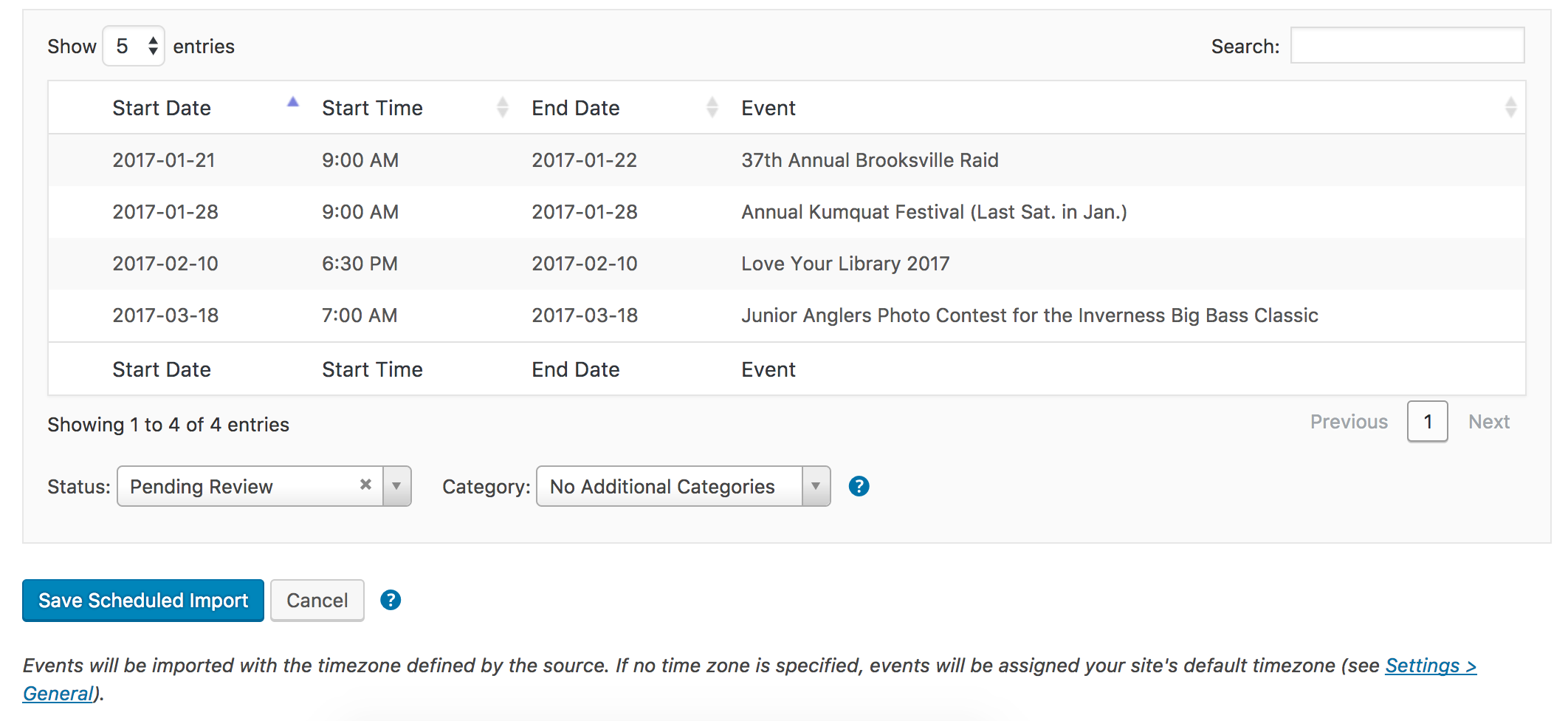
My last question related to the scheduled Facebook import issue: what did you set the ‘Status‘ dropdown setting to when you initially created the scheduled import? E.g. ‘Published‘ or ‘Pending Review‘. Please see the screenshot below for reference. I went ahead and created a scheduled import to occur daily from the Facebook page you shared with me, with the ‘Status‘ dropdown set to ‘Published‘. I’ll be sure to include my findings once I hear back from you.
When testing in the future, please make sure WP_DEBUG and WP_DEBUG_LOG are enabled on your site’s wp-config.php file. Any errors will display at the top of your page as you try to reproduce the conflict. Note what you find and please include it in your reply. I’d also like to share with you a list of Our Favorite Developer Plugins. We bring to attention and breakdown some helpful plugins that can hopefully help alleviate some future struggles.
I have a feeling once we resolve the issue related to Facebook, it will in turn resolve the iCal import issue. Please keep me updated and thank you for your patience while we work to identify and resolve the issues you’re currently experiencing. Cheers!
ModeratorHi James,
Thank you for sending over the System Information and I hope you had a great Christmas! Please run through the Testing for conflicts guide one more time. Make sure WP_DEBUG and WP_DEBUG_LOG are enabled on your site’s wp-config.php file. Any errors will display at the top of your page as you try to reproduce the conflict.
I’d also use your browser’s ‘Inspect‘ tool to see if any errors display in the console. This Using the ‘Inspect’ tool to make changes with CSS YouTube video is a great visual example. Note what you find and please include it in your reply.
Thanks again and have a pleasant evening!
ModeratorHi Diane,
Thank you for sending that over and I hope you’re having a wonderful holiday season.
1. I am having duplicate events, even from the same ical feed.
Please send over an iCal link so I can attempt to reproduce the duplicate event issues. Please provide any/all necessary information related to this import to ensure I am following the exact steps as you. This includes whether it’s a one-time import, scheduled import, desired post status/categories prior to import, etc. It might be best to send over screenshots and a screencast if possible.
My ical feeds are working, but my facebook feed is not: http://facebook.com/naturecoaster
Again, this is a fairly general statement that doesn’t help guide me to reproducing your issue and hopefully finding solutions. I quickly copy/pasted the Facebook link you shared with me and was able to successfully preview and import an event from said Facebook page.
Lastly, have you set up a test site using the default WP theme and only our plugins to see if you can reproduce the issues? It’s always best to have a test site where you can fully troubleshoot these types of issues.
Thank you and have a wonderful rest of the week!
ModeratorHey Gary 🙂
We’re definitely on the right track.
I think you are saying that the individual event listing map zoom is adjustable but not the main search map?
This is correct. When viewing a Map view with multiple venue markers, the map will adjust according to how far apart the venues are from each other. For example: if you have a venue in Los Angeles and one in New York, the map would display essentially a map of the United States. If there was also a venue in London, then you’d see a map of the United States and Western Europe.
Also is are the map in market customisable….can I change the information that is displayed in the pin when it is clicked on?
You can change which information is displayed in the map venue marker tooltips. Our Themer’s Guide goes over the process of creating and saving customizations.
As always, our support team members are here to help if you ever get caught up along the way. Please let me know if I’ve help clear up any confusion and have a great weekend ahead!
December 23, 2016 at 1:58 pm in reply to: Recurring event data is still being generated for this event #1210157ModeratorHey Matt,
Thank you for the update. Is this happening with all recurring events you’re attempting to create? Would you mind running through the Testing for conflicts guide, but this time add the following lines to your site’s wp-config.php file and let me know if you see any errors?
define('WP_DEBUG', true);

define( 'WP_DEBUG_LOG', true );
Lastly, the screenshot you shared with me of an event’s ‘Time & Date’ section doesn’t display the recurrence rules. Can you send over another screenshot, but this time with the entire ‘Time & Date’ section, including all recurring rules?
Thanks and have a wonderful weekend ahead. Cheers!
December 23, 2016 at 1:50 pm in reply to: Media Library hangs when Events Pro is active and WooCommerce invoices will not #1210155ModeratorBryan,
Thank you so much for taking the time to review the Testing for conflicts guide and provide such thorough feedback. It is truly appreciated.
The code you’re referring to could be the cause of conflict, though the only way to know for sure would be to temporarily comment out or remove the code to see if it makes a difference in the behavior. Let me know what you find out from testing our theory and we’ll go from there.
Before you go, I’d like to bring to your attention our What support is provided for license holders? Knowledgebase article so you know what is to be expected in terms of support here on the forums.
Keep me updated and have a wonderful weekend ahead. Cheers!
ModeratorHey Ross,
We appreciate you taking the time to provide your constructive criticism. I completely understand the faulty code that is currently affecting the recurring events feature is inconvenient, but rest assured we are taking the matter seriously and hope to release a fix as soon as possible.
Thank you for understanding our position on the matter and best of luck with your project. Feel free to reply back with any additional questions or comments. Have a great holiday season!
-
AuthorPosts
