

Forum Replies Created
-
AuthorPosts
-
Hunter
ModeratorWelcome back,
I attempted to reproduce the behavior on my test site but was unable to. Please view this short screencast and let me know if I’m missing a step to reproduce the issue and I’d be happy to test again.
I see you checked ‘Yes’ to reverting back to the default WordPress theme and deactivating all plugins other than ours as instructed in the Testing for conflicts guide, but can you please confirm this?
Regardless, would you mind testing again (make sure to deactivate custom theme and all plugins other than ours, see Testing for conflicts guide) ensuring WP_DEBUG and WP_DEBUG_LOG are enabled on your site’s wp-config.php file?
Any errors will display at the top of your page as you try to reproduce the conflict. I also recommend right-clicking your mouse and opening the ‘Inspect’ tool to see if any errors display in the console. Note what you find and please include it in your reply.
Cheers!
February 21, 2017 at 1:12 pm in reply to: View as Map function not working AND Near/Location filter not working #1243280ModeratorHey EM,
I visited your site but didn’t experience any issues when I switched from the default view to the Map view, however a plethora of errors appeared in the console once the Map view loaded. Can you please provide more information as to what issue you are experiencing and the step-by-step instructions to reproduce it on my end?
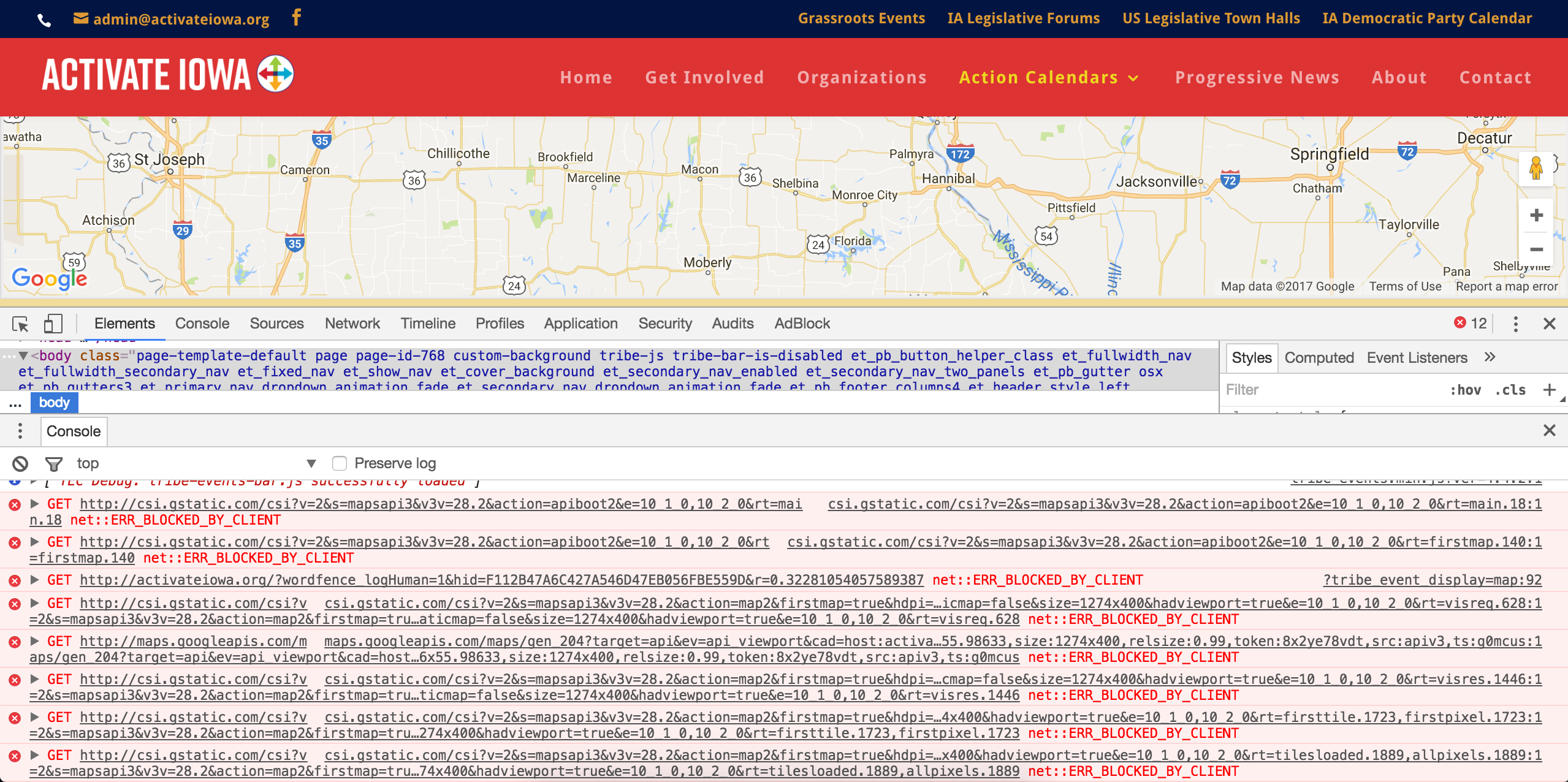
My best guess is your theme includes a Google Map functionality which might be conflicting with the maps used in our plugins. Can you please confirm this by temporarily deactivating your theme and deactivating all plugins other than ours? This is a required step to continue receiving support. Please follow the exact instructions in the Testing for conflicts guide. I will also need you to send your System Information as a private reply.
You also mention the “Near/Location” filter is not working. I see you’re using the classic header which doesn’t display that field, so I was unable to test it out. Can you provide more information and instructions to reproduce this too? Does this behavior occur when you have the default WordPress theme and only our plugins active?
If any issues you’re experiencing subside when your site is in the state outlined in the Testing for conflicts guide, you’ll need to address these on your own as we are unable to provide support for conflicts with custom themes and plugins by other authors. Please review our What support is provided for license holders? Knowledgebase article for more information.
Please let me know what you find and enjoy the remainder of your day 🙂
ModeratorHey Damian,
Sorry to see you’re having troubles. I got caught up on the issue by reviewing the thread you feel is related to yours. Before I’m able to confirm a bug is present, can you send your System Information as a private reply? Can you also confirm you reviewed our Testing for conflicts guide? If not, please do so and include your findings in your reply.
Thanks and have a great evening. Cheers 🙂
ModeratorHello!
First off, thank you for your purchase and welcome to our premium plugin support forums! Before we can proceed, can you please review our Testing for conflicts guide and reply back with your findings?
Please make sure WP_DEBUG and WP_DEBUG_LOG are enabled on your site’s wp-config.php file. Any errors will display at the top of your page as you try to reproduce the conflict. I also recommend right-clicking your mouse and opening the ‘Inspect’ tool to see if any errors display in the console. Note what you find and please include it along with your System Information as a private reply.
Thanks again and have a pleasant rest of your day. Cheers!
ModeratorHi Lerou 🙂
Welcome to the Pre-Sales Questions Channel and thank you for considering our plugins for your project! There is currently no feature which allows for users to subscribe to get notified when events are published, but I’m sure there is something available in the WordPress plugin repository that can accomplish what you need.
I know of the Event Calendar Newsletter, though I’ve never personally used it so I’m not 100% certain on it’s features and limitations. After a quick Google search, I came up with the following plugins, but again I’m unfamiliar with both of them so you’ll need to do some reading and testing to see if they’ll work for you:
• Better Notifications for WordPress
• Post Notification by Email (Old Notify Users Email)If you’d like to see this feature included in an upcoming release, we welcome user suggestions with open arms at our UserVoice Feature Ideas page. I hope this helps get you started in the right direction and please let me know if you have any additional questions. Have a great week ahead!
Cheers 🙂
ModeratorHey Daniel,
Thank you for your purchase and welcome to the premium plugin support forums. Without dedicating too much time on the matter, I did a quick search in the wp-content folder on my test site and found results relative to the
h3 class="tribe-events-filters-group-heading"
in /the-events-calendar-filterbar/src/Tribe/Filter.php.
I hope this helps get you started in the right direction and have a great rest of your day. Cheers!
ModeratorHey Philipp!
Sorry to see you’re having issues with the order of events displaying incorrectly. I see you said ‘Yes’ to deactivating all plugins other than ours, but you did not revert back to the default WordPress theme. Please review our Testing for conflicts guide and reply back with your findings. This is a required step to continue receiving support.
I notice in your System Information you have the Facebook Events and iCal Importer plugins installed on your site. If you’re not aware, we are in the process of retiring both of these plugins and replacing them with our newest plugin, Event Aggregator.
Please make sure WP_DEBUG and WP_DEBUG_LOG are enabled on your site’s wp-config.php file. Any errors will display at the top of your page as you try to reproduce the conflict. I also recommend right-clicking your mouse and opening the ‘Inspect’ tool to see if any errors display in the console. Note what you find and please include it in your reply.
You have been granted a license for Event Aggregator and it is set to expire on the same date your iCal Importer and Facebook Events licenses expire. For information, please review our Moving to Event Aggregator Knowledgebase article and if you run into any issues along the way, please create a separate thread.
Please let me know what you find after your testing and have a great rest of your day. Cheers!
February 20, 2017 at 7:09 pm in reply to: Mobile month view displays wrong when on weaker internet connection #1242622ModeratorHi Lucy,
Welcome back and sorry to see you here under the circumstances. Before we can proceed, can you please review our Testing for conflicts guide and reply back with your findings? Please include your System Information as a private reply.
Thanks and once I have that information I’ll have a better idea on how to proceed.
Until then 🙂
February 20, 2017 at 7:06 pm in reply to: I wanted to use a Custom Link For the Event When It Is Clicked. #1242621ModeratorHello,
We are unfortunately unable to provide support through our Pre-Sales forum channel, but you can head over to The Events Calendar WordPress.org support forums for assistance and answers.
If you have a premium plugin license, you can log into your account and get assistance through the premium plugin support forums.
Thanks for understanding and good luck resolving your issue. Have a good day!
ModeratorHello!
First off, thank you for your purchase and welcome to our premium plugin support forums! Before we can proceed, can you please review our Testing for conflicts guide and reply back with your findings?
If you do still experience troubles, please include a screenshot of the ‘Time & Date‘ section on the Add/edit event screen of an event that is being affected and I’d be happy to further investigate. Thanks again and have a great rest of your day. Cheers 🙂
February 20, 2017 at 7:02 pm in reply to: Change the link to "Login to Purchase" to account login #1242618ModeratorYou might want to check out a plugin like Theme My Login to help assist in the user experience after registering/logging in. Let me know how it works out and take care 🙂
ModeratorWelcome back,
Try replacing the first snippet I provided above with the following snippet and let me know how it works out. It will go at the bottom of your theme’s functions.php file.
/**

  * BCC site admin email on all Event Tickets' RSVP ticket emails so they get a copy of it too

  *

  * From https://gist.github.com/cliffordp/4f06f95dbff364242cf54a3b5271b182

  *

  * Reference: https://developer.wordpress.org/reference/functions/wp_mail/#using-headers-to-set-from-cc-and-bcc-parameters

  *

  */

function cliff_et_rsvp_bcc_admin_ticket() {

	// get site admin's email

	$bcc = sanitize_email( get_option( 'admin_email' ) );
// set Headers to Event Tickets' default
$headers = array( 'Content-type: text/html' );// add BCC email if it's a valid email address
if ( is_email( $bcc ) ) {
$headers[] = sprintf( 'Bcc: %s', $bcc );
}return $headers;
}
add_filter( 'tribe_rsvp_email_headers', 'cliff_et_rsvp_bcc_admin_ticket' );February 20, 2017 at 6:32 pm in reply to: New purchase and Valid license key but no choice to use Facebook import #1242604ModeratorHello,
It looks like you’ve got a valid license for Event Aggregator, so no need to purchase another one.
Can you please review our Testing for conflicts guide and reply back with your findings? Once I have that information I’ll have a better idea on how to proceed.
Thanks and have a pleasant rest of your day. Cheers!
ModeratorHi and welcome back,
I’m not 100% certain I understand your question, but I’ll provide all the relevant information I have on the matter. Please let me know if either help address your question.
1) Our Themer’s Guide goes over the process of creating and saving custom templates.
2) If you visit Events > Settings > Tickets > Post types that can have tickets and check the boxes for whichever post types you want tickets enabled for.
3) If you want to move where your RSVP/tickets form displays, please refer to our Moving RSVP and Ticket Forms tutorial.
If you have any feature requests, please submit them to our UserVoice Feature Ideas. We are unfortunately unable to provide assistance with customizations beyond what is already provided in the plugins and support forums. If you’re not aware of our Extensions page, please take a moment and review all the additional features available. If you need a customization beyond what your skill-set allows for, it might be best to hire a professional. Our list of non-affiliated customizers is a good place to start.
I hope this information helps and have a pleasant rest of your day. Cheers!
February 20, 2017 at 6:08 pm in reply to: Recurring Events Not Displaying in Chronological Order #1242597ModeratorHello again, Martha 🙂
We have a bug logged resembling what you’ve described, so I’ve added this forum thread to the ticket which helps expedite the process of getting a fix included in an upcoming release. I don’t have a precise date when it will be available, but please stay tuned to our Release Notes and the plugin changelogs for more information. Luckily, it’s marked as Priority Level 1 which means it’s being fast-tracked. Thanks again and let me know if you’ve got any additional questions or comments. Cheers!
-
AuthorPosts