
Home › Forums › Calendar Products › Events Calendar PRO › View as Map function not working AND Near/Location filter not working
- This topic has 9 replies, 4 voices, and was last updated 9 years, 7 months ago by
Ellen.
-
AuthorPosts
-
February 19, 2017 at 11:41 am #1241770
Ellen
ParticipantI have just installed the Events Cal Pro and have it working partially. However, the “View as Map” function is not working AND the “Near/Location” filter is not working.
I loaded an API key from my Google account
Thanks, EM
February 20, 2017 at 4:52 pm #1242570Hunter
ModeratorHi EM 🙂
Thank you for your purchase and welcome back to the support forums! It sounds like there might be a theme and/or plugin conflict going on. To confirm this, can you please review our Testing for conflicts guide and reply back with your findings? Please include your System Information as a private reply.
Thanks again and take care!
February 20, 2017 at 4:53 pm #1242573ParticipantHi Hunter:
I tried deactivating all the plugins and it did not help.
February 21, 2017 at 1:12 pm #1243280ModeratorHey EM,
I visited your site but didn’t experience any issues when I switched from the default view to the Map view, however a plethora of errors appeared in the console once the Map view loaded. Can you please provide more information as to what issue you are experiencing and the step-by-step instructions to reproduce it on my end?
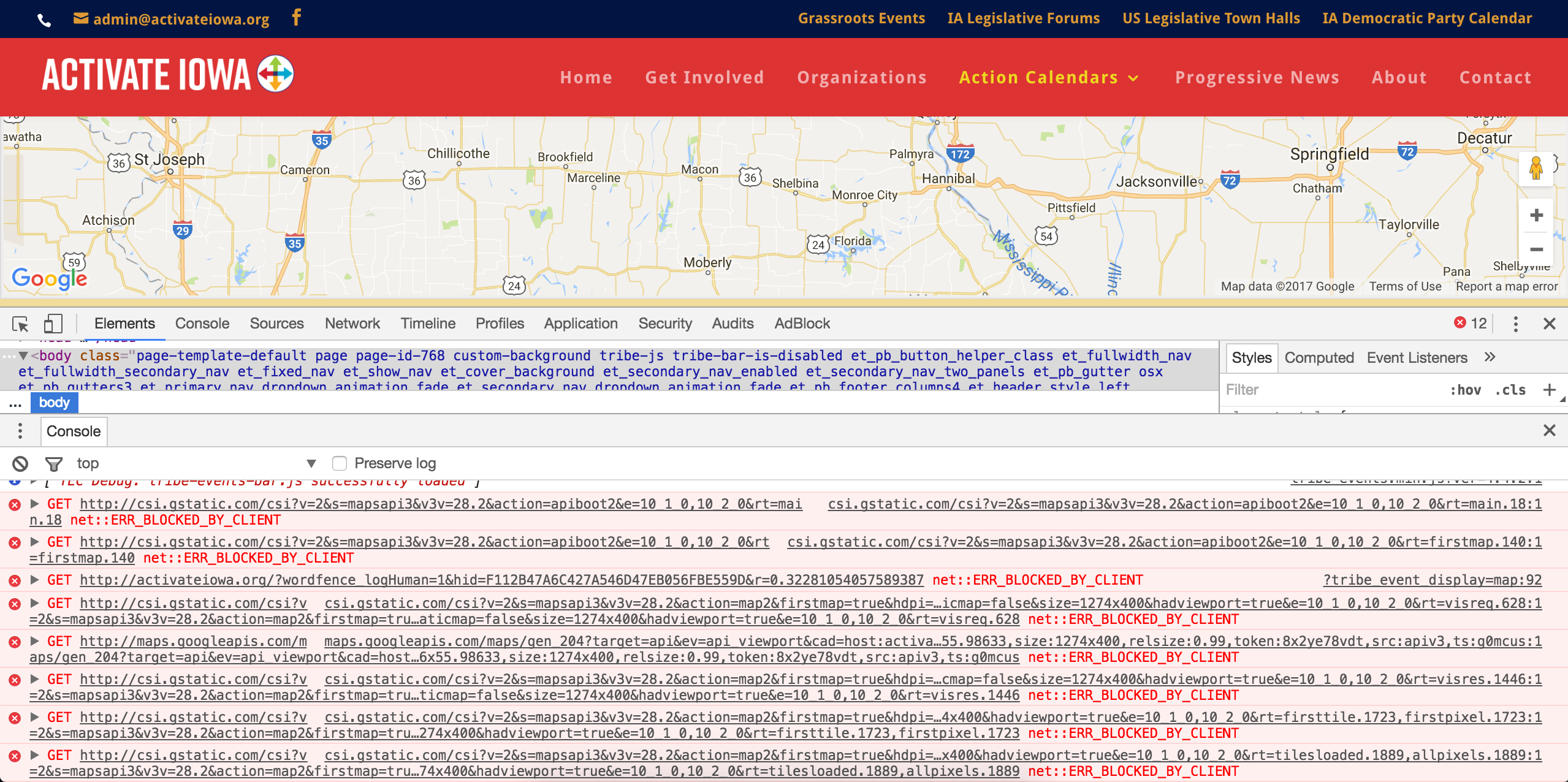
My best guess is your theme includes a Google Map functionality which might be conflicting with the maps used in our plugins. Can you please confirm this by temporarily deactivating your theme and deactivating all plugins other than ours? This is a required step to continue receiving support. Please follow the exact instructions in the Testing for conflicts guide. I will also need you to send your System Information as a private reply.
You also mention the “Near/Location” filter is not working. I see you’re using the classic header which doesn’t display that field, so I was unable to test it out. Can you provide more information and instructions to reproduce this too? Does this behavior occur when you have the default WordPress theme and only our plugins active?
If any issues you’re experiencing subside when your site is in the state outlined in the Testing for conflicts guide, you’ll need to address these on your own as we are unable to provide support for conflicts with custom themes and plugins by other authors. Please review our What support is provided for license holders? Knowledgebase article for more information.
Please let me know what you find and enjoy the remainder of your day 🙂
February 22, 2017 at 1:17 pm #1244018ParticipantHi – Thanks for looking into this: I have reinstated the normal header so you can see how the Near/Locatoin is functioning. Thanks!! – Ellen Marie
February 22, 2017 at 1:19 pm #1244020ParticipantHere’s the link:
http://activateiowa.org/grassroots-events/Also – I am wondering if I were to purchase the filter bar – would this be resolved?
Thanks, EM
February 22, 2017 at 1:19 pm #1244022ParticipantBTW – I took the API key out of my Divi settings…
February 22, 2017 at 9:28 pm #1244298ModeratorHello,
Thanks for the update. I took another look at your site but it appears the Near field is still not displaying:

Can you please describe in explicit detail what the issue with the Near field in the Tribe Events Bar? The only information I have at this time is that it’s “not working”.
Also – I am wondering if I were to purchase the filter bar – would this be resolved?
No, I highly doubt the Filter Bar would alleviate the issues you’re currently experiencing. My guess is you have either a theme and/or plugin conflict. To confirm this, you’ll need to review the Testing for conflicts guide and let me know what you learn. This is a required step to continue receiving support.
When testing, please make sure WP_DEBUG and WP_DEBUG_LOG are enabled on your site’s wp-config.php file. Any errors will display at the top of your page as you try to reproduce the conflict. I also recommend right-clicking your mouse and opening the ‘Inspect’ tool to see if any errors display in the console. Note what you find and please include it in your reply.
As previously mentioned, any issues which subside while your site is in the state outlined in the Testing for conflicts guide will need to be addressed by you as stated in our What support is provided for license holders? Knowledgebase article.
Please keep me posted!
Cheers 🙂March 16, 2017 at 9:35 am #1255321Support Droid
KeymasterHey there! This thread has been pretty quiet for the last three weeks, so we’re going to go ahead and close it to avoid confusion with other topics. If you’re still looking for help with this, please do open a new thread, reference this one and we’d be more than happy to continue the conversation over there.
Thanks so much!
The Events Calendar Support Team -
AuthorPosts
- The topic ‘View as Map function not working AND Near/Location filter not working’ is closed to new replies.