

Forum Replies Created
-
AuthorPosts
-
Hunter
ModeratorYou can disregard that message you saw come through – I had replied with incorrect information. We’re still working on the Extension, so for the time being you can try the following snippet. It ignores the selection for those settings, always showing a map when one is available regardless of what users checked:
/**

 * Causes calendar to always show Google Map and Link, regardless of individual event settings

 */

add_filter( 'tribe_embed_google_map', '__return_true' );

add_filter( 'tribe_show_google_map_link', '__return_true' );
Thanks again for your continued patience while we sorted things out. Let me know if it works and have a great weekend ahead!
February 24, 2017 at 1:57 pm in reply to: Remove previous – next events in Events Calendar Pro?? #1245496ModeratorThanks and have a great weekend ahead!
ModeratorGlad to hear it works! Can you please be more descriptive about the search-related issue you mention in your last response? Ideally I can get step-by-step instructions on how to reproduce the behavior on my test site. Thanks and have a great weekend ahead!
February 24, 2017 at 12:03 pm in reply to: Remove previous – next events in Events Calendar Pro?? #1245437ModeratorHey Gregory,
I understand how that might be confusing, but the /tribe-events/pro/ folder is reserved for files only available in /events-calendar-pro/src/views/pro…, so therefore the /the-events-calendar/src/views/single-event.php file would go in the /your-theme/tribe-events/ folder. As previously requested, try following the file as follows:
[your-theme]/tribe-events/single-event.php
If you take notice to the opening information for each template, we provide the necessary structure needed for overwrites to take effect.

I’ll bring your feedback to the attention of those who head up the Knowledgebase. Please let me know if you have any troubles when trying to save the template with the aforementioned structure and have a great rest of your Friday 🙂
February 24, 2017 at 11:40 am in reply to: Photo view displays vertical and not horizontal since EC Pro 4.4.2 update #1245420ModeratorThank you for your continued patience while we explored all avenues! I’ll close this thread out but feel free to create a new one if you have any more questions or concerns. Enjoy the rest of your day!
ModeratorHey Michael,
Welcome back 🙂
I’d be happy to help look into the issue for you. Are the events you’re having troubles with recurring? I’ll also need you to review the Testing for conflicts guide and let me know what you find out. Please include your System Information as a private reply.
Thanks and have a great rest of your day. Cheers!
ModeratorHey Donald,
Welcome back! I got a new keyboard for Christmas, so I’ll have to check your site out! Now, down to business 🙂
What you’ve described sounds like a possible bug. I’d be happy to test to see if I can reproduce the issue. Please visit Events > Imports > New Import and fill in the screen as you’ve been doing thus far, then take a screenshot and send it in addition to a screenshot of your Events > Settings > Imports screen. I’ll also need a Facebook event link you’ve been using to test.
Thanks and I look forward to your response. Cheers!
ModeratorHello,
I’d be happy to further investigate but before doing so, can you please review our Testing for conflicts guide and reply back with your findings? Please make sure all your plugins are updated to their latest versions, too.
Thanks and have a great evening! Cheers 🙂
February 23, 2017 at 10:20 pm in reply to: User Roles Community Tickets/Events & Woocommerce #1245028ModeratorHey Justin!
Welcome back. I unfortunately cannot think of any available extensions or plugins without dedicating too much time on the matter. Have you tried searching our forums and general web searches to see if you could find examples of this functionality in action? It’s been awhile since I developed anything resembling what you’re looking for, so I don’t have any sure-fire answers for you at the moment.
We are always incorporating the most popular and useful submissions from our UserVoice Feature Ideas, so please take a moment and share your ideas with us!
Sorry again I can’t be of more help and let me know what you end up doing! Cheers 🙂
ModeratorHi and welcome 🙂
I downloaded the last two URLs you shared with me and it appears there are 30 events attached to this url – http://www.explore419.org/events/list/?ical=1&tribe_display=list – and 242 events for this url – http://www.explore419.org/events/?ical=1&year-feed.
Everything appears to have imported into my Google Calendars app without any issues. Can you please send over your System Information as a private reply? I see you checked ‘Yes’ to reverting back to the default WordPress theme and deactivating all plugins other than ours as instructed in the Testing for conflicts guide, but can you please confirm this?
Thanks and I look forward to your response. Cheers!
ModeratorHi Titus,
Unfortunately, the only options available at this time include a text box, radio selection, checkboxes, and dropdowns. You could build something similar to a datepicker (see example below).
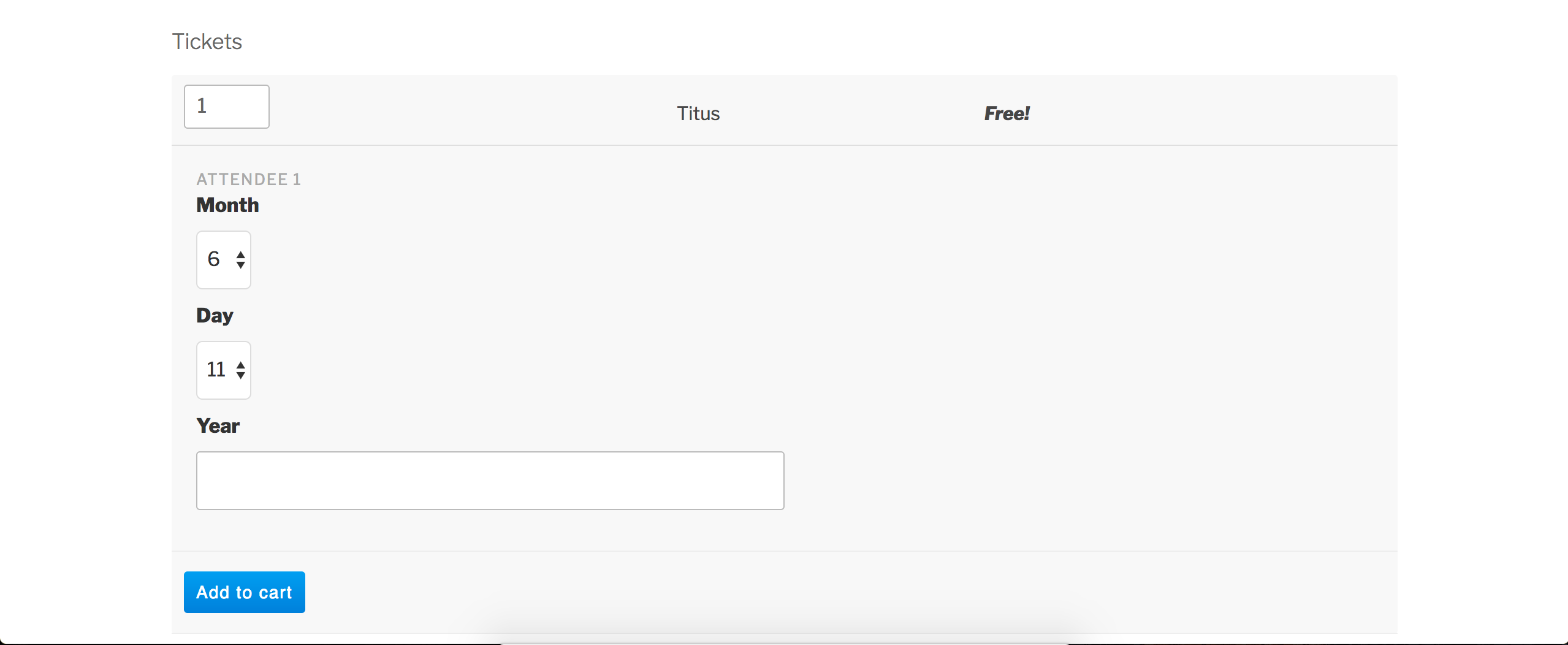
Sorry I don’t have a better answer! Visit our UserVoice Feature Ideas to submit any features you’d like included in an upcoming release. Cheers!
ModeratorHi and welcome back 🙂
1) My calendar is setup as monthly view & my footer is now not showing up on the page. Is there a reason for that? And if so, is there a shortcode that I can apply the monthly view into so that it appears & my footer shows up again? Or is there a better way to get the footer to show again?
I would start by reviewing the Events Settings Overview and Stylesheets and Page Templates tutorial and try different options available to see if it’s as simple as that. If none of the options have the desired effect, you might want to review the Themer’s Guide to identify if you have any custom template overrides. If you do, you might need to review the code in your overrides to make sure you’re not using outdated code.
When users have custom templates they are responsible for updating them to match changes made in new releases – of course, we try to minimize disruption as far as possible. Also, we try to clue them in to things they should look for by providing useful data in Events > Help > Recent Template Changes. If you navigate there, you should see a list of recently updated templates (which changes each release).
2) In the monthly view it shows all of the events & when you mouse over you see the time. Is there a way that the times can show up without the need to mouse over?
To accomplish this would require customizations as outlined in the Themer’s Guide. I haven’t done this particular customization but I imagine it wouldn’t be too difficult to achieve.
3) Lastly, is there a way to disable to click thru to a the page for that event?
I’m sorry, maybe it’s late, but I’m having a hard time understanding what you’re asking. Can you try rewording this request? Screenshots are always helpful for me 🙂
Please keep me updated and have a pleasant day. Cheers!
ModeratorHey Dan,
We have a bug report resembling what you’ve shared in this response regarding 404 errors on the ‘See All’ recurring event pages. Try adding the following code to the bottom of your theme’s functions.php file:
function translate_all_slug_to_alle( $text, $original, $context, $textdomain ) {

    if (

        $textdomain !== 'the-events-calendar'

        || $context !== 'all events slug'

        || $original !== 'all'

    ) {

        return $text;

    }
return 'alle';
}add_filter( 'gettext_with_context', 'translate_all_slug_to_alle', 10, 4 );
Be sure to visit WordPress > Settings > Permalinks and hit the “Save Changes” button after adding the code I shared above. We are nearing a release for this issue, so once it’s released and you update the plugin, you’ll need to revisit the functions.php file and remove the code. Keep an eye on our Release Notes for more info.
If you have not already, please review the Setting Up Your Google Maps API Key tutorial. Does this Google Maps issue occur when you deactivate all plugins other than ours and revert back to the default WP theme? I’m not able to reproduce the behavior on my test site and I’m not seeing any logged bug reports resembling this issue, so it might be best you set up a fresh WordPress installation where you can fully troubleshoot the issue. Make sure you have only the default WordPress theme and The Events Calendar installed and activated on the test site. Please review our Using One License for Live and Dev Sites and Moving Your License Keys tutorials for more information.
I understand this isn’t as seamless as you’d hoped for, but rest assured I’m here to help where possible. In the case any issues are not the fault of our plugins, you’ll need to address them on your own. Please review our What support is provided for license holders? Knowledgebase article.
Take care and have a great rest of your day. Cheers!
ModeratorWelcome back, Joyce 🙂
We are unable to log into customer sites, so I’ve removed your credentials from the response above. I would be happy to help look into this issue for you. Please visit Events > Imports > New Import and fill in the screen as you’ve been doing thus far, then take a screenshot and send it in addition to a screenshot of your Events > Settings > Imports screen. I’ll also need the Google Calendar ics link.
Thanks and I look forward to getting this issue resolved. Cheers!
ModeratorHi and welcome back,
Thank you for the update and sharing the System Information with me. Is there any way you can create a new thread on the WordPress.org Advanced Post Manager page? Seeing this is a plugin available in the WordPress plugin repository, support needs to be handled there. My apologies for not making this request in my first response.
Feel free to link back to this thread so the support team member is caught up. I’ll even go assign it to myself so I can see the issue through, I’m just unable to provide support here. Thanks for understanding and I’ll keep an eye on the WordPress.org support page for your thread. Cheers!
-
AuthorPosts