

Forum Replies Created
-
AuthorPosts
-
Hunter
ModeratorNo worries! If you haven’t reverted back to version 4.1.3, try adding the following snippet to you theme’s functions.php file and see if the video works properly. If not, revert back to 4.1.3 until we get a fix out for it. Thanks again.
Cheers!/**
* Avoid a problem with Events Calendar PRO 4.2 which can inadvertently
* break oembeds.
*/
function undo_recurrence_oembed_logic() {
if ( ! class_exists( 'Tribe__Events__Pro__Main' ) ) return;$pro_object = Tribe__Events__Pro__Main::instance();
$pro_callback = array( $pro_object, 'oembed_request_post_id_for_recurring_events' );remove_filter( 'oembed_request_post_id', $pro_callback );
}add_action( 'init', 'undo_recurrence_oembed_logic' );
ModeratorHello and welcome to the forums 🙂
I just did some testing and can confirm the video embed is conflicting with the embed feature recently released. You’ll need to revert back to versions 4.1.3 until we can get this issue addressed.
You can download version 4.1.3 of the free plugin here: https://wordpress.org/plugins/the-events-calendar/developers/
You can download version 4.1.3 of the PRO plugin here: https://theeventscalendar.com/my-account/downloads/
And follow these steps to manually update the plugin: https://theeventscalendar.com/knowledgebase/manual-updates/
I’ve attached this thread to the logged bug report for the developers to reference. Please stay tuned to your wp-admin and theeventscalendar.com/blog for maintenance release info. Thanks again for providing thorough information in your initial post and have a great upcoming weekend.
Cheers!
June 29, 2016 at 12:56 pm in reply to: Change the format of Events Calendar Pro "List View" #1133688ModeratorHello 🙂
Welcome to the premium forums and thank you for choosing PRO! I would probably start by visiting Events > Settings > Display and try different options there. Next, our Themer’s Guide does a great job of explaining how to create custom templates and how to save them so you don’t lose changes when updating. Lastly, Avada has an article titled ‘How To Use The Events Calendar With Avada‘ that may be of assistance.
I hope this helps and again, welcome to the forums. Have a great upcoming weekend.
Cheers!June 29, 2016 at 12:48 pm in reply to: Cannot get Filter Bar to filter….or do anything at all #1133684ModeratorHey Kezie,
Sorry to hear about the Filter Bar not filtering! Can you please review our Testing for conflicts guide to see if we can narrow down the source of conflict?
Reply back with your findings and we’ll take it from there. Take care and have a great Thursday.
Cheers!June 29, 2016 at 12:41 pm in reply to: Google Maps checkbox missing when editing existing events #1133682ModeratorHello and welcome back!
First off, thank you for running through our Testing for conflicts guide 🙂
I did a bit of testing and also took a look at our logged bug reports and can confirm you’re experiencing a known bug. For right now, you can revert back to versions 4.1.3 and you’ll notice the settings reappear.
You can download older versions of the free plugin here: https://wordpress.org/plugins/the-events-calendar/developers/
You can download older versions of the PRO plugin here: https://theeventscalendar.com/my-account/downloads/
And follow these steps to manually update the plugin: https://theeventscalendar.com/knowledgebase/manual-updates/
I’ve attached this thread to the logged bug report for the developers to reference. Please stay tuned to your wp-admin and theeventscalendar.com/blog for maintenance release info. Thanks again for providing thorough information in your initial post and have a great upcoming weekend.
Cheers!
ModeratorHey Hanna,
Thanks for reaching out. We don’t have any readily available snippets which allow the checkboxes to be altered to a dropdown, but it’s an idea worth adding to our UserVoice Feature Ideas page. We also have a list of customizers available for hire.
Best of luck and thanks for choosing PRO. Have a great upcoming weekend.
Cheers!ModeratorHey Adam,
Thank you for the update and I’m glad to hear you’ve got everything resolved! I’ll close this thread out but feel free to create a new one if you have any more questions or comments. Take care and have a great weekend.
Cheers!
ModeratorHi Michelle,
We are unfortunately unable to log into customer sites. Can you please send your System Information as a private reply? That will help us diagnose the issue. Also, can you please confirm you have Events Calendar PRO installed and activated on your site?
June 29, 2016 at 11:15 am in reply to: Can you change the url associated with our License key #1133630ModeratorHello,
The only thing you’ll “lose” when switching the ‘License URL’ will be the ability to update your premium plugins if/when an update is available. You won’t lose any data whatsoever. But as recommended, make a back up just in case.
We will always recommend backing up even though we anticipate a 0% chance of losing any data. We always say, “better to be safe than sorry.” I hope this alleviates your concerns and let me know how it goes!
ModeratorHey Nicolas,
I attempted to visit your site but am getting a 404 error. Do you have a link to the working events page so I can help out with that CSS? Thanks!
ModeratorWelcome back,
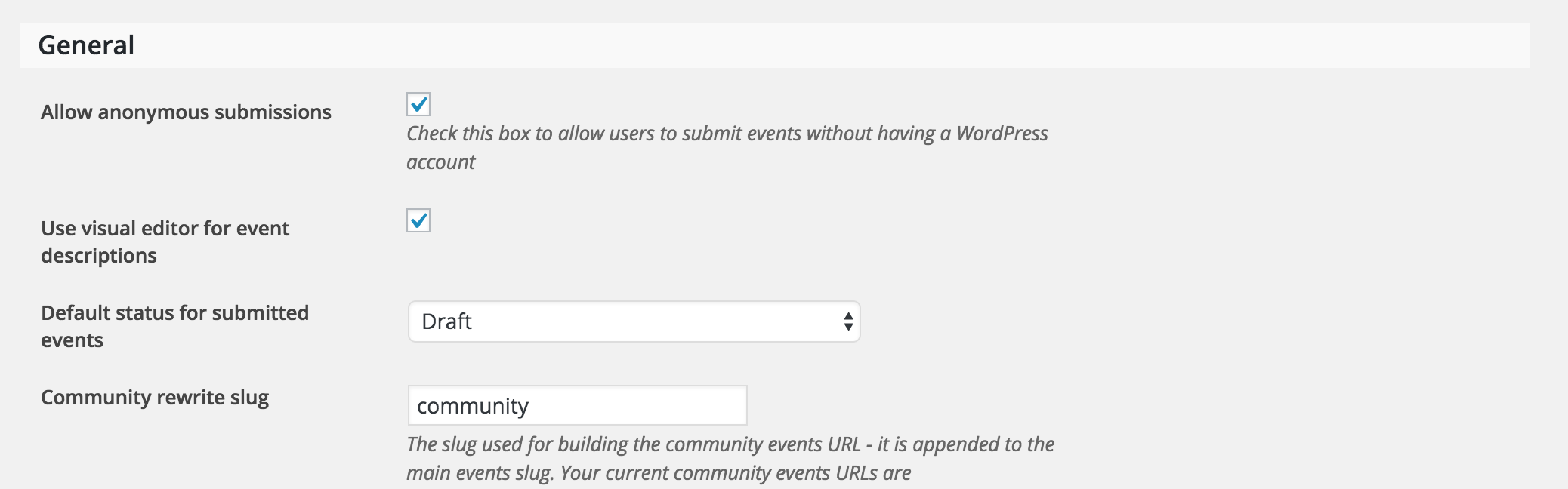
In response to your first question, are the events submitted from users other than the admin being saved as drafts or are they not coming through at all? (see screenshot below)
Are there any invite-only features on events ? ie private events. Say for example I want to create an event and only invite 5 people would it be possible to have it only show up on their view?
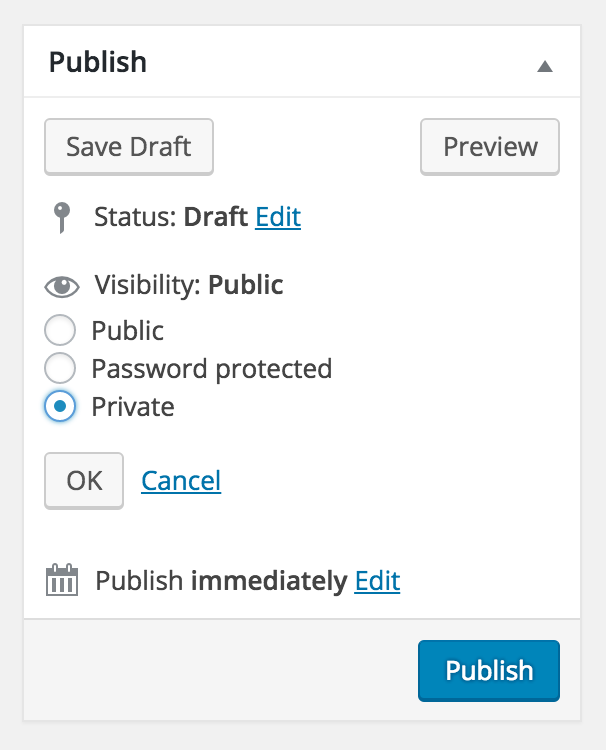
The only way I can think to do this would be to mark the event as ‘Private’ and give the password to access the event to those you want to invite. (see screenshot below)
For a little more background on the project, I am trying to make it possible for anyone signed in to create an event (basketball) game and have it show up on the calendar. As admin, we schedule some of the reoccurring games ourselves, but would allow for a use case of someone who wants to post an open game.
This sounds entirely possible with TEC, PRO, and Community Events. If you wanted to do ticketing, throw in Event Tickets for RSVP and Event Tickets Plus for paid ticketing functionality.
I hope I’ve helped answer your questions and feel free to reply with anything else you might need help with!
ModeratorHi Beth,
That is correct – the calendar will show all events starting from the date you enter. Does this help answer your question?
ModeratorHello again, Erin 🙂
You could add this snippet to your theme’s functions.php file which relocates the export buttons above the list of events:
add_action( 'tribe_events_after_header', 'tribe_change_ical_link_location' );

function tribe_change_ical_link_location() {

    Tribe__Events__iCal::maybe_add_link();

}
To add the note, you might try a template override as outlined in our Themer’s Guide. I’m limited on the amount of support I’m able to provide, but feel free to respond if you need any more direction and I’ll do my best to help out.
Cheers!
ModeratorHey Erin 🙂
Thanks for providing a link and the screenshot! I took a quick look and it appears the issue is most likely coming from your theme, but try altering the following CSS snippet through your style.css sheet or your theme’s custom CSS options and see if you’re able to get it looking how you’d like:
#tribe_events_filters_wrapper h3 span {

    display: inline-block;

    margin-right: 2px;

    position: absolute;

    position: relative;

    right: 0;

    top: 16px;

    width: 12px;

}
Try adjusting the ‘top: 16px;’ to ‘top: -5px;’ or something like that. If you want to hide it all together, change ‘display: inline-block:’ to ‘display: none;’ and that should do the trick.
I hope this helps and please keep me updated with the status of the issue and have a great day.
Cheers!ModeratorHello and welcome to the premium support forums!
We have a setting built-in which hopefully alleviates the duplicate venue issue you’re encountering. Visit Events > Settings > General Settings and look for the ‘Duplicate Venues & Organizers‘ option ‘Merge Duplicates‘. Try hitting that button and let me know if it helps address the issue. (see screenshot below)

Thanks for choosing PRO and have a great rest of your day.
Cheers! -
AuthorPosts