
Home › Forums › Calendar Products › Events Calendar PRO › "Create Event Button" and adding Calendar to Menu
- This topic has 10 replies, 4 voices, and was last updated 10 years, 3 months ago by
Julian.
-
AuthorPosts
-
June 27, 2016 at 1:29 pm #1132591
Julian
ParticipantHello. I am on the 30 day trial of events Calendar and after a lot of playing around I am very close to building out the functionalities I need but am a few features away.
First, how do you add the Events Calendar to the menu/top bar. I tried creating a page for the calendar, but was unable to. Essentially, I just want there to be a link that goes directly to the calendar.
Second, is there a way to add a “Add new event” feature on the events page. Part of the reason I paid for the Community Manager Pro was so that anyone could create an event, but right now I am only able to access that page via the Events dashboard. Also, is there a way to edit the “Add Event Form” to be more user friendly?
my website is ActivityHall.com and a basic over-view is we are listing local basketball courts and allowing players to either sign up to pre-posted games or to allow them to create their own game and invite friends.
Thanks,
Julian KeefeJune 27, 2016 at 4:10 pm #1132658Hunter
ModeratorHey Julian,
Glad to hear you’re almost finished up with your project! I’d be happy to help assist with your questions 🙂
Forgive me if I’m a little confused, but I believe you’re wanting to add a link to your main events page on your site’s menu/navigation, correct? If so, you can visit your site’s Appearance > Menus section and add a ‘Custom Link’ to your main events page.
To answer your second question, you could add a button image/code linking to your add event form under Events > Settings > Display > Advanced Template Setting or you could do a template override as outlined in our Themer’s Guide.
To edit the add event form, you can make changes (again as outlined in the Themer’s Guide) to /the-events-calendar-community-events/src/views/community/edit-event.php.
Let me know if my answers help out and have a great rest of your day.
Cheers!June 28, 2016 at 3:09 pm #1133186ParticipantThis reply is private.
June 28, 2016 at 4:36 pm #1133215Participantalso, is there a way to invite people via email of phone number to an event that aren’t members from that screen?
June 29, 2016 at 11:09 am #1133628ModeratorWelcome back,
In response to your first question, are the events submitted from users other than the admin being saved as drafts or are they not coming through at all? (see screenshot below)
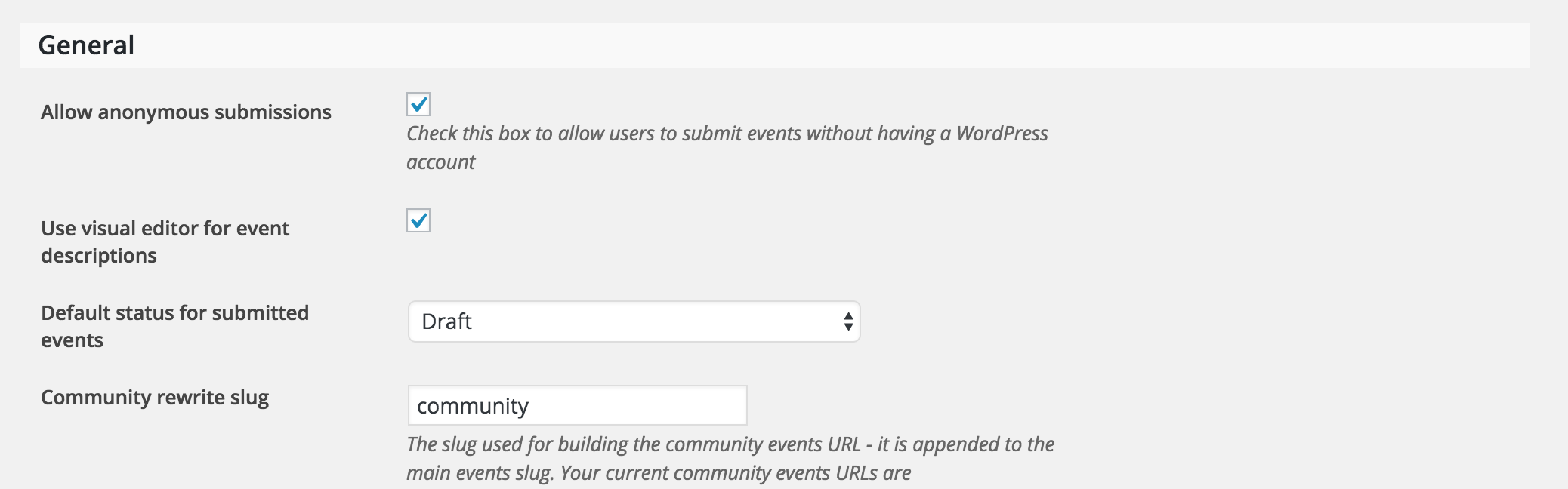
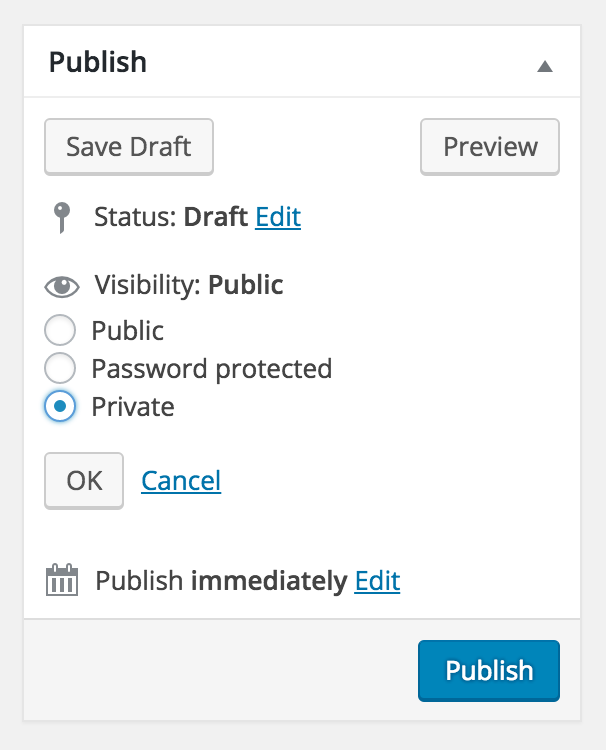
Are there any invite-only features on events ? ie private events. Say for example I want to create an event and only invite 5 people would it be possible to have it only show up on their view?
The only way I can think to do this would be to mark the event as ‘Private’ and give the password to access the event to those you want to invite. (see screenshot below)
For a little more background on the project, I am trying to make it possible for anyone signed in to create an event (basketball) game and have it show up on the calendar. As admin, we schedule some of the reoccurring games ourselves, but would allow for a use case of someone who wants to post an open game.
This sounds entirely possible with TEC, PRO, and Community Events. If you wanted to do ticketing, throw in Event Tickets for RSVP and Event Tickets Plus for paid ticketing functionality.
I hope I’ve helped answer your questions and feel free to reply with anything else you might need help with!
July 1, 2016 at 5:06 pm #1134691ParticipantThis reply is private.
July 4, 2016 at 12:28 pm #1135195ModeratorHey Julian,
Welcome back. I really wish I had better answers for you, but I personally don’t have any experience with Listify so I’m not sure what the limitations are there. Additionally, the submit event page is pretty basic and can be customized to your heart’s content. The file can be found at /the-events-calendar-community-events/src/views/community/edit-event.php.
We are always looking for ways to improve our plugin, so feel free to respond with any feedback that would make the submit event form more intuitive. Thanks for the response and I look forward to hearing back. Have a great week!
July 5, 2016 at 11:04 am #1135646ParticipantThis reply is private.
July 5, 2016 at 1:14 pm #1135689ModeratorHey Julian,
Thank you for getting back to me. That UI you sent over doesn’t seem like it would be too difficult to achieve, however we won’t be able to assist with that customization. Also, would you mind sending over your System Information as a private reply?
If you’re running out of time for the project deadline and need some immediate help, you could always check out this list of customizers that might be able to help you.
Thanks again and take care 🙂
July 20, 2016 at 9:35 am #1141967Support Droid
KeymasterThis topic has not been active for quite some time and will now be closed.
If you still need assistance please simply open a new topic (linking to this one if necessary)
and one of the team will be only too happy to help. -
AuthorPosts
- The topic ‘"Create Event Button" and adding Calendar to Menu’ is closed to new replies.