

Forum Replies Created
-
AuthorPosts
-
September 19, 2016 at 2:08 pm in reply to: "No iCal data was found at this URL" – but works fine with iCal itself #1166084
Hunter
ModeratorHey Christopher,
Thank you for purchasing the iCal Importer plugin and welcome to the support forums 🙂
Sorry to hear about the issue. Are you able to fetch the events when you download the .ics file and upload it manually by clicking the ‘Click to choose‘ button? (see screenshot below)
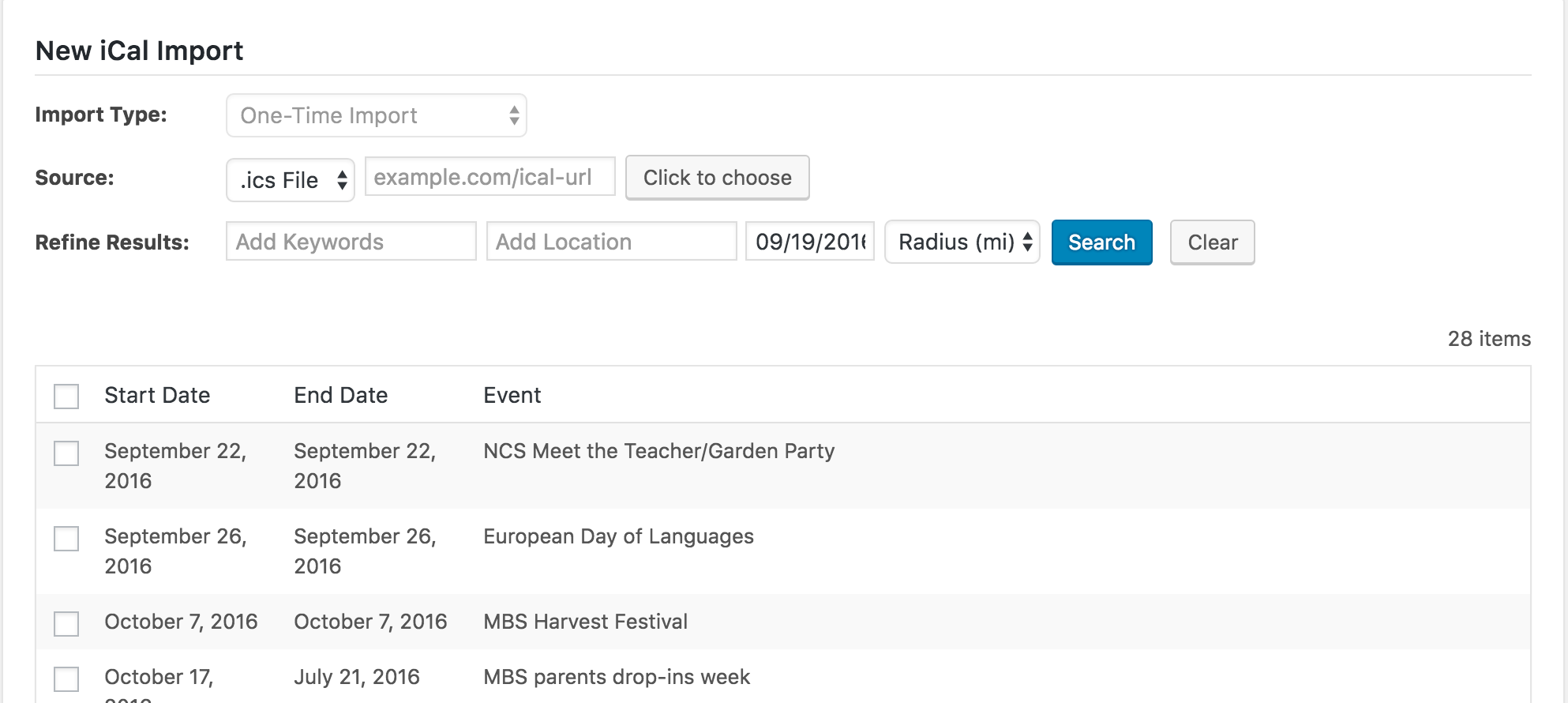
As you can see, I was able to successfully fetch 28 events from the .ics URL provided. Let me know if that works for you and we’ll pick up from there. Thanks again and enjoy the remainder of your day. Cheers!
ModeratorWelcome back 🙂
You can create a custom template override as outlined in our Themer’s Guide to overwrite/remove the PayPal fields from appearing on the My Events page.
The file you’ll need to overwrite is: /plugins/the-events-calendar-community-events-tickets/src/views/community-tickets/modules/payment-options.php
Be sure to save as [your-theme]/tribe-events/community/payment-options.php to avoid losing changes when updating. Best of luck and thanks for reaching out. Enjoy the rest of your day! Cheers 🙂
ModeratorHey Simon,
Thank you so much for the patience while I spent more time investigating the issue. I was unfortunately unable to reproduce the event not displaying in month view. (see screenshot below)
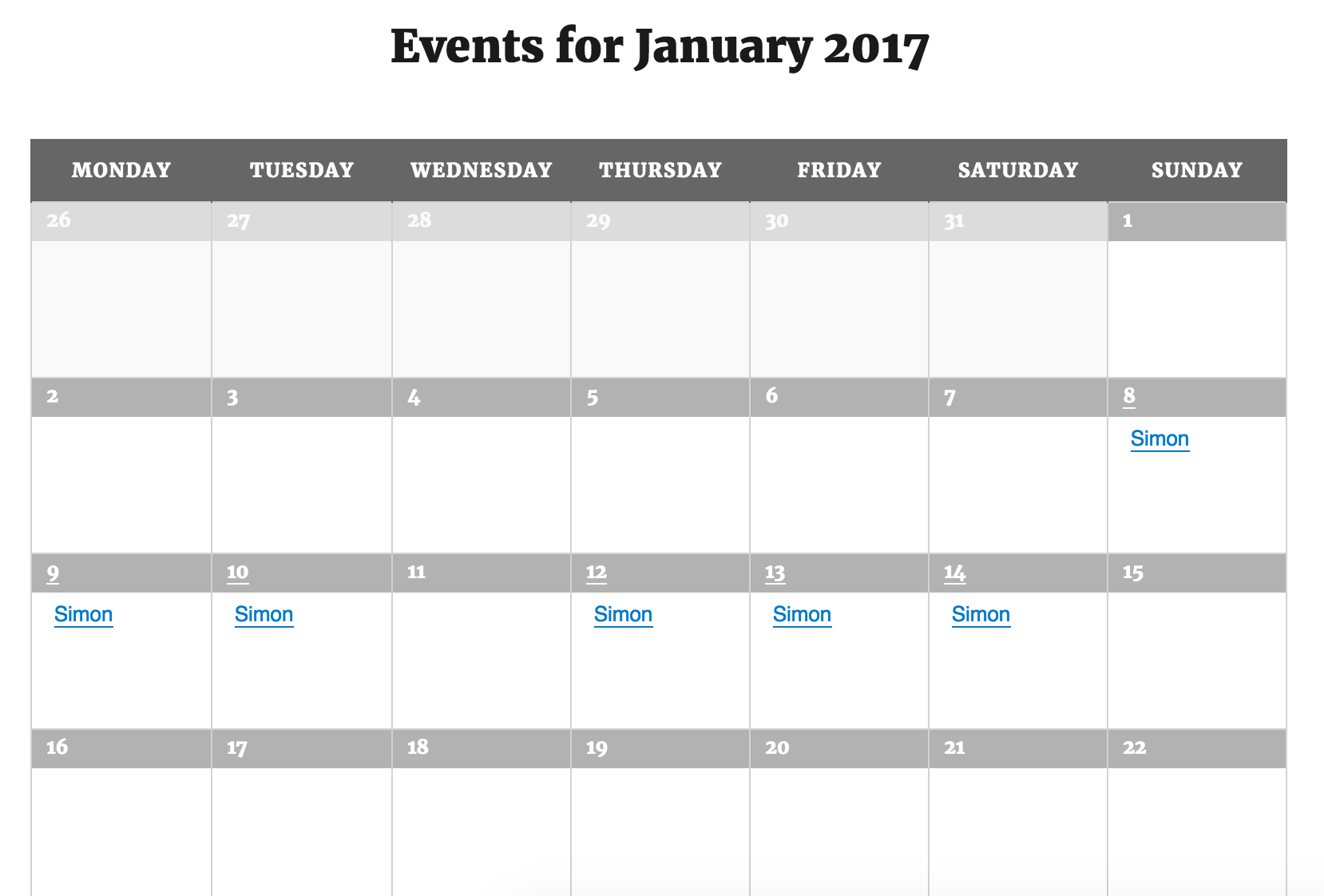
As you can see, I was able to reproduce the exclusion occurring on the incorrect date. I tested in my local timezone (UTC-7), so this leads me to believe the exclusion issue is not restricted to your timezone.
I’m really not sure as to why this is occurring and am not seeing any logged bugs resembling the behavior we’ve both experienced. With that said, I’ve gone ahead and logged a bug for the developers to address in an upcoming maintenance release. I don’t have a viable solution nor a concrete date when the fix will be released, but please keep your eyes on our release notes for info.
Thank you again for the patience while we investigated the issue and please let me know if you have any additional questions or comments. Have a great evening. Cheers 🙂
ModeratorHey Ben,
Thank you for sending that over. I hate to ask, but are you able to set up a test domain and test as required in our Testing for conflicts guide to see if you can replicate the issue? Let me know if that’s doable and if so, what the results are.
Thank you again for working with me on the issue and rest assured, if there’s a bug, we’ll find it! Have a great afternoon. Cheers 🙂
ModeratorExcellent! We truly appreciate you taking the time to add that to the UserVoice and hopefully can get it included in an upcoming release. Have a great rest of your week and please feel free to open a new thread if you have any questions or concerns. Cheers!
ModeratorGlad I could be of assistance! Please feel free to create a new thread if you have any questions. Enjoy your week and thanks again. Cheers!
ModeratorHey Malcom,
I took a quick peek but unfortunately am not able to come up with any viable solutions in a fashionable timeframe. If you haven’t already, I recommend reaching out to your theme author to see if they can provide any support. We also have a list of customizers that can help assist. Sorry again I can’t be of more assistance and best of luck. Cheers!
ModeratorWelcome back!
Before we go too much further, can you please clarify whether the .ics feed with incorrect times is being “exported” from your WordPress website or from Google Calendar? Better yet, break down the process you’re attempting in step-by-step instructions and I’ll do my best to reproduce the issue. Also, if you haven’t already, please review our Testing for conflicts guide to ensure a theme and/or plugin conflict is not in play.
Thank you for the response and enjoy the rest of your weekend. Cheers!
September 17, 2016 at 2:48 pm in reply to: In List view, text no longer right of photo in WP 4.6.1 #1165569ModeratorCraig,
Thank you for the response. With a little CSS, you should be able to get the layout how you desire. Try adding the following CSS to your theme’s style.css file and let me know how it works out for you.
.tribe-events-list .tribe-events-event-image+div.tribe-events-content {
float: left;
position: relative;
width: 100%;
}This YouTube Video is useful when attempting to adjust styles. Lastly, we have a bug logged which aims to address this display issue in an upcoming maintenance release. I’ve attached this thread to the aforementioned bug for the developers to reference while making improvements. Thanks again. Cheers 🙂
ModeratorChad,
Thank you for the update. I would sequentially upgrade from the earliest version that works for you up until you get to the latest version, doing so manually. With the amount of releases between 2.0.11 and now, it’s really hard to narrow down which version is the critical (if not multiple) version for maintaining your events.
Let me know if this makes sense and if it works out. Thanks again and best of luck.
ModeratorHey Ben,
Can you reply back with the iCal url (from Google) and your System Information as a private reply? I’d be happy to try and reproduce the issue.
Have a great night. Cheers 🙂
ModeratorHey Lisa,
Sorry to hear about the troubles! Have you tried reading through our Testing for conflicts guide to see if you can narrow down the source of conflict? If you’d like to reply with an iCal url, I’d be happy to try and reproduce the problem.
Thanks for your patience while we work to resolve the issue and enjoy the evening. Cheers 🙂
ModeratorHi and welcome,
I did a quick check of our logged bug reports but am not finding anything resembling what you described. I see you checked ‘Yes’ to reverting back to the default WP theme and deactivating all plugins other than ours at outlined in our Testing for conflicts guide, but can you please confirm this? It would also be helpful if you sent over your System Information as a private reply.
Keep me updated and have a great evening. Cheers!
ModeratorHey Malcom,
That code doesn’t look like it would be the culprit. Unfortunately, there isn’t much I can do here seeing you’re experiencing a theme conflict which are outside the scope of what we can cover. If possible, send a link to your submit event form and I’ll gladly take a look to see if I can be of more assistance. Thanks for the update and take care. Cheers!
ModeratorMekhael,
Thank you for the response. I unfortunately am not sure what the problem is here :-/
We don’t have any logged bugs of users reporting similar instances and I haven’t been able to reproduce the issue myself. I’m understanding correctly, when you delete an event by going to Events and select ‘Trash’ for an event, it still displays on your calendar? And if you edit the date for a published event, the calendar doesn’t reflect the changes on the front end? Do the updated date changes save, or do they revert back to the original date?
Simply renewing your plugin shouldn’t have any major effects, especially what you’re experiencing. Let me know as much information as possible and I’ll do my best to track down the source of conflict, but you might need to look into hiring a developer to resolve the issue for you. We have a list of customizers that can help.
Thanks again and have a great Thursday. Cheers 🙂
-
AuthorPosts