

Forum Replies Created
-
AuthorPosts
-
August 28, 2015 at 12:27 pm in reply to: Editing organizer details in front-end (community)? #1000045
George
ParticipantHey Jeff,
I appreciate your politeness in the face of what I definitely understand is a frustrating limitation. I agree with you, in fact, that the exclusion of just the Organizer from front-end editing stuff is a bit odd of a pattern.
I’m sorry about the frustrations that have risen from this and will voice your opinion with our development team. You should also post in our UserVoice forum, which is a great place for feature requests/tweaks to be vocalized and we frequently add changes to our code that start as ideas on here → http://tribe.uservoice.com/forums/195723-feature-ideas
Thank you Jeff!
If you have any other questions or concerns at all, please open a new thread any time.
Cheers,
GeorgeAugust 28, 2015 at 12:19 pm in reply to: How to stop sending email tickets after the order was completed?? #1000042ParticipantHey Emiliano,
Any luck with the solution that Brian shared? It’s a great solution and I hope it works for you! 🙂
(And thanks for sharing that, Brian!)
– George
ParticipantHey @Roberto!
Thanks for reaching out 🙂
You can achieve this in two ways, basically – first is to just create one event that starts on August 16th and ends on August 23, then in the event content itself just list what the sessions are via text.
The other method is to use the “Custom” recurring event type – if your events all happen within one week, then you can set the “Frequency” to “Weekly” and check each day that the event will happen, like shown in this screenshot:
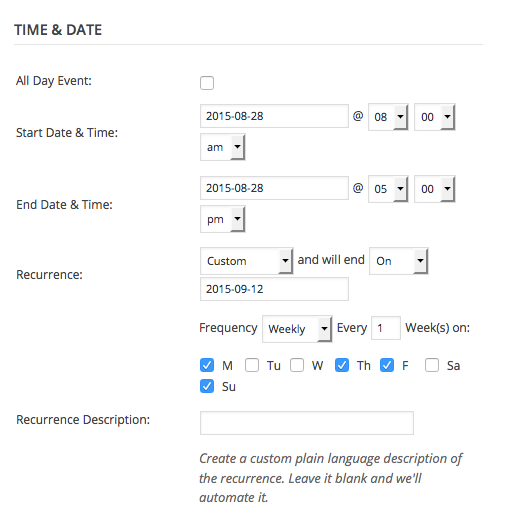
This latter option is still not 100% what you’re looking for, but should get pretty close.
I should also mention that our next version of The Events Calendar PRO is coming with some better free-form recurrence, so that you can choose “non-normal” patterns like the one you mentioned here. That release is coming very very soon!
— George
ParticipantHey @charrame,
Thanks for reaching out!
I unfortunately have some bad news here – if you’re essentially just trying to get events from your WordPress site to show up in another WordPress site, this is not possible without some very extensive custom coding that is far outside the scope of our support forums 🙁
I’m sorry to disappoint! Please let me know if this is what you mean and/or if you have anything else I can help with.
Sincerely,
GeorgeParticipantHi @smpcherrypoint,
Sorry you’ve had another issue arise like this!
Just to be certain, is the previous issue you’re referring to this one? → https://theeventscalendar.com/support/forums/topic/deadlock-database-error-generating-huge-error-logs/
If so, then I’m curious here – do you have any other recurring events now that are reminiscent of the one you mentioned in that other issue? I.e., recurring events that are recurring for 10 or 12 months or something like that, or even just a recurring event that is recurring several times per day for a month or something?
Just curious, because while I fully admit that we have some performance improvements we could definitely make to our plugin (and are working on very actively, in fact), from all of your issues the underlaying theme seems to be some limitations with your web server itself.
This is not a problem and I’m not trying to be rude or put all the blame on your server! No worries – I only mention this detail because your server itself has often been a limiting factor with issues you’ve reported here, and may be the problem-causing thing here since I cannot reproduce an error like yours on my site.
Thank you!
GeorgeParticipantHey @Martino!
I’m really sorry you’ve run into this issue on your site – it could be an issue with the way we translate strings in our code, or with your translation file itself. I’m not sure, and will take some time to investigate this further and will make a bug report so we can fix it in a future release if we find a bug here.
For now, however, you should be able to fix this by adding the following code to your theme’s functions.php file:
add_filter( 'tribe_get_event_categories', 'tribe_999937_filter_category_dt', 1, 4 );function tribe_999937_filter_category_dt( $html, $post_id, $args, $categories ) {
return str_replace( ':', 'Replace Event Categories', $html );
}
Now, instead of ‘Replace Event Categories’ in that code, replace it with whatever text you want in Italian or anything you’d like.
I hope this helps!
– George
ParticipantHey @charrame,
Sorry to hear that! You can indeed get the latest Spanish translations at any time by going to http://translations.theeventscalendar.com
If you’re not familiar with using this site to get translation files, no worries – we’ve got two articles here that you should read over and will hopefully find very helpful:
- https://theeventscalendar.com/knowledgebase/changing-the-language-on-your-calendar/
- https://theeventscalendar.com/knowledgebase/adding-or-updating-a-translation/
Cheers!
GeorgeAugust 28, 2015 at 11:23 am in reply to: Events Calendar Widget next and previous month links not working #1000018ParticipantHey @windhill,
Thanks for reaching out!
I checked out http://www.ncmaboston.org/ and only found one instance of our widget there:
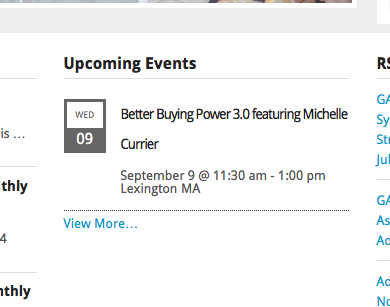
This only shows one event, but I went to http://www.ncmaboston.org/events and indeed found only one upcoming event there, so this widget is displaying things accurately.
I did not find another instance of our widget in the sidebar – can you add one back in place so we can see problems live?
For now, I didn’t notice anything wrong with that other widget’s display…apologies if I’m missing something here, just curious to understand the problem accurately so that I can best help you out! 🙂
Thanks,
GeorgeAugust 28, 2015 at 11:18 am in reply to: RSVP on community events and ability to add a buddypress user in a field #1000016ParticipantHey Hervé,
Thanks for reaching out! I’ll address both of your questions in order:
I mean there is rocket events but the list of responded users does not show off in the list of events fornt end usbmitted by a user. is this possible ?
This is possible, technically, but not something we can help with unfortunately. We do not offer support for customizations, and adding that list of responded users to the “My Events” list would take some extensive code customization.
2°) I need a simple way to add a field with user name when an event is submitteed; so that the visitor of envent can click on the user and see its buddypress profile.
Unfortunately, this is again a customization that you will have to make yourself or hire someone else to build for you. The good news is that it might be simpler to make than the other customization you’ve requested here – essentially, you’d first need to make a custom Community Events submission form field which you can learn how to do by learning our templating system as described here → https://theeventscalendar.com/knowledgebase/testing-for-conflicts/
Then you’ll need to some further digging and code customization to add this field to the list of fields whose data is saved upon submission, but hopefully what I shared here will give you a good start.
If you’re not comfortable editing code yourself but really need the custom features, your best bet is to hire a customizer. We have a list of highly-rated customizers here, if you’re curious → https://theeventscalendar.com/find-a-customizer
Sorry to disappoint Hervé! Please let me know what you think and if there’s anything else I can help with.
Sincerely,
GeorgeParticipantHey Gerry,
I’m sorry you’ve encountered a conflict on your site.
To address your question in reverse order – yes, you can definitely learn more about our Non-Profit Partnership Program here: https://theeventscalendar.com/knowledgebase/do-you-offer-discounts-for-non-profit-organizations/
If you are approved for a non-profit license, the license is free, but does not come with support. For access to these very support forums, a full license is required.
Just putting that caveat out there! We can definitely still help you out here for now 🙂
Speaking of doing that, can you answer these following questions?
1. How did you learn that The Events Calendar was the culprit for that conflict?
2. What is the conflict? If you found specific JavaScript errors, can you paste them here for reference?
3. Can you share a URL to a place on your website where this conflict is happening live, so we can take a look at it? I went to http://tabletennisengland.co.uk and searched for such a page but was unable to find one.Thank you!
GeorgeParticipantHey @cchung!
Thanks for reaching out – just to be sure I understand your goals here, do you mean that you want events that are in certain categories to just appear as text in the Month View on your site?
For example, if the event “Board Meeting” was somehow categorized “holiday” or “office closed”, then instead of looking like this:
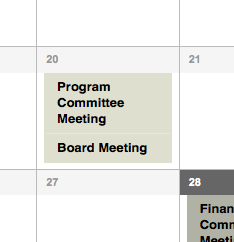
It would look like this:
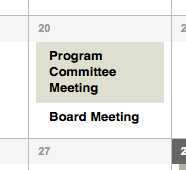
No I know the specific event would probably not be tagged “Holiday” or something, but it’s just an example of the display changes you’re trying to make when you say you “Don’t want it to appear as a link”.
Is this right @cchung? If not, let me know exactly what design effect you’re trying to add when you say you “don’t want certain events to appear as links”.
And finally, for now, if at all possible can you create a sample event or two on your site that are in the “Holiday” category and/or some that are in the “office closed” category? If this is a live site you can create these events far in the future and then just link me to that far-in-the-future month, so that the public is super-unlikely to actually see these test events…
Thank you!
GeorgeParticipantHey Anthony!
Thanks for reaching out. I’m curious, when you say that it loaded the next week’s worth of events, can you specify what actual number of events were imported? Was it 20 or 21, for example?
I’m only asking to try and pin down the problem – the iCal file generated at http://stanneschoolbarrington.org/events/ical contains 21 events, so if all 21 events were imported then we at least know that the events importing the file fine, and it’s the generated file itself that we need to fix.
But if, say, only 5 events were imported over the course of the next week, then there’s a problem with the importer itself and not necessarily with the generated file.
Does that distinction make sense? Let me know what you think and what number of events were imported when you used that http://stanneschoolbarrington.org/events/ical URL, we can continue troubleshooting from there.
Thanks!
GeorgeParticipantHey Filip,
Sorry to hear about this – has this issue always been happening with your widget, or did it just start recently? If the latter, then what were some of the last changes you remember making on your site before this issue arose?
Next, it looks like you’ve made some somehwat-extensive customizations to The Events Calendar’s front-end templates, right? It’s awesome and looks great, and there’s no problem with making such customizations – just curious about it though, as it’s possible that there could be a code conflict causing this from one or a combination of these sources:
• Other plugins on your site
• Your theme
• Your custom codeI cannot recreate this problem, so a conflict of some kind seems likely to be the case.
Let me know what you think about some of the questions I rose up earlier in my reply here, and we can pursue more troubleshooting steps from there based on your reply.
Thank you!
GeorgeAugust 28, 2015 at 10:29 am in reply to: Remove pagination from list view and list all events #999982ParticipantHey Lee,
I’m sorry you’re having trouble with this on your site! There are a few things that could cause that “events per page” option to not take effect, but before we explore possible culprits for that, can you start by sharing your “System Information” with us? Here’s an article on how to do that → https://theeventscalendar.com/knowledgebase/sharing-sys-info/
Also, in the meantime, can you see if anything is improved if you deactivate the Filter Bar plugin?
Thank you!
GeorgeParticipantHey @Corrado,
Thanks for reporting this! It’s something that we can definitely do better. I’m creating a ticket in our development tracking system for this, and hopefully it will be improved in an upcoming release.
Please let me know if there’s anything else I can help with here!
— George
-
AuthorPosts