

Forum Replies Created
-
AuthorPosts
-
George
ParticipantHey @B M,
I’m sorry that your application hasn’t come back yet – I just checked our NP application queue, and the oldest submission is from October 9th. So a few things could have happened: your submission might have failed to reach us; your submission might have successfully reached, but then our response to you (accepted or not) might not have reached you; or maybe our response was labeled “spam” by your email and is stashed in your email’s Spam folder – can you check for this to see if this is the case?
I’d recommend trying to submit again – what is the name of your organization? I will keep an eye out for it.
Sorry for the trouble – something must have gone wrong with email communication or perhaps our site’s form code itself. Regardless, we can hopefully sort things out now with the help of this thread. Thank you for creating it!
— George
ParticipantHey Artin,
I appreciate your awareness of our limitations with support for themes – and posing this question to the folks at Elegant Themes is indeed the best step. Let us know what they say about this issue!
For now, however, there is one thing that might work well for you to get around these limitations: changing the Events template on your site.
To do this, head to Events > Settings > Display in your site’s wp-admin. Then, scroll down to the aptly named “Events template” option there – try out each template that is available there, save your changes, and see if any of the chosen templates work a bit better with Divi builder.
Let us know what you find!
ParticipantHey Andrea,
We unfortunately cannot help a ton when it comes to theme conflicts, depending on the nature of the conflict – it sounds like the issue here is that you want to change the styles of the event titles on your site.
Is this correct?
If so, can you link directly to your events page? I tried to find it from your home page but was unable to.
We cannot help with design customizations; however, I will take a look and suggest whatever advice I can! 😀
ParticipantHey Bruce,
The nature of problems like this are unfortunately – usually – related to things on the level of the server. So, how are you hosting your web site? e.g. are you using a shared host like GoDaddy, MediaTemplate, WP Engine, etc., or are all you self-hosting it?
In either case, your best option for now is to contact your web host’s support team and open a ticket with them. I hate to send you to another support team when you’re here trying to open a ticket with us, but if this is indeed a server issue then only your web host will be able to help 🙁
ParticipantHey @David,
I’m really sorry to hear this – I’m not sure why that template override isn’t working for you, I just tested on my own site and it worked fine. Here’s a screenshot of my exact directory structure, I’m using the twentytwelve theme:
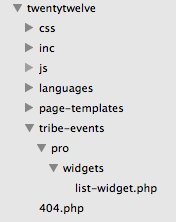
As for the shortcode and widget disparity, the shortcode actually just directly calls the widget instance; so with this in mind, then, does anything improve here if you just try adding no_upcoming_events=true to your shortcode? Like this e.g.:
[tribe_events_list limit="1" category="Home Page" Title="Forthcoming Events" no_upcoming_events=true]
October 12, 2015 at 2:20 pm in reply to: Is there a fix for the Calendar not showing correctly in month mode on iphone #1013870ParticipantHey @Lisa,
Thanks for this – these issues are unfortunately mostly a result from your theme. To confirm this, would you be able to try activating a “default” WordPress theme like Twenty Twelve? Once activated, have another look at the calendar views on your phone and see if these issues persist.
ParticipantI don’t have any more CSS for now Rob, I’m sorry for that – we offer no support for theme and design questions, so unfortunately I’ll have to close up this issue for now.
If you need to write custom CSS on your site, definitely check out a [free!] tool like Firebug if you use FireFox, or the Developer Tools for either Safari or Chrome. They have “Inspector” tools that let you zoom right over the element whose styles you want to customize; you can then just copy and paste the CSS from there and tweak the values to your liking.
Best of luck with your customizations!
George
ParticipantHey Lukas,
Thanks for the information. I unfortunately do not know if there’s a way around the timezone issue relating to “Summer/Winter Time”, because Facebook’s timezone features in their API don’t work well with implementations like our WordPress plugin – I’d recommend changing the timezone on your WordPress site from “Zurich” to its numerical UTC equivalent. I believe this is UTC+1.
Does this make any improvement with the behavior of your issues?
— George
ParticipantThanks for the update! Best of luck with your site 🙂
October 12, 2015 at 2:08 pm in reply to: Eventbrite tickets – no fields in editor or import option 3.12.1 #1013851ParticipantGreat!
Best of luck with your site 🙂
ParticipantHey Seth,
I changed my site to match your timezone settings and then tried creating multiple events with similar configurations (ending at 2am, e.g.) as your problematic event. I was not able to recreate the issue any time.
Can you share your full system information with us? Here’s how → https://theeventscalendar.com/knowledgebase/sharing-sys-info/
The “Timezone” setting you highlighted should not be related here, though we can come back to this for further testing based on your system information.
Thanks,
GeorgeParticipantHey Mark,
We unfortunately don’t have any plans for this in an immediately-approaching release. We’re not closed to it at all though! And you should make your voice heard on our UserVoice page here → http://tribe.uservoice.com/forums/195723-feature-ideas
I’ll close up this ticket for now since there’s not much more to be said on this topic, but open a new thread any time if other questions arise!
— George
ParticipantWell! It looks like some kind of caching on our server may have been preventing my pre_get_posts filter from working when I originally opened this thread
Weird! Glad you found out what the behavior was finally – best of luck with your site going forward! 🙂
— George
ParticipantThanks for all of this information! It unfortunately doesn’t reveal any obvious culprits, so for now, I would recommend the complete set of troubleshooting steps here → https://theeventscalendar.com/knowledgebase/testing-for-conflicts/
What do you find if you do these steps?
Thanks,
GeorgeOctober 12, 2015 at 9:43 am in reply to: Is there a fix for the Calendar not showing correctly in month mode on iphone #1013735ParticipantHey Lisa,
Sorry my code didn’t help – these are theme design issues and not ones with The Events Calendar, so it’s hard for me to offer a ton of help, but what you said here would indeed help:
If I could send a screenshot it would be easier.
You can upload screenshots to Imgur.com and share links to those images here – then, can you also link to the exact pages on your site where these screenshots were taken?
Apologies for getting it wrong the first time; let’s take a look at your problems again and see if I can recommend some better CSS this time! 😀
Cheers,
George -
AuthorPosts