

Forum Replies Created
-
AuthorPosts
-
George
ParticipantHa! 😀 thanks for the kind words @suzannegoodwin! I’m glad this has helped – keep a good backup of this code and/or bookmark this forum thread for future reference, just so you can add this code back to your theme if it ever gets lost.
Cheers!
GeorgeParticipantHey @Kandace,
I’m really sorry about the posting of that domain name! I didn’t mean any harm by that; I have left the URL in my reply intact, but I have changed my reply to “Private” so that only you and us on the Support team can see it; is this acceptable? I will leave all of my replies here private regardless, but if you would also still like my to remove the URL despite that, I will! Let me know.
The reason I will keep things in “Private” replies now is that discussing the specific URL here is important, in my opinion. I do not recreate this problem in any of my local sites, and you yourself don’t seem to have the problem on other sites, so the problem in my opinion seems to be the domain name itself:
http://www.newmargaretmalone.com.php53-13.ord1-1.websitetestlink.com/
Notice here there are two “.com.” stems in the domain, and how its an otherwise complex / “not-normal” domain name? Our code might be misreading that, or code within WordPress itself or something, thus leading to the incorrect generation of the URL slugs…
I will try to recreate a new local URL on my computer and try to recreate this problem. I will let you know the results; just wanted to post an update here regardless to comment on the private reply thing. Let me know if that is a sufficient amount of privacy regarding that URL – and to see for yourself that it keeps the content hidden, try logging out of your account on this site and then view this thread again as if you were a “public” user – the reply content should be hidden.
Thank you for sharing your system information and for your patience here. Stay tuned!
— George
ParticipantHey @Bo,
I’m really sorry to see this behavior on your site – I am not able to reproduce this problem on my own site, so for now, can you start by sharing your “System Information” with us? Here’s how to do that: https://theeventscalendar.com/knowledgebase/sharing-sys-info/
In the meantime, I would also recommend that you do our full set of troubleshooting steps outlined here → https://theeventscalendar.com/knowledgebase/testing-for-conflicts/
Let us know what you find!
Thanks,
GeorgeParticipantHey @Tommy,
Thanks for reaching out here – unfortunately, at this time there is no way to do this within the plugin itself. I also do not know of any plugins out there that enable this sort of functionality specifically.
This functionality is possible with some extensive code customization, but that is outside the scope of the support we can provide and so if you’re not familiar with writing custom code, you would have to hire a developer for assistance 🙁
If you do happen to be familiar with custom code, then you can get started on customizing the widget in the ways you describe by first consulting our “Themer’s Guide” and using these principles to start customizing → https://theeventscalendar.com/knowledgebase/themers-guide/
Otherwise, if you are interested in hiring a developer we have a list of highly-rated developers here that might be helpful → http://m.tri.be/18k1
Sorry to bear this bad news; let me know if you have any other questions, comments, or concerns!
Sincerely,
GeorgeOctober 10, 2015 at 9:58 am in reply to: Pull all eventbrite events within a geographic region #1013456ParticipantHey Bryan,
This is unfortunately not possible 🙁 It would require at least custom development, but also – as far as I know – an extensive custom relationship with Eventbrite.com itself; currently, you’re only allowed to do the sort of importing of event data that our Eventbrite Tickets plugin does with your own Eventbrite account’s events
Sorry to bear the bad news here – I hope, however, that this is at least a clear answer and helps you move forward in your project. Let me know if this is the case and/or if you have anything else we can help with!
Sincerely,
GeorgeParticipantHey Sam,
Thanks for reaching out, sounds like a cool project and I appreciate that you’re even considering our software for it. It’s with that in mind that I hate to bear the bad news about your essential question here:
So each listing on the site will have the facebook events from their page on each listing on carolina.beer?
Or is it just one large calendar with it all in as one and no way to assign it on a per page basis?
Unfortunately your second example there is basically how our plugins work at this time 🙁 Getting each listing to pull in FB events specific to it is possible, in theory, but it is not something our plugins currently do and it would not be possible without some extensive custom development.
If you’re interested in hiring a developer to build out this functionality for you, we do have a list of well-reviewed customizers here: http://m.tri.be/18k1
Otherwise there’s not much else our plugins do to achieve this exact functionality. I’m sorry to bear that news, but I hope at least that this is a clear answer and helps you move forward with your project. Let me know if this is the case and/or if you have anything else we can help with!
Cheers,
GeorgeParticipantHey Seth,
I’m sorry you’re having trouble here. It seems to me that the crux of this issue is exemplified in the last event in your screenshot; e.g. the one at the bottom of the list. While the left-hand-side date box says Saturday Oct. 10, the event meta in the right-side list says Oct. 9th. Is the extent of your issue here?
If so, I want you to know that at this time there is no known bug causing behavior like this – I and two other developers on our team have tried recreating this, to no avail. Does this mean that there is definitively no way a bug could exist here? Absolutely not, and there indeed might be a bug here we just haven’t discovered yet. But at this time, it is not clear whether this is caused by a conflict or an internal bug.
To get started on figuring out what the culprit is here, I’m curious about a handful of specific settings on your site. Can you confirm what each of these options on your site are as follows? (Sharing more Imgur screenshots would be ideal!)
1. Timezone Settings – these are on the main page in your wp-admin when you go to Events > Settings, as shown in this screenshot:
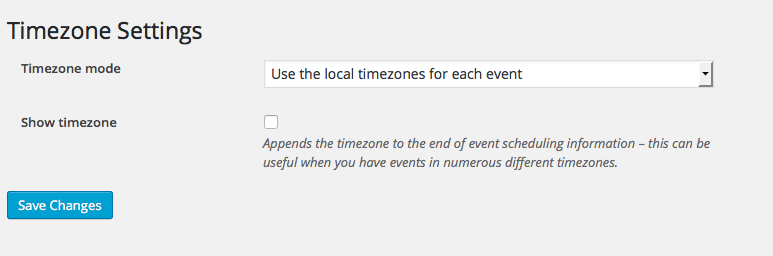
What are your settings here?
2. General WordPress “Timezone” Setting – this is in your wp-admin at Settings > General, as shown in this screenshot:
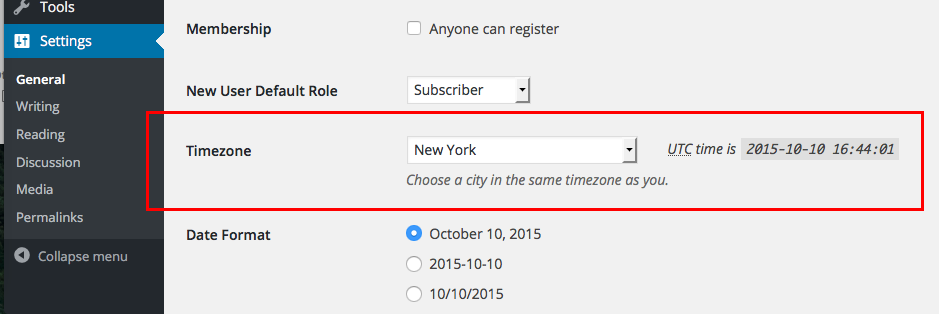
What is this set to on your site?
3. End of Day Cutoff – back in Events > Settings in your wp-admin, on the main settings tab there, you’ll find this option as shown in this screenshot:

What is this set to on your site?
In addition to these three specific options, can you share your “System Information” with us? Here’s how to do that → https://theeventscalendar.com/knowledgebase/sharing-sys-info/ This will reveal some additional information including some information about your server, which will be immensely helpful here.
I thank you in advance for providing all of this information – let me know what you find!
Thanks,
GeorgeOctober 10, 2015 at 9:33 am in reply to: Eventbrite tickets – no fields in editor or import option 3.12.1 #1013447ParticipantHey @rollocop,
I’m sorry to hear about these issues – one thing that stands out to me as the culprit here, perhaps, is what you said as follows:
We recently move the site from one host to another.
The domain name is exactly the same and we’ve set a redirect on the nameservers (so the site still exists on the other server but is not live).
Does this mean that e.g. your domain’s nameservers and DNS records still point to the old site, which “still exists but is not live”? I’m sorry if that’s not the case – let me know what you mean here, as I think this is very relevant to the way these issues are manifesting on your site.
In the meantime, I would recommend these steps for now:
1. Remove your Eventbrite API Key and Secret in your new site’s wp-admin. Then, deactivate the Eventbrite Tickets plugin.
2. Go to Settings > Permalinks in your wp-admin area, and just click “Save Changes” without actually making any changes. This may seem like an odd thing to do but is a little “trick” within WordPress to get the permalinks across your site to refresh, which might help here.
3. Go back to your Plugins page; reactivate the Eventbrite tickets plugin.
4. Do the “save permalinks” trick mentioned in step 2 here.
5. Authorize your Eventbrite tickets plugin anew; go to the settings page where API Key and Secret can be entered, and go through the process of setting this up like you did originally.
6. See if anything changes with your issues – if not, then can you include your System Information in your reply? Here’s how to do this → https://theeventscalendar.com/knowledgebase/sharing-sys-info/
Thanks!
GeorgeOctober 9, 2015 at 5:32 pm in reply to: Organizer Set as 'Draft' and not attached to event. #1013352ParticipantHey Matt,
This is an odd issue – it sounds like it could be a bug. I was not able to reproduce this behavior right off the bat on my testing site, so far now can you share your system information with us? Here’s how to do that → https://theeventscalendar.com/knowledgebase/sharing-sys-info/
That information will help us in trying to recreate this issue.
Thanks!
GeorgeOctober 9, 2015 at 5:30 pm in reply to: One event with different start/stop times per event #1013348ParticipantHey @Summer,
You’d unfortunately have to write some custom code to achieve exactly what you’ve described here.
We do not offer any support for custom code here, but some general tips on how to go about building this would be to first explore Events Calendar Pro’s “Additional Fields” feature – this alone might get you started at least with the display of various event times like in your example. Read more about “Additional Fields” here → https://theeventscalendar.com/knowledgebase/pro-additional-fields/
As for associating these events with tickets, that is unfortunately a much more complex customization. We can’t help much with the code side of that, but one thing we have that might be helpful is a list of well-reviewed developers who are available for hire → http://m.tri.be/18k1
I’m sorry that we don’t have much we can assist with here. Please let me know if any of this information helps!
— George
ParticipantI’m sorry to hear about this Larry! One thing I noticed right away is that you are using outdated versions of the plugins; to get started here, can you first manually update all of your Tribe plugins to their most recent versions? Here are all of the plugins and their most recent versions for reference, as well as where to download the necessary files:
- The Events Calendar: 3.12.3 – http://wordpress.org/plugins/the-events-calendar
- Events Calendar Pro: 3.12.2 – https://theeventscalendar.com/my-account/downloads/
- Eventbrite Tickets: 3.12.1 – https://theeventscalendar.com/my-account/downloads/
If you do this and problems still persist, I’d recommend next running through our complete set of troubleshooting steps as laid out here → https://theeventscalendar.com/knowledgebase/testing-for-conflicts/
Let us know what you find!
Thanks,
GeorgeParticipantHey @Harold,
When you mention Brian in your thread here, it sounds like you are referring to another forum thread where you might have reported this issue. I looked through your forum activity and could not find such a dialogue with Brian – can you link to the specific thread where you and Brian had an exchange about the issues you currently face?
In your reply here, can you also share your system information with us? Here’s how to do that → https://theeventscalendar.com/knowledgebase/sharing-sys-info/
Thank you!
GeorgeParticipantHey @David,
You unfortunately couldn’t get this to show nothing without custom coding 🙁
If you’re curious how to do that, you first need to find this plugin file:
the-events-calendar/src/views/widgets/list-widget.phpYou will see the code there like this:
esc_html__( 'There are no upcoming %s at this time.', 'the-events-calendar' )This is that text you want to remove; you can remove this whole block of code right from the original plugin file, or you can do the recommended approach of adding a duplicate version of this file in a new folder in your theme called /tribe-events. Then, you’d just remove the code from the duplicated version of the file, so that every time you update The Events Calendar in the future your customization will remain in place.
If you’re interested in this second option I mentioned, learn more about it here in our official Themer’s Guide → https://theeventscalendar.com/knowledgebase/themers-guide/
Regardless of method, the principle is the same: remove the text from that aforementioned list-widget.php file. That is unfortunately the only way at this time 🙁
I hope this helps!
— George
ParticipantThanks for your interest in our plugins Eric! What you’re looking for should indeed be possible, but with some caveats:
I need the ability to have a calendar setup with events listed, but also need the ability to have users sign up for an event (for a fee). Is this something that the events plugin can do or not? And if it can work, do I need any additional plugins to make it work or is it standalone?
To do this, you would need the following software:
• The Events Calendar (free)
• WooCommerce (free)
• The Events Calendar: WooCommerce Tickets ($89+)Our WooCommerce Tickets add-on is required for the process of getting people to sign up for a fee for classes; you’d be able to sell tickets to your events with these plugins.
I hope this information helps! Let us know 🙂
— George
ParticipantHey @jamie,
Do you mean the map view at http://winnebagoforest.org/events/map/? If so, this template seemed to be working fine for me…can you clarify what the problems are?
As for these problems themselves, we unfortunately offer no support for custom code and custom templates, so I cannot promise a solution here 🙁
With that disclaimer out of the way though, I’m really that things stopped working suddenly. I’d love to help as much as I can – to that end, the first thing I noticed is that you’re running very out-of-date versions of the plugins. So before anything else, you should update WordPress to version 4.3.1 and then update your Tribe plugins. Here are the version numbers you should be running, and where to get the files:
- The Events Calendar: 3.12.3 – http://wordpress.org/plugins/the-events-calendar
- Events Calendar Pro: 3.12.2 – http://theeventscalendar.com/my-account/downloads
Once all of these things are up-to-date, do problems persist?
If so, then copy and paste your custom template files in their entirety (do not edit anything out!) into Gists at http://gist.github.com and share links to these Gists.
I’ll take a look at your custom code and offer any insight that I can!
Thanks,
George -
AuthorPosts