
Home › Forums › Calendar Products › Events Calendar PRO › Calendar List View showing WRONG date (again)
- This topic has 6 replies, 3 voices, and was last updated 11 years ago by
George.
-
AuthorPosts
-
October 9, 2015 at 6:04 pm #1013355
Anonymous
InactiveHello, before the calendar view was showing the wrong date.
Now, the list view is showing a date that is tomorrow for (select) events?
No this is not a plugin or theme conflict it is a BUG
October 10, 2015 at 9:48 am #1013450ParticipantHey Seth,
I’m sorry you’re having trouble here. It seems to me that the crux of this issue is exemplified in the last event in your screenshot; e.g. the one at the bottom of the list. While the left-hand-side date box says Saturday Oct. 10, the event meta in the right-side list says Oct. 9th. Is the extent of your issue here?
If so, I want you to know that at this time there is no known bug causing behavior like this – I and two other developers on our team have tried recreating this, to no avail. Does this mean that there is definitively no way a bug could exist here? Absolutely not, and there indeed might be a bug here we just haven’t discovered yet. But at this time, it is not clear whether this is caused by a conflict or an internal bug.
To get started on figuring out what the culprit is here, I’m curious about a handful of specific settings on your site. Can you confirm what each of these options on your site are as follows? (Sharing more Imgur screenshots would be ideal!)
1. Timezone Settings – these are on the main page in your wp-admin when you go to Events > Settings, as shown in this screenshot:
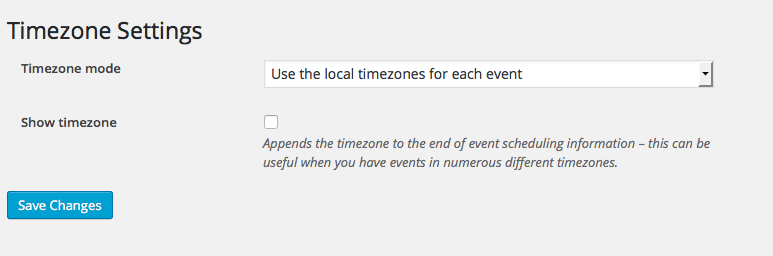
What are your settings here?
2. General WordPress “Timezone” Setting – this is in your wp-admin at Settings > General, as shown in this screenshot:
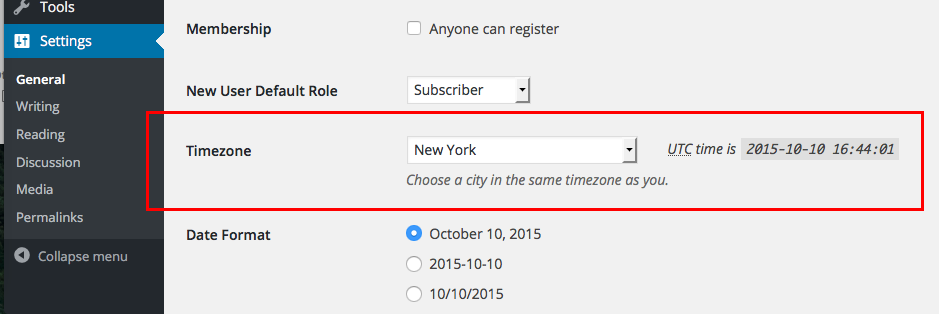
What is this set to on your site?
3. End of Day Cutoff – back in Events > Settings in your wp-admin, on the main settings tab there, you’ll find this option as shown in this screenshot:

What is this set to on your site?
In addition to these three specific options, can you share your “System Information” with us? Here’s how to do that → https://theeventscalendar.com/knowledgebase/sharing-sys-info/ This will reveal some additional information including some information about your server, which will be immensely helpful here.
I thank you in advance for providing all of this information – let me know what you find!
Thanks,
GeorgeOctober 10, 2015 at 10:25 am #1013465InactiveNotes
I recently upgraded the plugin &
I recently set the default city & state to Augusta, GA (could be timezone malfunction/related)
The event in question ends after Midnight (as do many of the events on my website) – which could also cause date issues**I Just noticed this first last night**
On the settings you mentioned above:
End of Date Cutoff: 3:00AM
Timezone: NY, NYThere is a button to update the Timezone settings
This may correct the issue if it pushes the fixes from the bug that was happening before (I hard-coded into the Plugin files a fix per your support team for this before)
If this does fix it, it may be good to have the software auto-update the timezone settings in the Database on Plugin Update
October 12, 2015 at 2:07 pm #1013849ParticipantHey Seth,
I changed my site to match your timezone settings and then tried creating multiple events with similar configurations (ending at 2am, e.g.) as your problematic event. I was not able to recreate the issue any time.
Can you share your full system information with us? Here’s how → https://theeventscalendar.com/knowledgebase/sharing-sys-info/
The “Timezone” setting you highlighted should not be related here, though we can come back to this for further testing based on your system information.
Thanks,
GeorgeOctober 14, 2015 at 8:12 am #1014560ParticipantHey Seth,
Just wanted to update this thread with news that our developer Brian has found a bug here. It’s an obscure one, only affecting literally a few specific hours out of a 24-hour time period; it’s related to the arithmetic used to calculate whether a given date/time is “Today” or some other day in relation to “Today”, e.g. “Yesterday”, “Tomorrow”, so on.
We’re working on a fix for this and already have a code-based fix in place; we just need to run it through QA and then hopefully can include in our fast-approaching Maintenance Release.
October 15, 2015 at 7:47 am #1014912Geoff
MemberHey Seth,
Just want to let you know that The Events Calendar PRO 3.12.3 just released today and includes a patch for this issue. Please do check it out and let us know if you continue to experience the issue in a new thread—we’d be happy to help.
Cheers and thanks for reporting this!
GeoffOctober 15, 2015 at 8:38 am #1014942Participant😀
-
AuthorPosts
- The topic ‘Calendar List View showing WRONG date (again)’ is closed to new replies.