
Home › Forums › Calendar Products › Events Calendar PRO › Hiding Widget via shortcode
- This topic has 7 replies, 3 voices, and was last updated 10 years, 11 months ago by
Support Droid.
-
AuthorPosts
-
October 9, 2015 at 12:10 pm #1013245
David
ParticipantI’m using the following to place a widget on my home page
[tribe_events_list limit=”1″ category=”Home Page” Title=”Forthcoming Events”]
This works great, but when there are no events it’s shows
Forthcoming Events
There are no upcoming events at this time.rather than showing nothing. How do I get the widget to autohide when empty ?
October 9, 2015 at 2:07 pm #1013301George
ParticipantHey @David,
You unfortunately couldn’t get this to show nothing without custom coding 🙁
If you’re curious how to do that, you first need to find this plugin file:
the-events-calendar/src/views/widgets/list-widget.phpYou will see the code there like this:
esc_html__( 'There are no upcoming %s at this time.', 'the-events-calendar' )This is that text you want to remove; you can remove this whole block of code right from the original plugin file, or you can do the recommended approach of adding a duplicate version of this file in a new folder in your theme called /tribe-events. Then, you’d just remove the code from the duplicated version of the file, so that every time you update The Events Calendar in the future your customization will remain in place.
If you’re interested in this second option I mentioned, learn more about it here in our official Themer’s Guide → https://theeventscalendar.com/knowledgebase/themers-guide/
Regardless of method, the principle is the same: remove the text from that aforementioned list-widget.php file. That is unfortunately the only way at this time 🙁
I hope this helps!
— George
October 9, 2015 at 2:16 pm #1013310ParticipantWouldn’t it be better to code up the “Hide this widget if there are no upcoming events” property to be available to the shortcode as well as the regular widget (which the docs say it supports) ?
October 12, 2015 at 5:02 am #1013588ParticipantWhere am I going wrong ?
I created the folder structure
/wp-content/themes/cake/tribe-events/pro/widgets/
and copied in to there the file list-widget.phpI then edited the appropriate line thus
<p><?php printf( __( ‘COPY There are not any upcoming %s at this time.’
(i.e I added the word COPY)
I also (as a later test) edited the original file
/wp-content/plugins/events-calendar-pro/src/views/pro/widgets/list-widget.phpchanging the line to
<p><?php printf( __( ‘ORIGINAL There are not any upcoming %s at this time.’
When I viewed the web page the ORIGINAL version is displayed rather than the COPY.
October 12, 2015 at 2:33 pm #1013874ParticipantHey @David,
I’m really sorry to hear this – I’m not sure why that template override isn’t working for you, I just tested on my own site and it worked fine. Here’s a screenshot of my exact directory structure, I’m using the twentytwelve theme:
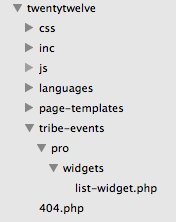
As for the shortcode and widget disparity, the shortcode actually just directly calls the widget instance; so with this in mind, then, does anything improve here if you just try adding no_upcoming_events=true to your shortcode? Like this e.g.:
[tribe_events_list limit="1" category="Home Page" Title="Forthcoming Events" no_upcoming_events=true]
October 13, 2015 at 12:56 pm #1014255ParticipantI’m guessing it must be something in the theme then that’s stopping it. Have over written the widget for the time being.
October 14, 2015 at 7:00 am #1014491ParticipantSorry about the trouble here @David – not sure why your custom template files aren’t working correctly…
For now I will close up this thread, but if these issues arise again open a new thread any time! Include a link back to this thread for context, if you think of it, and we’ll pick up where we left off.
Sincerely,
GeorgeOctober 29, 2015 at 7:05 am #1019711KeymasterThis topic has not been active for quite some time and will now be closed.
If you still need assistance please simply open a new topic (linking to this one if necessary)
and one of the team will be only too happy to help. -
AuthorPosts
- The topic ‘Hiding Widget via shortcode’ is closed to new replies.