

Forum Replies Created
-
AuthorPosts
-
October 13, 2015 at 8:22 am in reply to: Filter bar bug when browser window is resized to below 767px #1014143
George
ParticipantThank you for testing that Jessica! That unfortunately means that your custom theme is the source of this conflict; can you contact their support team and report this issue with them? They might be able to offer some help here.
We unfortunately do not help with problems from themes or other plugins, but I took a look at your events page regardless to see if I could learn more about the issues. I did not find any JavaScript errors or anything like that, so the conflict might be rather subtle here. Can you share your “System Information” with us as described here? → https://theeventscalendar.com/knowledgebase/sharing-sys-info/
Thank you!
GeorgeParticipantI’m sorry there’s not an easier way to do this Giles 🙁
As for hiring someone else to help you out, there’s not an official Users Group or something quite like that, but we do keep a list of highly-rated customizers here for folks who are interested in hiring someone → http://m.tri.be/18k1
I hope this helps!
GeorgeParticipantHey Bruce,
Thanks for the update here! I’m glad you’re on a good web host – and out of curiosity, what ended up being the source of the problem?
As for your question here:
Is the Events page fixed as narrow with sidebar?
This depends on the coding of your theme; if you’re not satisfied with the events template as it stands, one thing that might be helpful is to head into Events > Settings > Display in your wp-admin. On this settings tab, there’s an option called “Events template”. I’d recommend trying every available option here and seeing if any of them work better with the Events page.
Cheers!
GeorgeParticipantThanks for this System Information @Nicholas – things look good so I don’t think there’s a problem at core here other than our known bug that I mentioned previously.
I agree with you about this being a relatively show-stopping bug, and we’re working hard on a fix for this. I don’t have a specific ETA but we are hoping to get some maintenance releases out the door before Halloween!
ParticipantHey Lara,
I’m really sorry about this issue happening on your site – to get started on troubleshooting this issue, I unfortunately think the best step right now would be our complete set of conflict-testing steps described here → https://theeventscalendar.com/knowledgebase/testing-for-conflicts/
I recommend this because, based on your System Information, there is no indication of a plugin-version issue; i.e. when I try to recreate this problem on my own site with the same versions of the Tribe plugins as yours, I do not produce this problem.
Let us know if you can do those steps and, if so, what you find!
Thank you,
GeorgePS
I’m also really sorry about the delayed response here – we normally try to respond in 24 hours at most, and I “assigned” this issue to myself, but then it somehow didn’t show up in my support tools…really sorry about the delay!ParticipantHey Piluqui,
This question is unfortunately one that is mostly about the eCommerce platform you choose for our tickets add-ons, not the ticket add-ons themselves. For example if you want to use WooCommerce Tickets, then these issues of incomplete or abandoned orders are issues with WooCommerce itself – and are customizable! You have control over the behavior of abandoned orders and such, and there are many WooCommerce add-ons out there so there is probably one that lets you handle these types of incomplete orders a specific way…
For the most part, however, orders that are not completed will not show up in your admin and thus will not take up another ID number.
Cheers!
GeorgeParticipantHey Bart,
Thanks for your interest in the PRO plugin! This limit of 5 events is NOT anything imposed by our plugin(s) directly.
If you head to Events > Settings in your wp-admin, you’ll see this option which you should make sure is not 5:
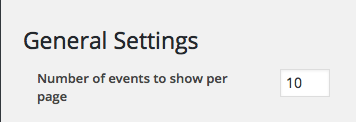
Then, head to Settings > Reading in your wp-admin – make sure these options are not 5:
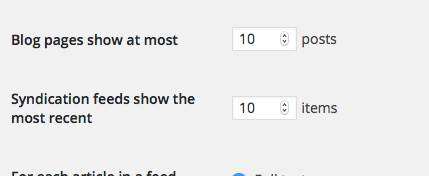
Then, unfortunately, if neither option here is set to 5, then that means another piece of software on your site is overwriting the events query 🙁 To figure out which software is causing the conflict, run through the troubleshooting steps here → https://theeventscalendar.com/knowledgebase/testing-for-conflicts/
I hope this helps!
— George
ParticipantHey @Elin,
This is possible but unfortunately only by customizing the tickets email templates in your plugins as described here → https://theeventscalendar.com/knowledgebase/themers-guide/
We don’t offer support for custom code but that guide covers a lot of details about this that should help immensely.
Let me know if that’s the case!
Cheers,
GeorgeOctober 13, 2015 at 6:41 am in reply to: Terms and Conditions checkbox not showing in Chrome Browser #1014047ParticipantHey Scott,
I’m really sorry to hear about this – unfortunately, it might not be related to WooCommerce Tickets. Can you try deactivating WooCommerce Tickets and then see if this issue persists?
Thanks,
GeorgeParticipantHey Craig,
Custom code snippets are something we offer when we can, to help resolve issues; but they’re not something we provide extended support for.
I just wanted to note this disclaimer – despite it, however, can you share a link directly to a page on your site where we can see the broken calendar widget in person? I’ll take a look and see what’s going on.
Thanks!
GeorgeParticipantHey Beth,
I’m sorry that imports are behaving this way!
It sounds like you’re using the built-in CSV Import function of The Events Calendar, is that right? (Just want to be 100% certain about the import method).
If so, can you first share a copy of one of your import files with us? One of the files that upon import, the post content is deleted? You can upload the file to http://ge.tt, and then share the download link in a “Private reply” here – only you and us on the Support Team will be able to see/access the link.
Once we have this, I’ll test and try to learn more.
Thank you!
GeorgeOctober 13, 2015 at 6:07 am in reply to: The Events Calendar is bringinh my Site Down after upgrade – Need Paid Support #1014028ParticipantI’m sorry to hear about this Carcal1!
There are three things I’d recommend here:
1. Contact your hosting provider immediately, and report this issue to them. There could be a server-side issue that they can help with, and/or they might have good advice about what files/plugins on your site are causing the issues specifically.
2. Run through our complete set of troubleshooting steps here, with one modification → https://theeventscalendar.com/knowledgebase/testing-for-conflicts/
The “one modification” being that after each step, you wait 20-30 minutes or so to see if your site goes down again.
This process is hugely important, and in the context of this issue, might save you a ton of time and money. Because if your hosting provider’s support isn’t very fruitful, then this step might reveal what specific code on your site is causing this. So if you find out that e.g. your just-updated theme is the culprit, you can contact their support before paying someone and see if they have a solution first.
3. Finally, paid support. If you’re interested in hiring someone, we have a list of highly-rated developers here → http://m.tri.be/18k1
I hope that helps!
Best of luck with your site,
GeorgeParticipantHey Nicholas,
I’m really sorry about this – it’s not quite “intended” behavior, but this is a known bug and we are working hard to fix this!
Just out of curiosity, can you share your site’s “System Information” with us? Here’s how to do that → https://theeventscalendar.com/knowledgebase/sharing-sys-info/
Thank you!
GeorgeParticipantHey Giles,
Unfortunately the only way to do something like this would be to customize the ticket emails as described in our Themer’s Guide here → https://theeventscalendar.com/knowledgebase/themers-guide/
I’m not sure if you’d consider that “relatively easy”, because it requires some custom coding along with the fact that we don’t offer support for the custom coding…
But if you’re interested in those methods, you can piece together the venue info with your own layout by using one of two methods: the first of which is to enter inline CSS in the template. The second method is to first go to /src/functions/template-tags/venue.php in your copy of The Events Calendar, which is a file that has all of the Venue-related display functions for The Events Calendar. So then you can customize the email template accordingly by removing the current venue-generation code, and then just replacing it bit by bid in the order that you would like.
Some combination of these methods would also work well 🙂
I hope this all helps!
Cheers,
GeorgeOctober 12, 2015 at 3:00 pm in reply to: Is there a way to create a calendar event from a blog post? #1013888ParticipantHey Bryan,
Sorry to disappoint but at this time there is no way to automatically turn an event into a blog post, OR to turn a blog post into an event 🙁
Sorry to bear that news! Let me know if you have any other questions,
George -
AuthorPosts