

Forum Replies Created
-
AuthorPosts
-
George
ParticipantHey Steve!
Thanks for your interest in our plugins 🙂
To answer your questions in reverse order, there is unfortunately no built-in way to have events post directly to Twitter at this time.
As for the functionality of recurring events, Events Calendar Pro DOES allow all of the recurrence patterns you gave as example – and more! To get a more detailed look at the way recurring events actually work, and all the options available, check out this knowledgebase article → https://theeventscalendar.com/knowledgebase/pro-recurring-events/
And note that we also have a no-questions-asked refund policy if you request a refund within 30 days of purchase. So if you try out Events Calendar Pro and find the recurrence features too limited, just request a refund and we’ll issue a 100% refund immediately.
I hope all of this info helps! 🙂
GeorgeOctober 13, 2015 at 7:43 pm in reply to: Does each plugin need to be purchased individually? #1014358ParticipantHey Patrick,
At this time all of the add-ons are wholly separate from each other and are sold as such, so if you want Events Calendar Pro, Eventbrite Tickets, and the Filter Bar, then you’d need to buy three separate licenses.
The way things work is essentially like this: The Events Calendar, the free “core” plugin on wordpress.org, is a fully-featured freestanding events plugin. It provides the events post type and such. Then, all other add-ons, including Events Calendar Pro, just embellish these core events and add more features to them. Each one is independent of each other.
I hope this information helps a bit!
Cheers,
GeorgeParticipantSorry to hear about this, @alisoncaron1344! I checked your user account and the license does appear to be active, with activation allowed until October 13 of next year…so it appears that the license is registered and working fine.
If you still find that issues persist, I’d recommend removing the license on your site; then, install the latest versions of The Events Calendar and Events Calendar Pro on your site if they’re not the latest versions already, which are:
• The Events Calendar v3.12.3 – http://wordpress.org/plugins/the-events-calendar
• Events Calendar Pro v3.12.1 – http://theeventscalendar.com/my-account/downloadsAfter updating, go to http://theeventscalendar.com/my-account/license-keys, and mouse over the site URL listed in the box for your Events Calendar Pro license. Use the “disconnect now” button to disconnect the URL.
Then, go back to this site’s wp-admin, and add the license key in the settings page again. See if anything improves! 🙂
Cheers,
GeorgeParticipantHey Fran!
We unfortunately don’t have RSVP functionality built into the plugin itself; but, you can add some functionality like you describe by using a free plugin one of our best developers has made in his spare time called “Event Rocket”. Both The Events Calendar and Event Rocket are free, download them here to play around with things and see if the combination will work well for you:
• https://wordpress.org/plugins/the-events-calendar/
• https://wordpress.org/plugins/event-rocket/Now, only offer limited support for The Events Calendar over on wordpress.org, and Event Rocket is not an official add-on so we offer no support for that either; but both pieces of software are free and I hope you can play around with them and get a feel for their features.
I hope this information all helps – let me know!
— George
ParticipantThanks for this information @Jamie! I checked out both links you provided and unfortunately did not find an outright JavaScript error on either page. With that in mind, then, your comments about customizations are interesting; do you mean that you have customized the map, single, and/or venue templates on your site already?
If so, then I’d recommend making a backup of these customizations. Once you have them backed up, try removing them from your site and see if any of these issues improve.
Let us know what you find!
Thanks,
GeorgeParticipantThanks for your input Nitin! Greatly appreciated. 🙂
ParticipantThis is great feedback Nitin, and an interesting idea! I will pass this feedback along and in the meantime you can post about it on our UserVoice page here → http://tribe.uservoice.com
As for your question here:
pls suggest us how to attach events with existing listings (other custom post type).
There is no way to do this in the plugin itself, but a popular solution for scenarios like this is the famous Posts 2 Posts plugin. It’s free, so check it out here! → https://wordpress.org/plugins/posts-to-posts/
I hope that helps 🙂
GeorgeParticipantHey Shannon,
There are a few ways to do this – the simplest might just be to use Events Calendar Pro widget filters. Basically, just create a category in which to put all of the “featured” events. Then, use the “Add filter widget option” as shown here:
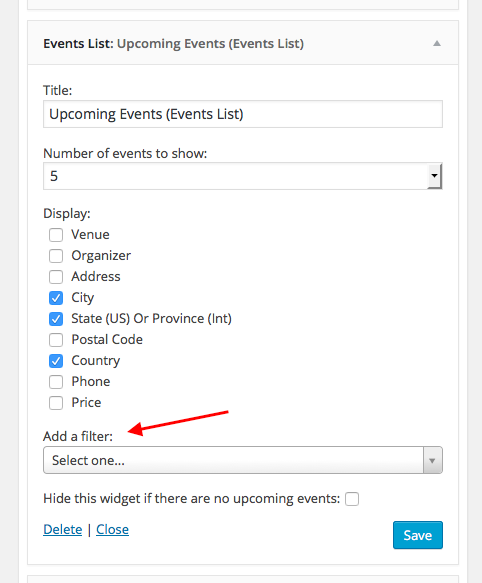
Don’t want an event to appear in the list? That should be fine as long as you don’t add it to the category. Only the events in the category will appear.
I hope this helps!
GeorgeParticipantHey Al,
We don’t have any special integration with Revolution Slider, but as long as that feature you showed in your screenshot just pulls all available post types (not just a select few post types from select few plugins), then our events should show up in that list. It’s something you can test for without buying any add-ons: just try installing the free version of The Events Calendar first, and then see if “Events” show up in that option in your screenshot.
You can then test them out and see if they’re compatible first-hand. I hope this information helps!
Cheers,
GeorgeParticipantHey Craig,
The original snippets of code were things meant to try and help a conflict coming from elsewhere on your site; in other words our software is working fine, but bad code within your theme and/or another plugin on your site are causing a JavaScript error on the page itself. This JavaScript error “Cascades” down the DOM and thus prevents the JavaScript down below, with our widget, from working correctly.
Unfortunately when I went back to your site I see the same referenceError Brian originally reported, coming from this URL:
http://www.realtor.org/sites/default/files/js/js_mvOBx446W38-RJpaYEwgvv0BFizY3AMy01XNs0EZRlI.js
Do you have any caching plugins or caching configuration on your site? If so, disable it completely and clear all caches, then take a look at the issues with the Events Calendar Pro widgets and see if they persist.
I want to be clear that I’m not saying we can’t help you at all here, Craig – I’m sorry if things came across that way. I just wanted to mention our “official policy” to keep expectations reasonable.
One thing you mentioned in the last issue with Brian was that even if you removed your Realtor Widgets temporarily, issues with the Events Calendar Pro widgets persisted. Can you remove these widgets again? I’ll take a look at your site in this state and see what issues persist in the Console.
Thank you!
GeorgeParticipantThanks for all of this information! There could be a software bug here; one important thing, however, is for me to test the CSV directly to see if maybe that file is playing a role in the problem.
Unfortunately, your http://ge.tt URL for me said the file was unavailable because the “upload was interrupted”:
Really sorry to ask again, but can you try uploading more time and then linking again? Apologies for the delay this causes; but I just want to be thorough here and see the CSV itself.
Thank you!
GeorgeParticipantHm, this is an odd character to appear because it’s just floating on your page in a “div” HTML tag, with no classes or IDs or anything like that…weird!
But yes, you should be able to hide that by adding the following CSS to the bottom of your theme’s style.css file:
body.single-tribe_events #tribe-events-content > div:first-of-type {

    display: none;

}
Let me know if that helps!
GeorgeOctober 13, 2015 at 8:49 am in reply to: Organizer Set as 'Draft' and not attached to event. #1014165ParticipantThanks so much for this information @Ryan!
I don’t encounter this issue on my site when I try submitting an event, so I’m wondering if you’d be able to test deactivating all of your non-Tribe plugins and then trying to submit an event again – does the issue persist?
Thanks for your patience here – trying to get to the bottom of this, as it could be a bug. Right now it does not appear to be, and appears instead to be a code conflict.
ParticipantHey @Andrea,
For your first question, about linking to the calendar page on the home page of your site, you can do this in any way by adding it to your menu, or hard-coding a link to the calendar page there, etc. This is a general WordPress question so explore on google for ways of adding menu items to a WordPress site if you’re curious for more! 🙂
—
As for your second question, I unfortunately wasn’t able to see the sort of issue you’re describing…this is all I see on your site when I look at events on your events page:
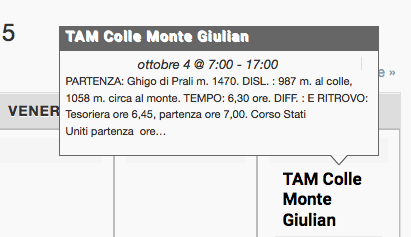
I don’t see the XML you posted in the source code of the site, either 🙁
Sorry my misunderstanding!
What is the specific problem on your site? You can boil it down to this: what is currently happening, and what do you want to happen instead?
Thank you for your patience!
GeorgeParticipantThanks Lukas! Keep us posted 😀
-
AuthorPosts