
Home › Forums › Calendar Products › Community Events › Featuring an event
- This topic has 4 replies, 3 voices, and was last updated 10 years, 11 months ago by
Support Droid.
-
AuthorPosts
-
October 13, 2015 at 10:30 am #1014205
Jason Stein
ParticipantHello,
I wanted to know if there is a way, and if so how, we can choose or select which events we want to feature on our homepage? Currently they are featured by date, but I would like to specify which events we highlight. Can you please let me know how to do this?
Thank you.
October 13, 2015 at 11:31 am #1014227George
ParticipantHey Shannon,
There are a few ways to do this – the simplest might just be to use Events Calendar Pro widget filters. Basically, just create a category in which to put all of the “featured” events. Then, use the “Add filter widget option” as shown here:
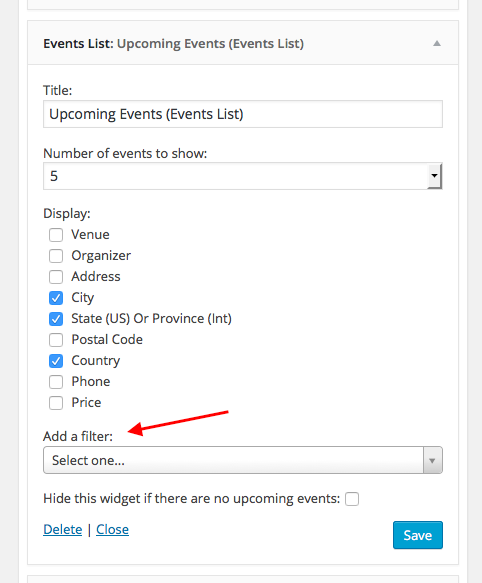
Don’t want an event to appear in the list? That should be fine as long as you don’t add it to the category. Only the events in the category will appear.
I hope this helps!
GeorgeOctober 13, 2015 at 3:26 pm #1014311ParticipantThank you, I am not sure you understood my question, although this was helpful. On our homepage of our website, we feature three events – http://www.svmbc.org. In the past, when we entered an event, there was a box that we would check that would allow that specific event to be featured on our homepage. However I do not see this option any longer. Can you please let me know how we can do this?
Thank you.
October 14, 2015 at 7:11 am #1014515ParticipantHey Shannon, really sorry to hear about this!
In the past, when we entered an event, there was a box that we would check that would allow that specific event to be featured on our homepage. However I do not see this option any longer.
Whatever option that was, it isn’t generated by or part of The Events Calendar or any of our add-ons, so your theme or another plugin on your site is where that check box comes from. I’d recommend contacting your theme developer for starters to see if their theme is what provides that feature.
Unfortunately there’s not much light to shed on this issue – the widget tip I shared is a way to show a select number of events; if you would like to show a selection of events another way, you’d unfortunately have to delve into custom code. We offer no support for custom coding, but do have these two pieces of documentation that are thorough and might help more than you’d think:
• https://theeventscalendar.com/knowledgebase/using-tribe_get_events/
• https://theeventscalendar.com/knowledgebase/themers-guide/If you can’t custom code the solution and/or don’t find the widget suggestion useful, then the only remaining actions are as follows:
• contact the theme developer and/or the plugin developer who added that “add to home page” checkbox
• hire a customizer to build this functionality for you; we have a list of customizers here if you’re interested in this route → http://m.tri.be/18k1Sorry to bear some of this disappointing news – let me know if you have any other questions, comments or concerns on this topic or anything else!
Sincerely,
GeorgeOctober 29, 2015 at 7:05 am #1019712KeymasterThis topic has not been active for quite some time and will now be closed.
If you still need assistance please simply open a new topic (linking to this one if necessary)
and one of the team will be only too happy to help. -
AuthorPosts
- The topic ‘Featuring an event’ is closed to new replies.