
Home › Forums › Calendar Products › Filter Bar › Make All Events link go to Category
- This topic has 6 replies, 3 voices, and was last updated 10 years, 12 months ago by
Support Droid.
-
AuthorPosts
-
October 6, 2015 at 1:09 pm #1012038
Sean
ParticipantHi,
I am basically trying to do what this person asked: https://theeventscalendar.com/support/forums/topic/all-events-link/ I have the template file open and understand where to edit the code, but I can’t figure out the correct code. I need to replace this:
<p class="tribe-events-back"> <a href="<?php echo esc_url( tribe_get_events_link() ); ?>"> <?php printf( __( '« All %s', 'the-events-calendar' ), $events_label_plural ); ?></a> </p>With?
Thank you!
October 7, 2015 at 5:40 am #1012193George
ParticipantHey Sean,
We don’t officially offer any support for custom code, but I’m happy to help here because this should be a fairly simple, straightforward tweak to make. You should be able to use the same function that Casey recommended in the original thread you linked to: get_term_link().
His example was as follows:
<a href="<?php echo esc_url( get_term_link( $your_category_id, 'tribe_events_cat' ) ); ?>">
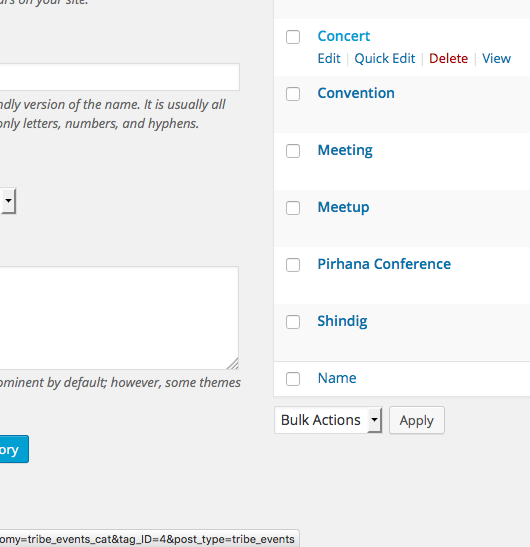
Replace the variable $your_category_id with the ID of the events category you would like to link to. You can find the category ID by going into your admin and going to Events > Event Categories, then hover your mouse over the category you would like to link to.
When hovering over the category, the URL in the bottom of the browser should have a parameter in it like &tag_ID=4 or something. This number is the category ID. Check out this screenshot for example, and see the URL in the bottom left as I hover over the “Concert” category name:
I hope this helps – best of luck with your customizations!
— George
October 7, 2015 at 8:58 am #1012363ParticipantI still don’t understand, if you can please help. I don’t see any reference in documentation for get_term_link or tribe_events_cat. I replaced the code with:
<a href="<?php echo esc_url( get_term_link( 6, 'tribe_events_cat' ) ); ?>"> <?php printf( __( '« All %s', 'the-events-calendar' ), $events_label_plural ); ?></a>This changed the All Events to a specific category, which is ok, but I need the category to display just as the same in Event category in details:
Can you tell me how to pull the category of the event being displayed? I figured it would be in the single-event.php page already, but can’t seem to find it in the code.
October 9, 2015 at 7:56 am #1013151ParticipantHey Sean,
We don’t offer any support for custom code, so unfortunately I cannot lay out the code for how to get everything working and looking as you hope. One thing you asked, however, is this:
Can you tell me how to pull the category of the event being displayed?
Do you mean that you want to get the categories for the currently-viewed event? This seems to be the case based on your comment about already having tried looking in single-event.php…
Assuming this is what you mean, then getting the category or categories for the currently-viewed event is possible with built-in WordPress function get_the_ID(). This does the magic of getting the Post ID for the currently-viewed item; so in the context of events, for example, just use this function and the tribe_get_event_categories() function together like this:
tribe_get_event_categories( get_the_ID() );
If you want to learn more about this function, check it out in the plugin directly here: the-events-calendar/src/functions/template-tags/general.php
Best of luck with your customizations!
— George
October 13, 2015 at 6:32 am #1014041ParticipantThis reply is private.
October 13, 2015 at 8:54 am #1014169ParticipantHm, this is an odd character to appear because it’s just floating on your page in a “div” HTML tag, with no classes or IDs or anything like that…weird!
But yes, you should be able to hide that by adding the following CSS to the bottom of your theme’s style.css file:
body.single-tribe_events #tribe-events-content > div:first-of-type {

    display: none;

}
Let me know if that helps!
GeorgeOctober 28, 2015 at 7:05 am #1019286KeymasterThis topic has not been active for quite some time and will now be closed.
If you still need assistance please simply open a new topic (linking to this one if necessary)
and one of the team will be only too happy to help. -
AuthorPosts
- The topic ‘Make All Events link go to Category’ is closed to new replies.