

Forum Replies Created
-
AuthorPosts
-
George
ParticipantHello,
I tried going to the URL you provided for this site, to check out the issue in person, and unfortunately I could not access the site. See this screenshot:
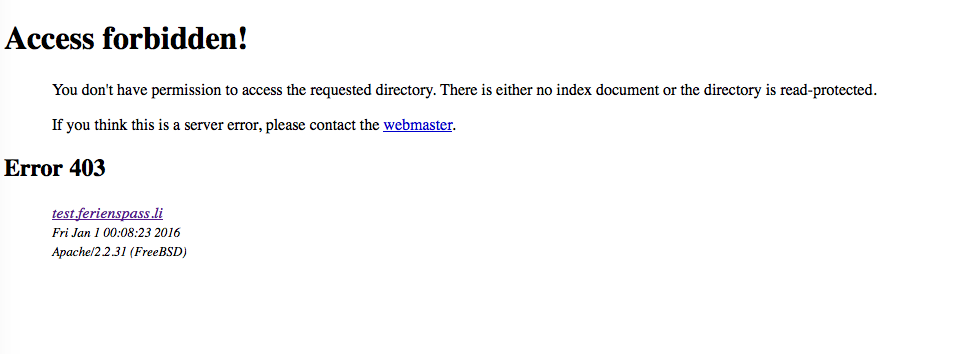
Since we are not allowed to log into customer sites, can you temporary ensure that the link you provided is publicly accessible? I will take a look at the page if so.
Thank you for your patience with our delayed response over the holidays!
GeorgeParticipantHey Vikas,
Thanks for describing these tests. What they reveal is that the page template from your theme (which is labeled “Default Page Template”) is broken in some way to prevent proper calendar functioning with the theme’s “Default Page Template” template.
To get your customized layout for the calendar, with the right-sidebar, you should contact the theme developer to help troubleshoot the broken theme template and see if you can get the sidebar to display properly with the calendar.
Alternatively, you can custom-code your own theme templates with sidebars and then use those templates instead. However, this is something you’d have to code yourself or hire someone to code for you.
I’m sorry that with both the WP Member plugin conflict, and the theme page template conflict, there is not much we can do 🙁 With this in mind, I will close up this thread for now. If you have other support issues, open a new thread any time.
Best of luck with your project,
GeorgeParticipantI hope the (awesome!) code that Brook shared here helps @dcanto! For now, I will close up this specific thread. While we cannot help further with customizations, if any issues with the plugin arise open a new thread any time! 😀
Happy New Year,
GeorgeParticipantThanks for your patience with my delayed response over the holidays here!
In regards to adding a small notice, this is something that should have displayed in our plugin…I’m not sure why the notice did not display. I will investigate the code for a bug here and make a bug report for our developers if I find one.
For now, I’ll close up this thread, but feel free to open a new thread any time if other issues arise.
Sincerely,
GeorgeParticipantThis may be possible in the future, though at this time there is not a feature update coming in the near future that would achieve this. I’m sorry to disappoint!
If you don’t need and/or are unsatisfied with the license, we can definitely issue a refund for your license! We unfortunately cannot do it if your purchase is older than 30 days, because of our payment processors, but you can follow the steps for a refund here if you’re still interested → https://theeventscalendar.com/knowledgebase/refund-policy/
I will close up this thread for now.
Thanks,
GeorgeDecember 31, 2015 at 2:49 pm in reply to: Looking for functions to display various informations #1048610ParticipantSorry to disappoint @Cesar 🙁 Thanks for understanding and for being patient with my delayed response here over the holiday season.
Best of luck with your project!
GeorgeDecember 31, 2015 at 2:47 pm in reply to: Events Calendar PRO Map View: sorting by distance #1048608ParticipantHey @Sarah,
Thanks for your patience with my delayed reply here over the holidays – yes, if you need distance-filtering that works in a way other than what’s already in the plugin, then that’s technically a feature request.
We appreciate the feedback! This is not the sort of thing that we can turn around and implement in one release, but stay tuned to plugin updates and always read the “changelogs” in their release notes to see what new things are included in the update. If something like this ever makes it into the plugin, it will be noted there and on our blog here → http://theeventscalendar.com/blog
I will close up this thread for now, but if any other issues arise open a new thread any time! 😀
Cheers,
GeorgeParticipantI’ll close up this thread for now, if other issues arise open a new thread any time! 😀
Cheers,
GeorgeParticipantHey @fifteen15studios,
Events Calendar Pro is NOT REQUIRED for any add-ons – only The Events Calendar is.
For Event Tickets and Event Tickets Plus specifically, you do not even need The Events Calendar. They work well together, but if you don’t need The Events Calendar, you can just use Event Tickets and Event Tickets Plus together installed and activated on the same site.
—
Second, can we decide what information we need to take from the user for each ticket? For example, if a person buys two tickets, we want them to provide the names of both attendees, tell us if they have any dietary restrictions, choose from one of three meals, and have them tell us whether they need wheelchair accommodations. Is this something we can do with this plugin?
This is unfortunately not possible without some extensive code customization at this time. 🙁
—
Also, does this save into some sort of database in our admin section if a person purchases a ticket, such as what kind, and all the above metadata? Can I export this as a CSV or something?
The data indeed exists inside a SQL database, from which you can export into a number of formats. This process is not related to The Events Calendar / Event Tickets themselves, however, and so we cannot help much with this – if you need to export your database contents in a specific way, your best bet would be to search for things like “how to export SQL to CSV”, for example…
—
Also, lastly, and importantly, what payment services can this use? Is Authorize.net an option? I thought I saw that it was, but I can’t find where I saw that.
Any of the officially-supported WooCommerce Gateways should work fine alongside our ticketing plugins. You can see all the gateways here → https://www.woothemes.com/product-category/woocommerce-extensions/payment-gateways/
Cheers!
GeorgeParticipantHey @dcantato,
There’s unfortunately not a simple or straightforward way to go about this sort of customization 🙁 It’d require some rather complex rewriting of aspects of our code, which is information I’m sorry to have to share!
If you’re not able to build this out yourself, I’d recommend hiring a professional developer like the ones we have listed here → http://m.tri.be/18k1
Cheers!
GeorgeParticipantHey @dcantato,
This configuration is unfortunately not possible at this time in any simple or straightforward way 🙁
If there are 20 events in the Map, they will show in the list view below it by default.
The only simple way I can think of for getting around this is to set the “Number of events per page” option on the “General” settings tab to whatever number you’d like. This settings tab is in Events > Settings in your wp-admin.
Then, you could add custom CSS to hide list view events other than the top 5 items, like this:
#tribe-geo-results .type-tribe_events {

    display: none;

}
#tribe-geo-results .type-tribe_events:nth-child(1),
#tribe-geo-results .type-tribe_events:nth-child(2),
#tribe-geo-results .type-tribe_events:nth-child(3),
#tribe-geo-results .type-tribe_events:nth-child(4),
#tribe-geo-results .type-tribe_events:nth-child(5) {
display: inline-block;
}
This CSS will hide all of the list view items under the map on Map View; but then selectively only show the first 5 items. Just an example of how you could pull this off…
I hope this helps!
Cheers,
GeorgeParticipantHey @websource,
Community Tickets is NOT fully compatible with EDD at this time, it works the best with WooCommerce by a wide margin.
As for its higher-than-normal price, this is because all of our other add-ons are very specifically meant for consumers, for folks with individual sites and they’re using the add-on to add features to that site.
With Community Tickets, however, this is an add-on for businesses; you can build an entire marketplace with Community Tickets, an entire business on it. With this in mind and the complicated nature of the plugin’s development itself, the price is thus elevated above our more consumer-oriented add-ons.
I hope this information helps!
Cheers,
GeorgeParticipantHey Matt,
Thanks for reaching out.
Adding columns as you describe is indeed possible, but unfortunately would require custom coding by yourself or by a professional developer that you hire to implement that for you. 🙁
I’m sorry that it’s not a simpler process for now. Please let me know if I can help with anything else!
— George
ParticipantHey @Quentin,
There are numerous incompatibilities that still remain with WPML at this time 🙁
While it’s true that things are better now than in earlier versions, issues persist and we have many of them on our radar for fixes in the future.
If tickets do not even show up on the front-end, I’m wondering – have you set up WPML with The Events Calendar as specifically directed in this knowledgebase article? → https://theeventscalendar.com/knowledgebase/setting-up-the-events-calendar-with-wpml/
If not, I would recommend following the steps of that article for integrating things anew and seeing if any difference is made.
Otherwise the best that can be done here is, unfortunately, for me to just make a development ticket so that we can try and fix this in a future update 🙁
Cheers,
GeorgeParticipantHey Philip,
I’m really sorry about that! That was simply a mistake on my part, I clicked the “Close thread” button. Sorry for the trouble!
—
Now as for these issues, thank you for sharing your system information…there doesn’t seem anything out of place there, so I went to my own site and recreated an event with the exact configuration you have in your screenshot (thank you for sharing that!).
There are two things to note from when I did this:
1. The event generated fine and its exclusion for June 1 2016 was fine.
2. However, I was not able to recreate your second exclusion because it doesn’t seem to be a valid date! This may be the source of the problem. Look closely at the date for that second exclusion in your screenshot – the date there is 13/1/2016, but your date format elsewhere in the admin in your screenshot is Month/Day/Year, so this 13/1/2016 date would be pointing to some nonexistant 13th month..
How did you do this, do you remember?
Also:
3. If you make another event with the same exact configurations EXCEPT that you change the second date to be 12/1/2016, then publish this event, does that make things work any better?
Thanks for your patience with this!
Cheers,
George -
AuthorPosts