

Forum Replies Created
-
AuthorPosts
-
George
ParticipantHey folks, I closed this thread prematurely, it was just a dumb accident and mistake on my part. Sorry Philip!
The conversation is being continued here → https://theeventscalendar.com/support/forums/topic/recurring-event-weekly-but-on-different-days-2/
— George
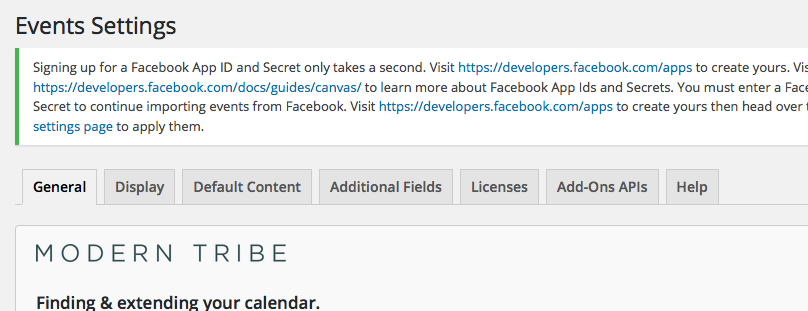
ParticipantI’m sorry to hear this @Josiah – do you have a tab in your Events settings screen called “Add-ons APIs”, like here in this screenshot? The tab in question is the second from last, right before the “Help” tab:
— George
ParticipantHey there! Sorry to hear about these issues. Hopefully these questions and the answers they elicit will provide a clearer understanding of what’s happening:
We limit display of recurring events to 3 per day
1. How specifically do you impose this limit of 3 per day?
2. I noticed that your “Events Page” slug and single events slug are the same, as illustrated in your System Information:
eventsslug = calendar

singleeventslug = calendar
If you ensure that these are different, then save your changes, does anything improve with the issues you’ve reported here?
— George
December 22, 2015 at 7:58 am in reply to: There is an update available for The Events Calendar PRO but your license key ha #1045389ParticipantHey @Howard,
I’m sorry to hear about this – when you enter your license key, does the license key “stick” in the license key field? Or does the license key vanish from the field when you click “Save Changes”.
Also, I noticed in your system information that Events Calendar Pro is at version 3.12.6 on your site, which is out of date. If possible, update Events Calendar Pro form inside your wp-admin if there is an “Update” button for it on the Plugins page.
If not, then at this time I would recommend just manually updating Events Calendar Pro to 4.0.2 and seeing if anything improves here – you can find the files for a manual update like this by heading to http://theeventscalendar.com/my-account/downloads
Cheers,
GeorgeParticipantHey @websource,
It’s unfortunately not possible to add checkout fields to the RSVP ticket type at this time 🙁
It may be possible with custom coding, but you’d have to write that custom code yourself and/or hire a professional to write it for you.
I’m sorry to bear this news!
Sincerely,
GeorgeParticipantHey @oniregoc,
I didn’t mean to make you angry at all, and would love to help as much as possible.
However, we cannot help with custom code as stated here in the “Product Support” section → http://theeventscalendar.com/terms
—
With that being said, can you elaborate on your questions that you still need help with? I will help as much as possible!
Sincerely,
GeorgeDecember 22, 2015 at 7:46 am in reply to: Is there any way to embed this calendar into a website? #1045378ParticipantHey Javier,
If you just need to create a calendar like on wpshindig.com/events, you can indeed do that with The Events Calendar.
However, if you’d like to take the same calendar and embed it into more than one place, that is unfortunately not possible 🙁
Cheers,
GeorgeParticipantI’m sorry @oniregoc, but we cannot help troubleshoot custom code problems here 🙁 I’m sorry! But I will have to close up this thread for now. Please read the “Product Support” section of our site terms here for more information → http://theeventscalendar.com/terms
Cheers,
GeorgeParticipantHey @Sebastian,
To learn about customizing emails, I would recommend that you first learn about the best way to customize The Events Calendar’s views in general by reading this → https://theeventscalendar.com/knowledgebase/themers-guide/
Once those general principles are in mind, you can apply those principles to this file in your Event Tickets plugin files:
event-tickets/src/views/tickets/email.phpMake good backups of your changes along the way and tinker around with this a bit, an you should be able to start customizing things successfully.
Cheers!
GeorgeParticipantHey Jake,
This appears to be the specific event that has the date and time configuration you mention here → http://www.employmenthelp.org/workshop/resume-is-the-word-grimsby/2016-01-21/
Can you view the “edit” page for this event in your site’s wp-admin, and share a screenshot of Event information metabox on the event? This is the box in the screen where you set the start date and time, the end date and time, the recurrence info, et cetera…
You can do this by uploading the screenshot to Imgur.com, Flickr.com, CloudUp.com, or any similar image-hosting site; then just share the links to those images here and I’ll take a look.
Thank you!
GeorgeParticipantHey Kristine,
1. On the event that has this “Free – 10€” cost display, do you have any “Free” tickets? Do you have any RSVP tickets?
2. Please link to this event directly on your site, I’ll take a closer look 🙂
3. Can you share your system information? Here’s how to do that → https://theeventscalendar.com/knowledgebase/sharing-sys-info/
Cheers!
GeorgeDecember 22, 2015 at 6:40 am in reply to: The Events Calendar Pro comply with the W3C Validator and AA #1045338ParticipantHey George,
Depending on what HTML Doctype your theme declares, our code is indeed valid HTML. Our code is valid HTML5, but for previous versions of HTML you should expect some “notices” and “warnings” about The Events Calendar use of data attributes and such…
As for accessibility, admittedly there may not be 100% compliance here. 100% is the number we are chasing in terms of compliance with accessibility norms, but at this time there are likely some inconsistencies when The Events Calendar’s output is rendered by screen readers or other similar devices.
I’m sorry that this isn’t a simple “Yep, 100% to both!” sort of reply, but just being candid here and hope the information is clear and helpful. Let me know if this is the case and/or if you have any other questions!
Sincerely,
GeorgeParticipantHey Thiago!
Unfortunately there are not any features for this within our plugins directly 🙁
The best option would be to find another plugin to handle these access-control features. A popular option for that is this plugin here → https://wordpress.org/plugins/restrict-content/
There are many other similar plugins out there, you should be able to find one you like fairly easily.
I’m sorry that this isn’t a feature built-in to The Events Calendar or Event Tickets, but hope this information helps!
Cheers,
GeorgeDecember 22, 2015 at 5:42 am in reply to: What happens when two people try to buy the last ticket? #1045126ParticipantHey Roberto,
Thanks for reaching out.
At this time, there is not a 15-minute lock-out like you mention for when the last ticket is trying to be purchased…
Currently, if there are many requests hitting your server to buy that last ticket, the first order to finish the checkout process is the one that will get the ticket. The others will not.
To have any more customized or specific version of this would require custom coding, unfortunately.
Thanks,
GeorgeParticipantHey @Anthony,
Thanks for reaching out! 🙂
There is a system within Events Calendar Pro that will “Clean up” some old events if they are part of a recurring event series.
Other than that, there is not a cleanup system like this, and there is also unfortunately not a system that cleans up the media files associated with events as you describe…
I hope this information helps!
George -
AuthorPosts