

Forum Replies Created
-
AuthorPosts
-
January 14, 2016 at 12:38 pm in reply to: Plugin conflict preventing search bar from working. #1056181
George
ParticipantThanks for clarifying things and testing, Jon – that custom theme is indeed the source of the problem here.
Did you code this theme on your own? If you had another developer do so and/or bought this theme from somewhere, definitely reach out to these parties for assistance with this. (Apologies for not being familiar with the Hollowells theme).
I’m sorry about the nature of this conflict but am glad that its source has at least been identified.
Please let me know any further thoughts you have here or if there is anything else I can help with.
Thank you,
GeorgeParticipantHey @Jenna,
The ‘limit’ attribute should be working here – do you find that it does? For example, to increase that number to 100 items, try this:
[list_venues limit=100]I hope this helps! If this does not help, then in your reply can you share your “system information”? Here’s how to share that → https://theeventscalendar.com/knowledgebase/sharing-sys-info/
Thanks,
GeorgeParticipantHey @Kathleen,
Thanks for reaching out. This a tricky issue and unfortunately, we cannot help with customizations or with any problems that arise as a result of customizations. 🙁
That being said, you might be able to get things to load/refresh by adding some code like the following to your theme’s functions.php file:
add_action( 'wp_footer', 'tribe_support_1056073' );function tribe_support_1056073() {
?>
<script>
jQuery(window).load(function(){
if ( typeof tribe_events_calendar_ajax_post == 'function' ) {
tribe_events_calendar_ajax_post();
}
});
</script>
<?php
}
I do not know if this will solve your problem 🙁
But it might help!
Thanks,
GeorgeParticipantHey Lisa,
Really sorry to hear about these issues on your site!
You mention using version 4.0 of both plugins; however, can you still share your “system information” with us so that I can see the versions of other plugins and other information about your site? Here’s how to share “system information” → https://theeventscalendar.com/knowledgebase/sharing-sys-info/
—
You mention having made customizations and there are clearly some on your site – these may be the factor here.
If you back up, and then temporarily remove, your customizations, does the problem persist?
We are unfortunately not able to help with customizations or with issues that arise as a result of customizations, but let me know what you find by testing this! 🙂
Thank you,
GeorgeParticipantHey @Birgit,
I’m sorry about this issue on your site! I checked out your site to investigate but was not able to identify the problem.
To help us investigate this, can you share your “system information” with us? Here is how to do that → https://theeventscalendar.com/knowledgebase/sharing-sys-info/
I will continue to investigate from there.
Thank you!
GeorgeParticipantHey Peter,
I’m sorry about the information overload here!
Out of all the products you listed there, only two are relevant at this point in time:
• Event Tickets [free]
• Event Tickets Plus [$89 and up]These two plugins replace all of the other ones you listed, which were our old plugins for tickets.
So, to clarify what these plugins do, Event Tickets is a free “core” plugin that lets you sell free RSVP slots to events on your site.
If you would like to then sell “paid” tickets and collect payments for these paid tickets, you would install Event Tickets Plus on your site (alongside Event Tickets; both plugins active and installed).
Then, you would be able to sell tickets and collect payments.
Does this information help at all? Let me know!
— George
ParticipantHey @xwenieeeorg,
I’m really sorry to hear about this. We’ve had some issues with this in the past related to various types of domain names, but some recent code updates we’ve shipped in late 2015 should’ve resolved most of these sorts of issues.
To help investigate this, can you share your “system information” with us? Here’s how to do that → https://theeventscalendar.com/knowledgebase/sharing-sys-info/
Thank you,
GeorgeParticipantHey @Rebecca,
I’m sorry to bear this news but this is indeed a result of your theme. Your theme is somehow restructuring much of the default markup of The Events Calendar. We cannot help with theme-related issues like this, unfortunately, so your best bet to truly get things looking as you hope is to contact the theme developer.
That being said, I took a look anyways and played around with some code because I want to at least try and help! I was able to make some progress with the following CSS; I would recommend pasting this into the very bottom of your theme’s style.css file:
#tribe-events-content div.cmsms_icon_list_item_content {

    margin-right: 4% !important;

}
For further tweaking you would have to turn to your theme developer, but I hope this makes a difference and helps keep the text from being cut-off.
Sincerely,
GeorgeParticipantHey @Nyna,
Thanks for reaching out and for the kind words about our plugins.
I’m very sorry about the frustrating lack of Community Events add-on compatibility with WPML! 🙁 This is something we are hoping to finishing in the coming months, but I unfortunately do not have a specific ETA.
It is not something that would be fixed by the end of this month, for example, and will likely not be fixed in February either. I unfortunately do not know the plans for things beyond that.
Please let me know your thoughts here; I’m sorry that I don’t have any more specific ETA information. If there’s anything else I can help with, let me know.
Sincerely,
GeorgeParticipantHey there,
If you head into your wp-admin and to Events > Settings > Default content, there are two options that let you set default Organizer and default Venue, like this:
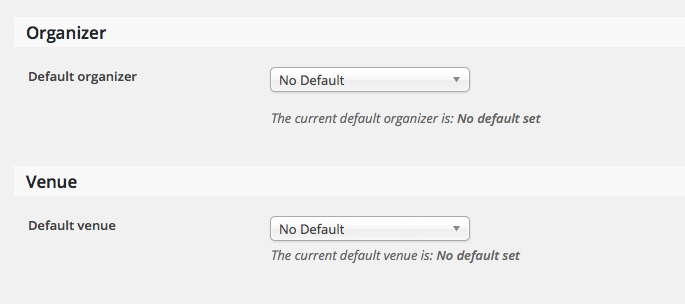
If you set the defaults and save the settings, that should do the trick!
Let me know if this helps,
GeorgeParticipantHey Marvin,
Thanks for reaching out!
The items you list here are indeed mostly possible, in some sense, but not quite in the way it sounds like you are envisioning. I will address each point below with more detail, however just to be clear off the top, there isn’t a “Scheduler” system that any of our plugins come with. I.e. there is not a central place where you can book appointments and such; each event is its own standalone event, and buying a ticket on this specific event is the only thing our plugins support.
On to your specific points to elaborate on this:
1. Appointments can be made Monday to Friday.
YES – You can make events that take place any time or day..
2. There are 8 time slots available per day.
YES – You could not use recurring events for this, because recurring events do not support tickets at this time. But you could definitely have each “slot” be a single one-hour long event.
3. But only 4 appointments can be accepted each day. Once 4 slots are taken no more appointments can be accepted.
NO – at this time, the best you could do here is set a max number of tickets PER EVENT, or “PER SLOT” in your case. So, you could set the number of tickets to 1 per event, so that only one ticket can be bought per event (which would be one “appointment” “booked” per hour). But you could not limit this to only 4 total slots/tickets per day with our plugins as they are at this time. 🙁
4. Site visitors that use the scheduler can reschedule the appointment.
NO – There is not a system for users to go into any part of their admin or the front-end of the site and change their ticket times, etc.
5. Option to open up more slots and appointments on a given date, example on Feb. 15, make 15 slots available and accept 8 appointments.
YES/NO – YES you could add more events on a certain date if you wanted. However, see my response above to your question #3 – regardless of quantity of appointments, there is not a way to have a limit of tickets sold per day, only per-event.
6. Payments are not needed to set an appointment.
YES – Event Tickets’ default option is the “RSVP” option, which is free and has no checkout process.
For your needs, since you are not charging money (or at least not collecting payments for the appointments), you actually do not need any of our premium plugins. You can get all necessary calendar features mentioned above and the free-RSVP “ticketing” feature by simply having these two free plugins:
• Event Tickets → http://wordpress.org/plugins/event-tickets
• The Events Calendar http://wordpress.org/plugins/the-events-calendarSo, definitely try installing both plugins and playing around with them first-hand if you’re curious. And let me know if you have any other questions!
Sincerely,
GeorgeParticipantHey Steve,
Good questions – apologies for not clarifying some of our account/user login configurations thus far.
You unfortunately cannot really register an account here unless you buy a license; accounts are created in the checkout process. Once you have one account you can just keep using that account for all your other licenses.
However, at this time you cannot buy Events Calendar Pro and then have access to all other licenses/downloads. Each license only comes with one license key and one download/access to that one specific plugin.
So, unfortunately to “trial” or “demo” another plugin, at this time the process is to buy a license, play around with the plugin, and then if you need to refund it because it’s not for you, request a refund within the first 30 days after your purchase using the steps here → https://theeventscalendar.com/knowledgebase/refund-policy/
So, when you ask this:
if I purchase a single license for Events Calendar Pro will this allow me to download and try out ALL of the other plugin PRO versions?
No, this is the not the case 🙁
I’ve checked out the ‘Orders’ screenshot for the Community Tickets PRO plugin and from this it would appear that each event organiser would register on our site and they provide their email address related to their paypal account and that we can set a commission rate. Am I correct?
Yes, this is correct 🙂
— George
January 14, 2016 at 10:15 am in reply to: Plugin conflict preventing search bar from working. #1056112ParticipantJon, this is great news as this confirms that there is a code conflict somewhere on your site. As far as where this leaves you with support, you are not necessarily on your own, but there is further investigation I would recommend to try and isolate the specific cause of your problems.
First, let’s see if your own code customizations are the culprit.
To test this, put your site back in the state you put it in in your last reply above; when you said “the Find Events search facility WORKED”.
Return things to this state, but then add one more change: which is to add your customizations back onto your site. Do not change anything else other than adding these customizations back.
Does the searching work still?
1. If NOT, then your custom code is the problem and we can proceed from there.
2. If it DOES still work, then your custom code is NOT the problem and you can leave it in place for now. I would then recommend re-activating your custom theme (i.e., whatever them you are using that is not Twenty Sixteen). When you re-activate the theme, does the search work? If NOT, then your theme is the source of the problem. If it DOES still work, then your theme is NOT the problem and so then I would recommend activating every other plugin on your site, one at a time, and after EACH plugin activation, go back and see if the search works. If after any specific activation, the search fails again, then that last-activated plugin is the culprit.
Thank you for your patience here!
Let me know the findings of the above testing.
Sincerely,
GeorgeParticipantThanks Mark! 🙂
Best of luck with your project,
GeorgeJanuary 14, 2016 at 10:10 am in reply to: Activating plug-in results in not being able to customize theme #1056108ParticipantThank you so much for your testing!
This comment of yours reveals that the Goodwork theme itself is the source of the problem.
I activated Twenty Fifteen with the EC Pro plug-in activated and the Customize screen displays correctly.
If this is the case, then there is a code conflict arising from the Goodwork theme. We unfortunately cannot delve into the code of other themes/plugins, so the next step from here is to reach out to the Goodwork team and see if they can find the bug/conflict here and help resolve it.
In the meantime, just to try and make some effort in finding out that conflict, if you are willing to do this I would recommend seeing any errors pop up on your site if you head to your site’s wp-config.php file and change this line of code:
define('WP_DEBUG', false);to this:
define('WP_DEBUG', true);That will display PHP errors if any exist, which might be quite useful here.
Once you make this wp-config.php file change, make sure the Goodwork theme is active and then try to use the theme customizer. When you do this, do any errors pop up? If so, what are they?
This may be useful, although if the problems are JavaScript-related then unfortunately this step will not reveal that error.
I’m sorry about this situation but hope that reaching out to the Goodwork theme team helps you move forward with your project.
Thank you,
George -
AuthorPosts