

Forum Replies Created
-
AuthorPosts
-
George
ParticipantHi @jrummel,
Our support thread response times are a response within 24 hours. Thank you for your patience.
I am writing up a response and trying to investigate why your files might not be loading, but just in the meantime here, if you are curious about skeleton/full/tribe-events styles and what loads with each, the simplest way to see this is in the src/resources folder of The Events Calendar’s plugin files. The file names there reflect which option they load under; so, tribe-events-skeleton.css is the only CSS that loads in Skeleton mode. In “Full” mode? tribe-events-full.css. And so on. When the full “tribe events” theme stylesheet mode is active, every minified CSS file will load there except for the tribe-events-skeleton files.
In regards to JavaScript, where you see a file name with a specific view in its name, that file only loads on that view; so, tribe-events-ajax-list.min.js only on List View, tribe-events-ajax-day.min.js on Day View, and so on.
Then tribe-events.min.js loads everywhere on the front-end calendar views.
To come back to the failure of scripts being loaded on your site, I notice that all of the asset URL’s are relative. So, instead of being http://yoursite.com/path/to/some/file.css, for example, the stylesheet paths are just /path/to/some/file.css – there is no absolute URL for the assets, which is how things are by default with WordPress so this has been modified somehow on your site.
How are you making your site load things with relative paths instead of the default configuration which uses absolute paths?
(I am talking about http://trailnet.org/calendar/, because your other site is a local site and so we cannot see it or troubleshoot on it).
Thank you,
GeorgeJanuary 14, 2016 at 9:53 am in reply to: Recurring Events on the Same Day & Recurring Events Featured Events #1056101ParticipantHey Josh,
I do not see the issue you have in #1 in your most recent reply:
1) Any recurring event created does not show the event time under “Event Details” for ALL first day events.
I will take another closer look at trying to recreate this and see what I can learn, but just in the meantime I wanted to get an answer out to you about your second question:
2) If we have multiple recurring events of the same event how do we display all those recurring events on one page?
At this time, there is the /all page for one recurring event’s series that will show all instances of that event. For any other method of displaying all events in a series, or of multiple series for different events and such, this would unfortunately require custom-coding a new page template or something to show those series.
I’m sorry to disappoint on that front!
I will now take a closer look at the issue in #1 and see what I find; at this time, I have so far been unable to recreate this issue.
Thank you for your patience,
GeorgeParticipantThanks for the information Edwin. I’m glad to hear that the Help page works now.
—
As for a set schedule for the release, at this time I unfortunately do not have a specific date. 🙁
—
If the plugins don’t work, then you could try writing custom code if you are familiar with that. In either case the configuring of roles and users and users is a bit outside the scope of support we can provide, but if you’re curious about what custom coding would be required, you could try adding code something along the lines of this, just as a quick example:
add_action( 'admin_init', 'tribe_support_1055281' );function tribe_support_1055281() {
$role = get_role( 'editor' );
$role->add_cap( 'manage_woocommerce' );
$role->add_cap( 'view_woocommerce_reports' );
}
If that doesn’t help you would unfortunately have to take the reins on implementing this on your site from there, but this works for me in terms of adding capabilities. You can learn more about this code on the WordPress codex here → https://codex.wordpress.org/Function_Reference/add_cap
Sincerely,
GeorgeParticipantHey @Karly,
I took another look at the Nico shared and I found the problem. While the same word is not being used in both places, there is more code that needs to be included to be able to change the strings in the “search” box.
Okay, so for example please try out this snippet instead:
add_filter( 'tribe-events-bar-filters', 'tribe_support_1043886', 1, 1 );function tribe_support_1043886( $filters ) {
$value = '';
if ( ! empty( $_REQUEST['tribe-bar-search'] ) ) {
$value = esc_attr( $_REQUEST['tribe-bar-search'] );
}$html = sprintf(
'<input type="text" name="tribe-bar-search" id="tribe-bar-search" value="%s" placeholder="%s">',
esc_attr( $value ),
'Placeholder text'
);$filters['tribe-bar-search']['caption'] = 'Label text';
$filters['tribe-bar-search']['html'] = $html;return $filters;
}This snippet will change the label where it says Label text, and the placeholder text where it says that of course. So for example, the exact code above will make this change on the front-end:
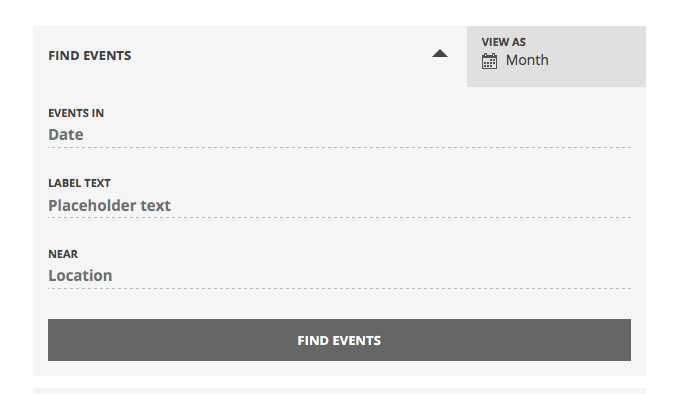
I hope this helps!
— George
ParticipantGlad to hear this @alonso – sorry about the original hiccup, if you notice any other issues with this please reach out to us any time.
I will close this thread for now; best of luck with your site!
Sincerely,
GeorgeParticipantHi Edwin,
Thanks for reporting all of this – there are several issues so I will try to address them all, and appreciate your patience with this! 🙂
1. To be clear, in your last reply do you mean that the “Help” page in your wp-admin is now showing up fine? Or are there still issues?
2. You reported some inconsistencies with our .po file and I appreciate this. I investigated the missing translation for the QR Code string and you are right, this is not translated! We need to fix that. I will try to get this fix into the next release.
3. Finally, in regards to your permissions questions, the least amount of work to achieve what you describe would be to keep the client and “Editor” role, and then grant shop-managing capabilities to that role.
To manage WooCommerce orders and such, only the following two capabilities are required:
• manage_woocommerce
• view_woocommerce_reportsSo, my personal recommendation would be to just use a third-party plugin to add the above two capabilities to the “editor” role.
More information on how to add these capabilities can be found on the WooCommerce site here: https://docs.woothemes.com/document/roles-capabilities/
That article also links to some specific plugins that should let you make those changes, so definitely give this article a read and let me know if it helps.
Thank you!
GeorgeJanuary 13, 2016 at 5:28 pm in reply to: Threads that are not resolved should no be closed. #1055701ParticipantHi @Douglas,
1. By “deleting events” do you just mean deleting duplicates? If you are deleting events other than duplicates, there is no need to do this.
2. By “changing settings”, do you mean that you’re changing just that one “Event status” option? That should be the only option adjusted for this testing.
As for information regarding your father, I am very sorry to hear about this and I wish him the best.
– George
January 13, 2016 at 5:14 pm in reply to: Threads that are not resolved should no be closed. #1055699Participant@Douglas, if you see the amount of text I have poured into this issue I hope you can see how I have clearly not “given up” on this issue.
The year’s worth of back-and-forth trial and error in the bug ticket screenshot above should show you that our team has not “given up” either.
I have stated numerous times that I have tried recreating this as described.
So your last question answers itself and the implication that we have “given up” in any way is an insult.
Almost twenty replies ago – TWENTY REPLIES – I asked you if changing ONE OPTION in your admin altered the behavior.
Instead of addressing this point, you dodged that simple question completely as evidenced above in all of your replies. If anything, you are the one who appears to be giving up here.
@Douglas, it is 8pm now in my timezone and I have been tending to your issue all day.
Please either do the test of changing the Facebook Importer event status from PENDING to PUBLISHED and let some imports run, and let us know if the issues persist.
OR please share a SQL database dump with us by emailing [email protected] with the export attached.
These are the only two options on the table at this point. We are working diligently to try and fix this bug and need your cooperation do so. If you will not do either of these two things, there is nothing left to be done on this thread.
— George
January 13, 2016 at 4:53 pm in reply to: Threads that are not resolved should no be closed. #1055692ParticipantYes, I have attempted to recreate the issue several times, including on a vanilla WordPress installation.
I have clarified this numerous times, as in the following quote of mine from a few replies ago:
We cannot recreate this issue, regardless of what instructions or plugin configurations we try.
January 13, 2016 at 4:44 pm in reply to: Threads that are not resolved should no be closed. #1055687Participant@Douglas,
I asked for clarification because I am surprised by the confusion. I did not expect it. You have said this, for example:
I have done technical support, quality control and software development for a living with a Fortune 500 company for years.
I assumed with that experience that you knew that “System Information”, which is just a block of text about some of the configuration details on your site, and “MySQL Database Dump”, which is a Database export, were different things. MySQL is among the top three most-used database systems in the world and so I assumed familiarity with it.
My apologies.
(Furthermore, the word “database” does not appear at all in the “system information” text you quoted in your reply above, nor in our “how to share system information” article here → https://theeventscalendar.com/knowledgebase/sharing-sys-info/)
To be clear, a MySQL Database is a .sql file of your site’s database. We cannot log into customer sites, but by sharing a copy of your literal database with us, we can install that on one of our test sites and basically have a “clone” of your site.
This is what Brian emailed last month about; since databases contain sensitive information, please only share your database dump over email privately.
If you’re not sure how to get a MySQL database dump, please contact your web host and ask them for a SQL export.
In the meantime, what have you found by setting the “Pending” status to “Published” in your Facebook Importer settings? Have you done this step yet?
Thank you,
GeorgeJanuary 13, 2016 at 4:33 pm in reply to: Threads that are not resolved should no be closed. #1055678ParticipantHey @Douglas,
So, to be clear, are you saying that you think that a block of “system information” text is the same as a MySQL Database Dump?
January 13, 2016 at 4:19 pm in reply to: Threads that are not resolved should no be closed. #1055665ParticipantNowhere in that thread are database dumps mentioned.
The only thing in this thread you write about database dumps is as follows:
George, I have not been able to generate a database dump from my server because I do not have the tools to do so. Spent more time thanihad trying.
I have provided system dumps for both my production and the test server that I created to prove it is a vanilla issue
1. You say “I have provided system dumps” – so, to restate the question: where have you posted these MySQL database dumps? Blocks of “System Information” are not MySQL databases. Where have you posted your actual MySQL databases for us to test?
2. On your site, please change the Facebook Importer event status to “Published” instead of “Pending”. Once you do this, does the behavior of your issue change at all?
January 13, 2016 at 3:42 pm in reply to: Threads that are not resolved should no be closed. #1055645ParticipantYes, you can recreate it on your sites, which is exactly why I am asking if any behavior changes if you try changing one setting on your site where you can recreate this. (I would try changing the option myself, but we cannot log into user sites).
We cannot recreate this issue, regardless of what instructions or plugin configurations we try.
As for the database dump thing, to clarify – Brian sent you an email on December 15 requesting a database dump; I quoted this email above. This email is requesting a MySQL Database Dump. You did not respond to this email. Have you provided a MySQL dump anywhere else thus far? If so, please link to this place where you have provided a MySQL dump.
Thank you,
GeorgeJanuary 13, 2016 at 3:16 pm in reply to: Threads that are not resolved should no be closed. #1055618Participant@Douglas,
I am not lying to you when I saw that we cannot recreate this bug on our own sites.
Why is this fact relevant?
Well, because despite my attempts at clarifying the issue you have again missed the target, and have gone on a tirade against our development, QA, and support teams.
You are implying, if not outright accusing, that we are willfully ignoring this bug or “putting the work onto the customer”, as evidenced in the following three statements from your last reply:
It would appear that because it can’t be found and fixed, you are trying to keep it from being an issue for further sales of the product.
That then means that you sold me a product that claimed to do something that was in fact broken.
Do you really expect your customers to find your bugs?
You are wrong to imply or accuse us of this.
We are not able to reproduce this bug on your own testing sites, whichever testing sites we are trying.
So I am asking you to change one variable on your website because your website is one of the only sites where this is happening as of now, as far as has been recently reported.
Closing threads does not shut down the conversation. It does the opposite; it continually keeps the conversation on the crest of the wave of our “new” thread counts, which keep the bug alive and prescient.
You seem to not believe me when I say to you that we cannot reproduce this bug. Here is a screenshot of over a year’s worth of discussion in our bug tracker’s ticket for this issue. Please read this if you do not believe my assessment of the bug.
Screeshot of year’s discussion about this bug:

You mention having shared database dumps with us – can you please share a link to the thread where you did this, or confirm if you sent it over email?
— George
January 13, 2016 at 2:26 pm in reply to: Threads that are not resolved should no be closed. #1055588Participant@Douglas, I do not expect you to be happy and thrilled about the existence of a bug like this.
However, your replies have gone far afield from the realities of this situation. You are skewing the realities of this situation to fit a narrative that is not accurate.
I will reiterate the main points of this issue and hope that it can bring us back to the bullseye of the problem at hand so that our exchange can be useful.
1. Support threads are not a good channel for staying on top of updates. Your central argument against my closing of your original thread regarding this bug was that the people in that thread would lose the ability to be notified of updates. This is not sound because threads are bad ways to stay on top of updates, and we actively close threads when there are no more moves on the board for the issue in question. (With rare exceptions, like if someone reports a bug that we definitely have a fix coming for in a week or two, for example).
This is because updates are published in two locations:
• The wp-admin dashboard of licensed users.
• The release notes published on our blog at http://theeventscalendar.com/blogIf a bugfix is included in a release, it is noted in the Changelog in either of the above sources. This provides two centralized, accurate locations where bugfixes and code updates are reported, which is much better for both users and for our support team than having a decentralized collection of individual threads all addressing different bugs/combinations of bugs.
So, this is why the original thread was closed, on top of the facts I described about such as Nico’s temporary absence while he’s away on vacation, and that basically all voices in that thread have been completely silent since Fall of 2015.
This is the accurate reason for the closing of that thread; there is nothing personal against you about closing that thread, or any intent to make things harder for anyone. Quite the opposite, in fact.
2. The bug you report is a bug that exists, and has existed for at least one year. 3. The bug you report is a bug whose specific cause we do not yet know. 4. The bug you report is a bug we have spent a very large amount of time investigating on the test installations of numerous team members’ websites; with feedback from numerous customers; and with events from numerous different Facebook pages. 5. The bug you report is a bug whose specific cause we do not yet know, even after the many hours of investigation. 6. Fixing a bug requires knowing what the specific bug is. 7. Since we do know the cause of the bug [see #3, 4, and 5], we cannot fix the bug. 8. Since the investigation is still open, more information from more users who have the bug is better than less information. This last item, #8, is why I am asking for information about your website at this time even though, yes, you have been maintaining a dialogue with us in previous months and have been sharing information up to this point.
If you follow through the logic of items 1 through 8, here we are:
• In a new thread, not an old thread.
• Still investigating this very annoying, very frustrating bug, which we desperately want to fix.I am genuinely sorry about this bug, @Douglas, I really am.
If you are genuinely interested in contributing towards the fixing of this bug, and would like to continue to work with me on this, then can you please do nothing else but simply change the Facebook Importer status on your website from “Pending” to “Published”? Navigating to the page, changing the status, and clicking the Save button amounts to three mouse clicks of effort.
Once the setting is changed, after a few imports do you notice any change in behavior with your issue?
If you are not interested in continuing to work on this, I understand. However, I unfortunately cannot refund your orders because they were purchased too long ago for our payment processors to facilitate a refund.
The ball is in your court on how we proceed; however, if what’s chosen is not a cooperative effort to troubleshoot here, then there are no other options in regards to this bug except to close this thread, and wait for a proper bug fix.
Please review my response here and let me know what you think.
Sincerely,
George -
AuthorPosts