
Home › Forums › Additional Help › Translations › Same Title and Placeholder Terms
- This topic has 7 replies, 3 voices, and was last updated 10 years, 9 months ago by
George.
-
AuthorPosts
-
December 18, 2015 at 5:43 pm #1043886
Sean
ParticipantIn the Tribe Events Bar, the same string that is used for the “Search” header is also used for the “Search” field’s placeholder text. How can we translate the placeholder text to something different than the title (or vice versa)?
December 21, 2015 at 6:12 pm #1044970Nico
MemberHi Karly,
Thanks for getting in touch! I’ll help you here 🙂
The string used in both the title and the placeholder is the same, so if you translate one of them you’ll end up changing both. What you can do to change this is to modify the filter text before it gets printed. Paste the following snippet in your theme functions.php file:
add_filter( 'tribe-events-bar-filters', 'tribe_modify_search_filter' );function tribe_modify_search_filter ( $filters ) {
foreach ( $filters as &$filter ) {
if ( $filter['caption'] == 'Search' ) {
$filter['caption'] = 'Other Word';
}
}return $filters;
}
Please give a try and let me know,
Best,
NicoDecember 28, 2015 at 4:49 am #1047219ParticipantHi Nico,
Thanks for your reply and this suggestion. I tried adding this to my functions.php file (added a couple ending brackets to the snippet) but unfortunately it causes the Tribe Events Bar search options to disappear. Is there something that should be changed in the snippet?
January 12, 2016 at 8:46 pm #1054954ParticipantHey Karly,
Apologies for the delayed reply – we were still mostly out as a team for the holidays when your last reply came in, and Nico has been out-of-office recently so I wanted to jump in here and get you a reply.
I’m actually not sure why Nico’s code causes your filter bar search options to disappear. However, I think a great solution might be to use another code snippet altogether.
Check out this knowledgebase article for the snippet approach I would recommend → https://theeventscalendar.com/knowledgebase/change-the-wording-of-any-bit-of-text-or-string/
If you tinker around with that I think you’ll be able to pull of what you are hoping for here.
Best of luck with your customizations!
GeorgeJanuary 13, 2016 at 1:49 pm #1055563ParticipantGood afternoon George,
Thanks for this suggestion. I gave this alternate snippet a try, but unfortunately it is disabling all of the other translations I’ve made (in the Search Bar, in the Filter Bar, etc). Any other advice? In case it helps, I’m using the Avada theme.
Also, even if the other translations were not being overridden, I’m not clear on how this would only change only one of the two “Search” strings, since both are exactly “Search” in the code and use the same source text? (In Poedit, the references are /src/Tribe/Main.php:4400 and /src/Tribe/Main.php:4400)
Thanks and have a good night.
January 14, 2016 at 9:43 am #1056095ParticipantHey @Karly,
I took another look at the Nico shared and I found the problem. While the same word is not being used in both places, there is more code that needs to be included to be able to change the strings in the “search” box.
Okay, so for example please try out this snippet instead:
add_filter( 'tribe-events-bar-filters', 'tribe_support_1043886', 1, 1 );function tribe_support_1043886( $filters ) {
$value = '';
if ( ! empty( $_REQUEST['tribe-bar-search'] ) ) {
$value = esc_attr( $_REQUEST['tribe-bar-search'] );
}$html = sprintf(
'<input type="text" name="tribe-bar-search" id="tribe-bar-search" value="%s" placeholder="%s">',
esc_attr( $value ),
'Placeholder text'
);$filters['tribe-bar-search']['caption'] = 'Label text';
$filters['tribe-bar-search']['html'] = $html;return $filters;
}This snippet will change the label where it says Label text, and the placeholder text where it says that of course. So for example, the exact code above will make this change on the front-end:
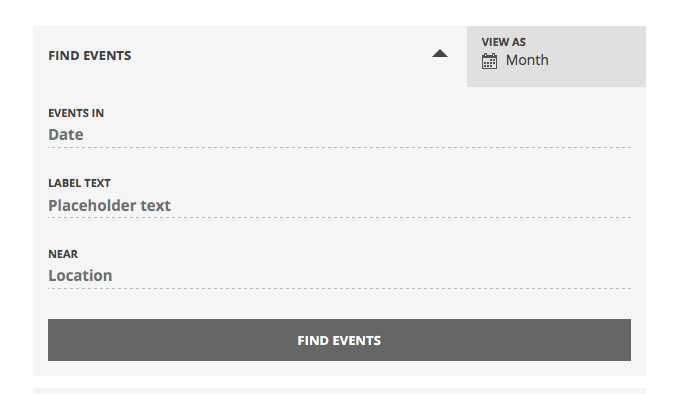
I hope this helps!
— George
January 14, 2016 at 3:29 pm #1056248ParticipantHi George,
Thank you so much! I tried this out it is exactly what I was looking for. Thanks again for helping troubleshoot and get a solution for this. Really appreciate your help!
Best regards,
KarlyJanuary 14, 2016 at 5:37 pm #1056278ParticipantNice! Glad to hear this – apologies for my original misunderstanding of your issues, glad to hear we finally got it right 🙂
I’ll close up this issue, but as always, feel free to open a new thread if other issues arise.
Best of luck with your site,
George -
AuthorPosts
- The topic ‘Same Title and Placeholder Terms’ is closed to new replies.