

Forum Replies Created
-
AuthorPosts
-
George
ParticipantHey Peter,
Thanks for reaching out. We don’t quite have an HTML input like you describe, which I am sorry about 🙁
You can learn more about all of our additional-field types here: https://theeventscalendar.com/knowledgebase/pro-additional-fields/
As for getting the shortcodes to be added dynamically to events, you could do this with some custom coding but there’s unfortunately not a way of doing this with the plugins as they are “out of the box”, so to speak. I’m sorry to bear this news, but please let me know if it is helpful and/or if there is anything else I can help with.
Thank you!
GeorgeJanuary 13, 2016 at 11:24 am in reply to: Threads that are not resolved should no be closed. #1055486Participant@Douglas, you say “Build your own test accordingly and see for yourself.”:
1. are you stating that you believe that I have not done this? In your mind, do you think we do not have test websites our own and have not tested this issue?
I just want to be clear if this is what you believe or not.
2. Changing one option in your site’s wp-admin is nothing along the lines of development or quality control. As stated numerous times, this has not been an issue that we can consistently reproduce. In effort to reduce the variables of this problem, all I am asking you to check is if changing the status of imported events, and letting some imports run while you go about your life, then check on things later, does anything change with this issue?
Please address both items #1 and #2 here specifically.
Thank you,
GeorgeJanuary 13, 2016 at 11:21 am in reply to: history back, and showing month you were on in mini calendar view #1055484ParticipantHey @Claire,
I’m sorry to further disappoint here by bearing the news that, no, there is not another mini calendar view at this time 🙁
Sorry to keep bearing bummer news!
Sincerely,
GeorgeParticipantThank you Theresa, keep us posted on things.
ParticipantThank you @jrummel!
On the link you shared, the plugin’s own CSS is being loaded fine. This stylesheet, specifically, for example:
http://trailnet.org/wp-content/plugins/events-calendar-pro/src/resources/css/tribe-events-pro-full.min.css?ver=6ca24da96ad60c6b524d3513990a9808JavaScripts are loading fine, too, like this one:
http://trailnet.org/wp-content/plugins/events-calendar-pro/src/resources/js/widget-this-week.min.js?ver=6ca24da96ad60c6b524d3513990a9808Can you elaborate a bit on what you see as the problems here? Sorry if I am missing something!
Thanks for your patience here,
GeorgeParticipantApplications are evaluated on a case-by-case basis, but generally speaking, absolutely 🙂
Check out that page and file an application for further questions and such about this – we can chat more privately about your application over email if need be.
I look forward to your application!
— George
January 13, 2016 at 11:14 am in reply to: Threads that are not resolved should no be closed. #1055475ParticipantI appreciate the sentiment and willingness to let us into your site, @Douglas, but we have a strict policy whereby we cannot log into customer sites for any reason whatsoever. I removed the login information you posted as soon as I saw it, and have not logged into your site.
To change the default import status, simply head into your wp-admin and go to Events > Import. On the main page there, you will see Facebook Importer settings, one of which will be the default import status. Here’s a screenshot for reference:
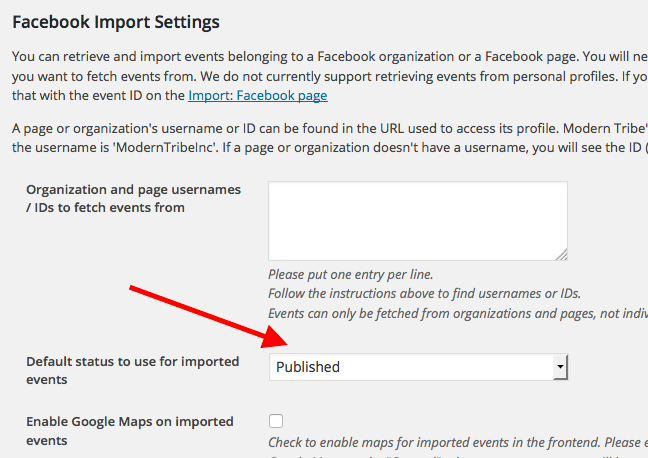
Set this to “published” and save the settings.
I would recommend letting several imports run. Watch the results of the scheduled imports, AND I would recommend trying some manual imports if possible.
How do things behave when you make this change?
Thank you,
GeorgeParticipantHi @Alonso,
I looked up that order number and nothing shows! 🙁 I am very sorry about this, I do not know what went wrong but can investigate a bit more. I am very sorry about this.
In the meantime, I have manually ensured that your “Facebook Importer” license is now active and new, and up-to-date 🙂 Check out your license keys page here to confirm → http://theeventscalendar.com/my-account/license-keys
That should work now, regardless of issues with your order.
Thank you!
GeorgeParticipantHey @Musiclives,
We have a non-profit partnership program and you should definitely apply for it! 😀
You can learn more about it and find the application link here → https://theeventscalendar.com/knowledgebase/do-you-offer-discounts-for-non-profit-organizations/?source=tri.be
Check that out! Let me know if that is helpful.
Sincerely,
GeorgeParticipantI agree with you completely that this bug is a pretty major one – I was surprised to see its priority set somewhat low in our bug tracking system. I have raised that priority to its highest, now, and will push to get this the attention it deserves.
As for an ETA, I’m sorry to say that I do not have one at this time 🙁 I would wager some time in the next three plugin releases, so hopefully before the end of March. That’s just a ballpark time frame and it could, of course, arrive sooner than that, or possible even later, though I would be surprised if it’s later than that.
I’m glad to hear to that the manual process isn’t as horrible is it could be if you had tons of items; but regardless, @Mad Dog, I’m really sorry about this bug. We’ve got it indexed now as a high-priority item and will hopefully have a fix ready for it soon.
Thank you for your patience and politeness despite the existence of this bug! Please let me know if you have any further thoughts on this matter or if there’s anything else I can help with.
Sincerely,
GeorgeParticipantAwesome! Thanks for clarifying. This is fortunately very simple to control – when Filter Bar is installed, all you have to do is head into your site’s wp-admin dashboard and then head to Events > Settings > Filters.
At the bottom of the page is a “Filters Default State” option – set this to “Open”, save the options, and the filters should default to “open” on page load.
Here’s a screenshot of the option for reference:

I hope this helps!
Thanks,
GeorgeParticipantThanks for this @Linda!
The problem seems to be that the HTML “script” tags specifically are being stripped; everything else seems fine, just these HTML tags.
Now, this partially intentional for security purposes, but allowing script tags may be possible if you add the following code to your theme’s functions.php file:
add_filter( 'tribe_events_excerpt_allowed_html', 'tribe_add_script_tags_filter' );
function tribe_add_script_tags_filter( $allowed_html ) {
$base_attrs = array(
'class' => array(),
'id' => array(),
'style' => array(),
);
$allowed_html['script'] = $base_attrs;
return $allowed_html;
}
Thank you!
GeorgeJanuary 13, 2016 at 10:52 am in reply to: Threads that are not resolved should no be closed. #1055456ParticipantThank you, @Douglas.
If you the published status on your sites, do the issues with duplication persist? Do they behave differently in any way?
Thank you,
GeorgeJanuary 13, 2016 at 10:51 am in reply to: Warning: strtotime() expects parameter 1 to be string, object given in #1055455ParticipantHey Matt,
I understand your points completely and am sorry to have raised the alarm by mentioning closing this thread.
The problem is that, at this time, we still are not recreating your issue. Rex has reported the issue too, but if you see how much information we went through in regards to your own site, my main goal of moving Rex to another thread was just to keep things organized as I request system information and such for this THREE websites.
I have indeed looked through your comments above in this whole thread to try and arrive at a solution, but there is unfortunately just not a solution at this time 🙁 I am very sorry about this! It’s a bug we are not able to recreate yet but are still trying to.
Leaving this thread open does not move us forward on finding the bug, but I will leave it open for a bit to hear more from you about my comments here. Closing the thread will help us keep track of each individual’s own complaints – if you’re concerned about being notified of a bug fix, there are two places we publish bug fixes when they arrive:
• The changelogs of updates when they arrive in your wp-admin dashboard.
• Release notes on http://theeventscalendar.com/blog
Please let me know what you think here, Matt – sorry to have raised the alarm about my comments about closing this thread!
—
@Rex, regardless of the state of this current thread, can you still post your issues in a separate, new thread as described in my last post?Thank you both for your cooperation and patience!
George
ParticipantNo worries @John! I’ve gone ahead and closed up that other thread – I’ll do the same here, but before doing so, are there any last questions I can help with?
I’m sorry that we cannot help much with customization, but if there’s anything else you are curious about, let me know.
Thanks,
George -
AuthorPosts