
Home › Forums › Welcome! › Pre-Sales Questions › Search by Month Filter
- This topic has 4 replies, 2 voices, and was last updated 10 years, 8 months ago by
Support Droid.
-
AuthorPosts
-
January 13, 2016 at 6:41 am #1055273
Theresa Snyder
GuestHi, we updated our Events Calendar Plug-in during the summer. With the upgrade, we lost our ability to search by month/year along with the ‘hover’ over the event to see details.
Does the “Pro” version allow a user to search by month, or is that in the “Filters” version only.
The reason I ask is on your live calendar example for “Pro”, a filters bar is shown. Is the filters bar a part of “Pro”?
I really only need a month/year search and that ‘hover’ ability.
Also, I am the main calendar user at our school. However, I am not IT. How do we go about purchasing if the paid version is what we need? Our IT guy is [email protected] if you want to email him directly with the sign-on information. He does not have it as he didn’t work here when the events calendar was introduced.
Thank you very much for your attention.
Theresa Snyder, Activities Office
Holy Cross Academy (re-branded January 2015)
856-461-5400 Extension 3033January 13, 2016 at 9:27 am #1055378George
ParticipantHey Theresa,
I’m sorry to hear about those original issues that arose over the summer – it sounds like there is unfortunately a JavaScript conflict or other code conflict related to your theme. Adding the Events Calendar Pro add-on will not necessarily resolve these code conflicts.
As for your questions about the filter bar, just to be clear, when you refer to our live example do you mean http://wpshindig.com/events? If so, then the bottom filter is NOT provided by Events Calendar Pro; it’s provided by the separate add-on, Tribe Filter Bar. The top filter bar, however, IS provided by Events Calendar Pro [and mostly comes from The Events Calendar core itself anyways].
Just to be 100% clear, I made a screenshot here to illustrate my point. I apologize for the crudeness of this! 😀 Just want to be as clear as possible:
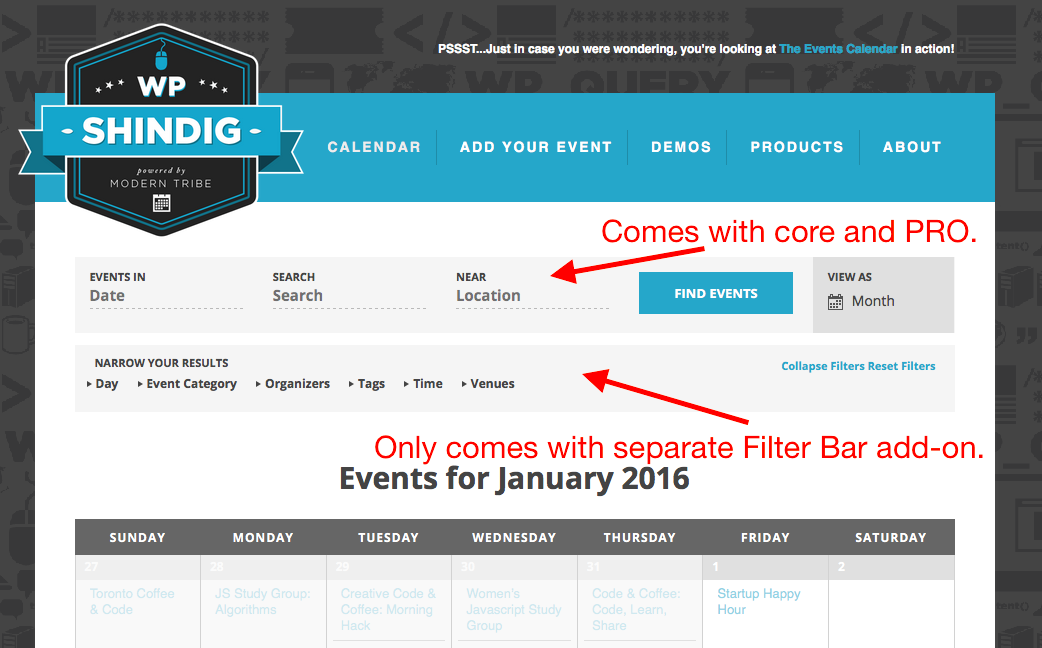
Finally, you posed the following question:
How do we go about purchasing if the paid version is what we need?
Anyone at your school can buy the license for the school – you do NOT need to be tech-savvy or anything like to buy the license. Once purchased, you will have an account here on http://theeventscalendar.com with the license keys and download files and all that, so you can just share the login information for this account with the “IT guys” or anything necessary like that.
Does this information help?
Let me know!
– George
January 13, 2016 at 11:17 am #1055479GuestThank you George. I will forward the information to our IT dept. Not having the search has been a real issue for us here. I will post again after we find a resolution.
January 13, 2016 at 11:19 am #1055482ParticipantThank you Theresa, keep us posted on things.
February 18, 2016 at 8:34 am #1076747KeymasterThis topic has not been active for quite some time and will now be closed.
If you still need assistance please simply open a new topic (linking to this one if necessary)
and one of the team will be only too happy to help. -
AuthorPosts
- The topic ‘Search by Month Filter’ is closed to new replies.