

Forum Replies Created
-
AuthorPosts
-
George
ParticipantHey John,
You posted another thread with similar questions here, in which you mention this thread specifically and ask for it to be closed: http://theeventscalendar.com/support/forums/topic/search-results-view/
No worries about posting twice! It happens 🙂
I will go ahead and close up this thread now, but will still be following up with you in that other thread of yours.
Thanks,
GeorgeJanuary 13, 2016 at 10:38 am in reply to: slow, slow, slow – on load and especially inside WP #1055449ParticipantHey DeAnne,
Thank you for some of the information here.
To be clear, I am not denying that The Events Calendar can slow down a site!
We are working hard on performance improvements because it is not as efficient as it could be.
That being said, if your server is itself a low-performance server, then there are inherent limitations from that the The Events Calendar cannot work around. Let us know more about your interaction with the local hosting company, and if they are able to offer any insight as to your site’s slow performance when The Events Calendar is active.
Thank you!
GeorgeParticipantHi @Annette,
Wow, I am truly baffled by this. This is such bizarre behavior! Every time I test my code on your site, it works fine, and I have confirmed that your CSS is added correctly. Weird. I am not sure why these changes are not working.
At this point, the only solution I can think of is a JavaScript one. Not ideal, but it should work. Try adding the following bit of PHP to your theme’s functions.php file:
add_action( 'wp_footer', 'tribe_support_1017704', 99 );function tribe_support_1017704() {
?><script>
if ( jQuery( '.tribe-events-tooltip.recurring-info-tooltip' ).length ) {
jQuery( '.tribe-events-tooltip.recurring-info-tooltip' ).remove();
}
</script><?php
}
Thank you for your patience with this!
— George
January 13, 2016 at 10:29 am in reply to: Threads that are not resolved should no be closed. #1055446Participant@Douglas, does anything change with this issue if you set your imported event statuses to a PUBLISHED status instead of a PENDING status?
ParticipantThank you for sharing this, @Aris! 🙂
ParticipantHey Jared,
Thanks for reporting all of this information. Those server times do indeed look random – they look somewhat they are happening every three hours or so, but then the pattern falls apart once you get to the fourth and fifth item and beyond. Weird.
In fact, “Weird” can be said about this issue in general! I still do not see this error at all in my own error logs, but since you have reported this and do not have the same site configuration as the original reporter of the issue (@dmallett), this is definitely worth considering a “bug” and I will make a bug ticket so we can have our developers investigate this.
I am glad that this error, so far, appears to only be “diagnostic”, and is not actually affecting things on your site. It will take us some time to investigate this and, unfortunately, I would not expect a bug fix for this for at least one or two releases from now.
I’m sorry that there is no immediate action to be taken here – this is an odd error and an odd bug. However, I have created a bug ticket for this and so it will be getting some attention from developers nonetheless.
Let me know if you have any further questions here or if there’s anything else I can help with!
Thank you,
GeorgeParticipantI’m sorry to hear about this! I cannot recreate this and we have no reports of this sort of problem; can you share a link to your staging website so I can explore its markup and such, and see if I notice anything that way?
Thank you!
GeorgeParticipantThank you both for posting here and helping each other out. I wish you both the best of luck with your sites!
For now, I will close this this thread.
– George
ParticipantHey Carla,
Thanks for posting here – this does indeed appear to be a problem with Divi so I would recommend posting this to them first, however you can absolutely open a new thread on these forums here on http://theeventscalendar.com too.
For now, since this thread is about @Aris’ problems and the original problems are resolved, I will close this thread.
If you open a new thread here we’ll get to it as soon as possible! To save a step, when you open that new thread can you include your “system information” with it? Here’s how to do that → https://theeventscalendar.com/knowledgebase/sharing-sys-info/
Cheers!
GeorgeParticipantTroy, I’m sorry about the frustrations with our product on your site, and am sorry about the pains of reiterating things in your support thread. As you mentioned, this issue has persisted since September, and so while the reiterating of things is tedious I was hoping to establish a new baseline here in January just in case specific, relevant details had changed.
Based on your comments about this not needing a response and such, I will close up this thread. Before doing so I would like to underscore the fact that this is a non-normative issue that appears to be something unique to your site’s combination of plugins, code, and server configurations on your webhost.
I’m not trying to shrug off responsibility or blame here; however, with the nature of your issue in mind, these sorts of unique, hyper-specific issues that are resultant of server configurations are very difficult for us to help with. That was evidenced here in this thread and I am sorry about that.
I wish you the best of luck with your site.
Thanks for giving our software a chance at all and for your patience with our exchanges here.
Sincerely,
GeorgeParticipantHey @Mike,
Sorry to hear you are having issues like the original poster in this thread. I’m happy to help.
What I would recommend here is that you share your “system information”, as described in this knowledgebase article: https://theeventscalendar.com/knowledgebase/sharing-sys-info/
However, since this thread is so old, would you mind opening a new thread of your own and starting it out with a recap of this issue, and then just post your system information there?
This may seem trivial, but it’s best for me to close up this old thread of @Nethaji’s and attend to your issues in your own thread.
I’ll close up this thread and keep my eyes out for your new one – and remember to post your system information in it, as this will help me understand your site environment which may be a factor here.
Thank you!
GeorgeJanuary 13, 2016 at 9:41 am in reply to: history back, and showing month you were on in mini calendar view #1055396ParticipantHey @Claire,
Thanks for reaching out. What you describe is unfortunately an inherent limitation in our plugin at this time based on the way it’s coded. There is not a workaround at this time 🙁
I’m really sorry to disappoint about this! Please let me know if this information helps you move forward with your project, or if there’s anything else I can help with.
Sincerely,
GeorgeParticipantHey @Edwin,
Thanks for reaching out. Can you share your “System Information” here? Here’s how to do that → https://theeventscalendar.com/knowledgebase/sharing-sys-info/
I’m curious because our most recent version of the plugin does have this string translatable.
In terms of missing translations at any time, this is unfortunately not something we can take much action on in most cases. I’m sorry about this! The reason why is that translations are almost purely community-submitted – to learn more about the processes involved, check out the following knowledgebase articles:
• Translating The Events Calendar: http://theeventscalendar.com/knowledgebase/translating-the-events-calendar/
• Translating our premium add-ons: https://theeventscalendar.com/knowledgebase/adding-or-updating-a-translation/
• Changing the language on your site: https://theeventscalendar.com/knowledgebase/changing-the-language-on-your-calendar/
I hope this information helps.
Thank you!
GeorgeParticipantHey @Jrummel,
That behavior is quite odd, and I’m sorry to hear about it existing on your site!
If you’ve already ruled out theme or plugin conflicts, I’m curious about the following details:
1. Can you share your “system information” with us? Here’s how → https://theeventscalendar.com/knowledgebase/sharing-sys-info/
2. Any chance you could spin up a non-multisite site on Vagrant, with basically everything the same but for the fact that it’s not a multisite install? I’m curious if those network features are at play here.
Thank you!
GeorgeParticipantHey Theresa,
I’m sorry to hear about those original issues that arose over the summer – it sounds like there is unfortunately a JavaScript conflict or other code conflict related to your theme. Adding the Events Calendar Pro add-on will not necessarily resolve these code conflicts.
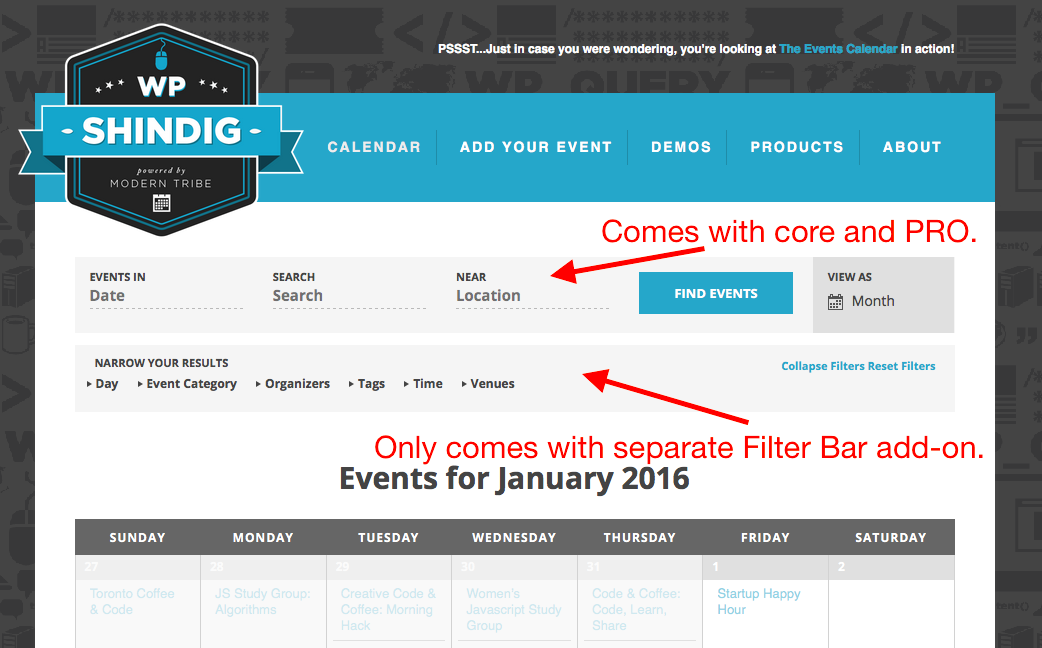
As for your questions about the filter bar, just to be clear, when you refer to our live example do you mean http://wpshindig.com/events? If so, then the bottom filter is NOT provided by Events Calendar Pro; it’s provided by the separate add-on, Tribe Filter Bar. The top filter bar, however, IS provided by Events Calendar Pro [and mostly comes from The Events Calendar core itself anyways].
Just to be 100% clear, I made a screenshot here to illustrate my point. I apologize for the crudeness of this! 😀 Just want to be as clear as possible:
Finally, you posed the following question:
How do we go about purchasing if the paid version is what we need?
Anyone at your school can buy the license for the school – you do NOT need to be tech-savvy or anything like to buy the license. Once purchased, you will have an account here on http://theeventscalendar.com with the license keys and download files and all that, so you can just share the login information for this account with the “IT guys” or anything necessary like that.
Does this information help?
Let me know!
– George
-
AuthorPosts