
Home › Forums › Calendar Products › Events Calendar PRO › slow, slow, slow – on load and especially inside WP
- This topic has 15 replies, 3 voices, and was last updated 10 years, 9 months ago by
George.
-
AuthorPosts
-
January 12, 2016 at 9:29 am #1054694
ltm-cvb
ParticipantOur site has been slow on loading, and even slower when working inside the program. I’ve spent time deactivating plugins and running speed tests with GTMetrix. When I activate TEC things really bog down.
I’ve been able to reduce webpage load time with a couple of plug-ins, it’s better although far from ideal, but when working in Events, or pages, or anywhere really it takes forevaaaaaaaaaaaaaaaaaaah.
Please say there’s a magic wand that I can wave and make all things speedy in the site.
Thanks, DeAnne
January 12, 2016 at 11:32 am #1054769ParticipantHey @DeAnne,
There is unfortunately no magic wand 🙁
I’m curious, can you please clarify the following two details:
1. How many events are on your site, roughly? Dozens? Hundreds? Thousands? Dozens of thousands? Thousands per month?
2. How specifically are you hosting your website? What webhost are you using [please link to their site], and which “tier” of hosting are you signed up for?
There is unfortunately very little – and basically nothing – that we can do about site performance 🙁 But the information above may help me in making some recommendations for you.
Thank you in advance for that information!
Cheers,
GeorgeJanuary 12, 2016 at 1:30 pm #1054845ParticipantNumber of events? Maybe hundreds. We’ve only been using it since mid October 2015.
Not sure on host. Client is hosted through a local company. I will call them.
It’s just odd to me that if I disable TEC then the speed issues are resolved.
DeAnne
January 13, 2016 at 10:38 am #1055449ParticipantHey DeAnne,
Thank you for some of the information here.
To be clear, I am not denying that The Events Calendar can slow down a site!
We are working hard on performance improvements because it is not as efficient as it could be.
That being said, if your server is itself a low-performance server, then there are inherent limitations from that the The Events Calendar cannot work around. Let us know more about your interaction with the local hosting company, and if they are able to offer any insight as to your site’s slow performance when The Events Calendar is active.
Thank you!
GeorgeJanuary 15, 2016 at 2:18 am #1056376David
ParticipantI am having the exact same issue. At times, it take me 1-2 minutes to publish an event, after which I have to clear the cache on our site… or the site is basically unaccessible.
We just started using the plugin in November. We have nearly 50-100 events so far, and we are hosted on a private server.
I noticed the issue with speed about 2-3 weeks ago.
January 15, 2016 at 6:15 am #1056613ParticipantYep, that sounds like us.
January 15, 2016 at 8:11 am #1056658ParticipantHey @Allyson,
Sorry to hear about similar performance issues.
You mention being hosted on a private server – can you elaborate on the setup and speed and such of this private server?
And @DeAnne, can you share links to the hosting provider you are using, and specify which hosting plan from them you are using?
—
While it is true that The Events Calendar is not as performant as it could theoretically be, on some level the hosting configuration is the main limiting factor. We have Enterprise installations of The Events Calendar that deal with enormous quantities of events and site visitors and all of that; and the performance is fine and reliable.
However, if the server itself is a low-performance server there’s a paucity of things we could do to get around that. I am very sorry about this! 🙁
One last thing to mention; we do have a Month-View caching feature that might help a bit. To enable this, head to Events > Settings > Display in your wp-admin, and find the option that looks like this:

If you enable this option and save the changes, there should be somewhat of an improvement on the month view which is the slowest view, usually. This does not help with admin-facing slowness; but just wanted to recommend something here! 🙂
Let me know what further thoughts or questions you might have, and let me know more about your hosting environments and such if possible.
Thank you,
GeorgeJanuary 15, 2016 at 9:45 am #1056713ParticipantThank you George.
The month-cache has been enabled already. I have adjusted settings so that only events 12 prior or in the future are listed.
I sent a request to our private hosting provider, and they are looking into server issues.
I don’t know if this is related to the issue or not, but the client notified me that it started or rather stopped around the same time period. Previously, when you hovered over a date a either on the mini calendar or the large events page calendar you would see a preview listing the events for that particular date. That doesn’t happen any more; you must click on an individual date for a listing.
January 15, 2016 at 9:53 am #1056718ParticipantI’m sorry to hear about this second issue, @DeAnne.
By “preview listing”, do you mean a small little tooltip that pops up? Or something more elaborate?
See http://wpshindig.com/events for an example of tooltips. Those are the only thing our plugins show in terms of “preview listing”, so if something else is meant by “preview listing” then it is unfortunately a customization of some kind that we cannot help troubleshoot.
If the “preview listing” you meant IS exactly the sort of tooltip you see on http://wpshindig.com/events, then it sounds like there’s a JavaScript conflict here; in which case can you share a link directly to the pages on the site where the preview listings no longer show?
I will take a closer look there.
Thank you!
GeorgeJanuary 15, 2016 at 9:58 am #1056725ParticipantYES! tooltips that’s the word! When I pull up the /events page the events aren’t even listed, just a dot indicating that “something” is happening this day.
January 15, 2016 at 10:09 am #1056731ParticipantThank you @DeAnne.
On the page you linked, the “mobile view” of the calendar is active. How specifically was this enabled on your site?
The mobile view does not have tooltips. To be clear, the mobile view is essentially just the use of Dots instead of the “full” view which lists the titles of events. Only the titles in this “full” view have tooltips, so as long as the “mobile view” is being used there will not be tooltips.
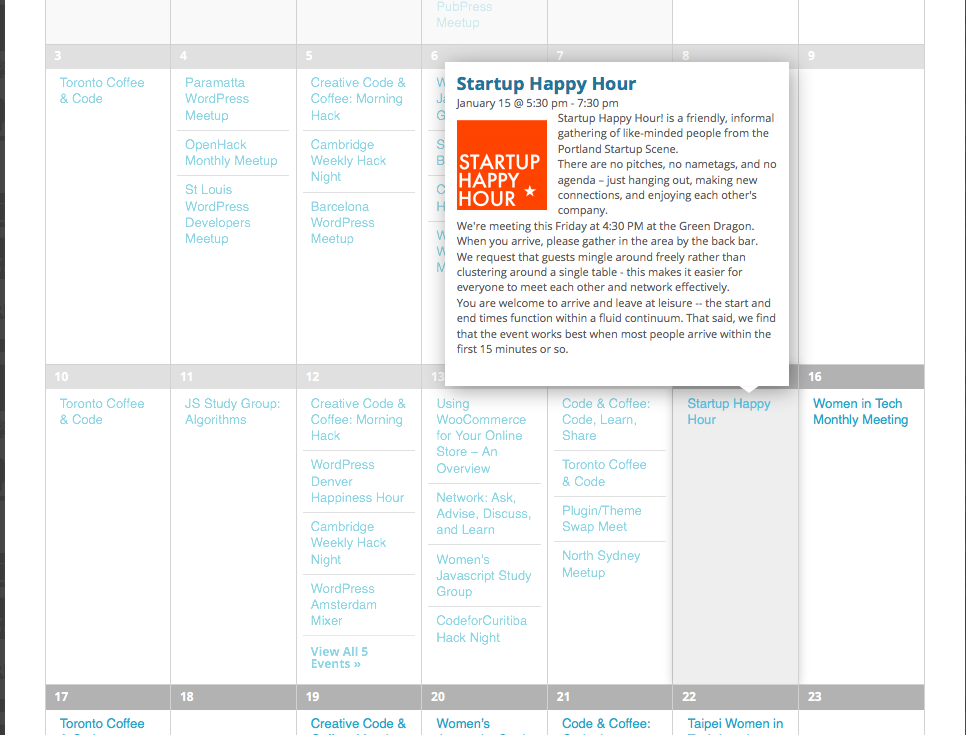
Does that make sense? As an example to illustrate the point, take another look at http://wpshindig.com/events. In “full” view, titles of events show up and hovering provides the tooltip, as shown here:
However, if you downsize the browser to trigger the activation of the mobile view, the mobile view is used as shown here with the dots instead of titles:
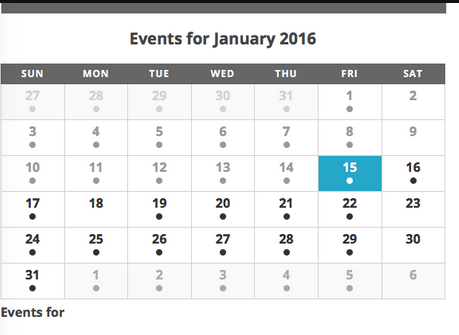
There are no tooltips on hover there, which is by design.
I hope this information helps. You cannot have the mobile view, which uses dots, and tooltips at the same time. Tooltips are exclusive to the “full” view.
Thank you!
GeorgeJanuary 15, 2016 at 10:14 am #1056734ParticipantI check settings and cannot find where “mobile” would be enabled. Where do I find this beast to banish it and return it to “full” view?
January 15, 2016 at 1:08 pm #1056804ParticipantHey @DeAnne,
It seems like there is custom code that is making the “Mobile view” active.
1. Have you written any custom code on your site? If so, try temporarily removing it all, and see if this returns things to the default view. (Make sure you back up your customizations before removing them!)
2. If you are not sure how you enabled this view, or you remove customizations but the issue persists, then I would recommend doing each of the steps on this page → https://theeventscalendar.com/knowledgebase/testing-for-conflicts/. After EACH step in that process, check on the main events page of your site and see if anything changes there in regards to the view.
Let me know what you find!
Thanks,
GeorgeJanuary 15, 2016 at 2:39 pm #1056848ParticipantThis reply is private.
January 16, 2016 at 4:46 pm #1057240ParticipantOk, well that was certainly exciting (given the slow dashboard time) BUT I followed all conflict instructions. And it seems like “nothing” caused TEC to change to mobile. It appeared as full on every test, down to the very last one.
So… good news, the problem with the event calendar showing in mobile view is solved.
The bad news, the site is still slow. I think there is a server issue and have the hosting folks looking for a resolution.
I will mark this as resolve as you’ve done all you can on your end.
Thanks for all of your help.
As always, YOU ROCK!
de -
AuthorPosts
- The topic ‘slow, slow, slow – on load and especially inside WP’ is closed to new replies.